
Categories: AI 3D Model Generator, AI Image Generator, AI Texture Generator, Image to 3D Model, Text to 3D
3D AI Studio Review: Is This AI Tool Really Magic?

If you’ve ever tried to create anything in 3D, you know the grind. Hours spent wrestling with vertices in Blender, the painstaking process of UV unwrapping, and the eternal quest for the perfect texture map. It’s a labor of love, but man, sometimes it’s mostly labor. I’ve spent more nights than I’d like to admit fueled by coffee and sheer stubbornness, just trying to get a model to look right.
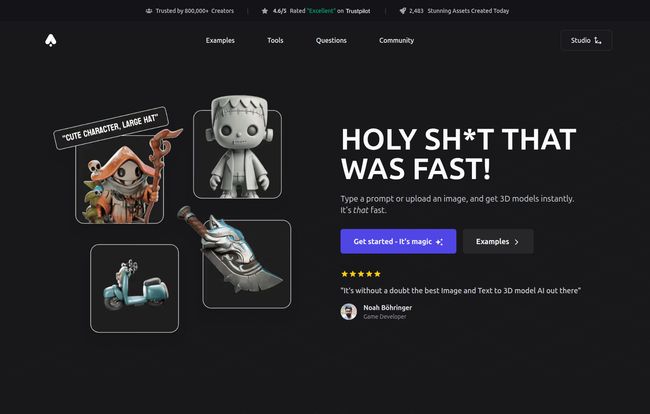
So, when a tool pops up with a landing page that literally screams, “HOLY SH THAT WAS FAST,” you bet it gets my attention. That tool is 3D AI Studio, and it promises to turn simple text prompts or 2D images into fully-fledged 3D assets in seconds. Seconds! The claim is so bold, it’s bordering on absurd. It’s like someone promising to build you a house if you just describe it on a napkin.
Is it magic? Is it hype? I had to find out. So I rolled up my sleeves, and this is my honest, no-fluff take on what 3D AI Studio brings to the table for creators, game devs, and the 3D-curious.
Visit 3D AI Studio
So, What’s the Big Deal with 3D AI Studio Anyway?
At its core, 3D AI Studio is an AI-powered toolkit designed to massively speed up the 3D creation workflow. Forget the week-long modeling slogs for simple props. The whole idea here is to let you generate assets almost as fast as you can think of them. You type what you want, or you upload a concept sketch, and poof—a 3D model appears.
It’s not just some obscure project, either. The platform already boasts over 400,000 creators. On the day I checked, it had already churned out nearly 3,000 assets. That’s a lot of 3D goodness being born from the digital ether. It’s clearly tapping into a real need in the creative community.
The Core Features: How the Magic Actually Happens
Okay, so it’s fast. But what can it actually do? The platform isn’t a one-trick pony. It’s a suite of tools that tackle some of the most time-consuming parts of 3D asset creation.
From a Few Words to a Full Model (Text-to-3D)
This is the headline act. You enter a prompt—something like “a worn leather spellbook with a glowing crystal embedded in the cover”—and the AI gets to work. It interprets your words and constructs a 3D model from scratch. It’s basically a genie for 3D artists. The potential for rapid prototyping here is insane. Need a dozen different potion bottle variations for your game? You could generate them in the time it takes to brew a cup of tea.
Breathing Three-Dimensional Life into 2D Images (Image-to-3D)
This feature, for me, is maybe even more powerful. Got a cool character sketch? A logo? A photo of a cool-looking rock you saw on a hike? You can upload it, and 3D AI Studio will attempt to build a 3D model from it. It’s not always perfect, of course—AI is still learning—but for turning concept art into a tangible 3D base mesh, this is a monumental shortcut. It bridges that gap between 2D imagination and 3D reality in a way that feels genuinely new.
AI Texturing and Remeshing: The Unsung Heroes
Now we’re getting into the nitty-gritty that seasoned 3D artists will appreciate. Generating a model is one thing, but making it usable is another. Raw AI-generated meshes can be… messy. That’s where remeshing comes in. 3D AI Studio automatically cleans up the model’s topology, making it a cleaner, more optimized asset. Think of it as an automatic polisher for a rough diamond.
And the AI Texturing? Chef’s kiss. It can generate and apply textures to your model based on a prompt. No more spending hours searching for the right PBR materials or painting by hand. Just tell it “make it rusty metal with chipped paint” and see what it cooks up. This alone can save days of work on a complex project.
Automatic LODs and Format Freedom
This one’s for my fellow game developers. The tool can automatically generate LODs (Levels of Detail). In simple terms, it creates lower-poly versions of your model to be used when the object is far from the camera, which is critical for keeping game performance smooth. Doing this manually is a tedious, soul-crushing task. Automating it is a godsend.
Plus, it exports to all major 3D formats (FBX, OBJ, GLB, etc.), so you’re not locked into some weird proprietary ecosystem. You can take your creations straight to Unity, Unreal Engine, Blender, or wherever else you need them.
My Honest Take: The Good, The Bad, and The Quirky
No tool is perfect. As an SEO and traffic guy, I know that you have to look at the whole picture. So here’s the breakdown based on my experience and what the platform itself tells us.
| The Wins (Pros) | The Wrinkles (Cons) |
|---|---|
| ✓ Blazing fast generation ✓ Super intuitive interface ✓ surprisingly high-quality assets ✓ Private by default (huge!) ✓ All-in-one texturing & remeshing |
✗ Generation costs credits ✗ AI can be unpredictable ✗ Potential browser/GPU issues |
I have to bold the Private by default point. In an age where many AI companies are happy to train their models on your creative work, knowing your generations are yours and yours alone is a massive relief. It’s a sign of respect for the creator.
On the flip side, the AI isn’t a mind-reader. Sometimes your prompt for a “majestic dragon” might come out looking more like a confused lizard. You have to learn how to prompt it, and even then, there’s an element of chance. And for those on older machines, the site warns about potential WebGL compatibility issues, so make sure your browser and GPU are up to snuff.
Who Should Be Using 3D AI Studio?
So, who is this for? Is it going to replace professional 3D artists? No. Not yet, anyway. But it’s an incredible force multiplier.
- Indie Game Developers: For rapid prototyping and creating background assets, this is a no-brainer. It can fill your game world without draining your budget or timeline.
- Concept Artists: Quickly turn your 2D drawings into 3D mockups to check forms and lighting.
- Marketing and eCommerce Pros: Need a quick 3D mockup of a product? This could be your new best friend.
- Hobbyists and Newcomers: If you’ve always been intimidated by traditional 3D software, this is your on-ramp. It lets you experience the joy of creation without the steep technical learning curve.
Let’s Talk Money: The Pricing Mystery
Alright, the big question. What does it cost? Here’s where things get a bit… mysterious. The “Cons” listed on their own materials mention that “Generation costs credits,” which points to a pay-as-you-go model. However, when I tried to find their pricing page, I was met with a 404 error.
Honestly? I don’t hate it. It adds to the mystique. But from a practical standpoint, it means you’re likely buying packs of credits, and each generation (depending on its complexity) will use a certain number of those credits. I personally prefer this for specialized tools, I pay for what I use. But for heavy-duty users, it’s something to be aware of, as costs could rack up if you’re generating hundreds of assets.
Frequently Asked Questions
How long does a generation take?
Their tagline isn’t just for show. Simple generations can take mere seconds. More complex models might take a few minutes. It’s still exponentially faster than doing it by hand.
How do I actually create a model?
It’s as simple as they say. You either type a detailed description into the text box or upload a 2D image. Then you hit the generate button and wait for the AI to do its thing.
How much does an asset task cost?
This is tied to their credit system. While the exact cost-per-asset isn’t public (thanks to that 404 page), you can expect that more complex tasks like high-poly generation or detailed texturing will consume more credits than a simple, low-poly model.
Are the models I create really private?
Yes. According to 3D AI Studio, all your generations are private by default. They aren’t shared publicly or used to train their AI unless you explicitly choose to share them. This is a critical feature for professional work.
Do you offer refunds?
Their site’s FAQ section suggests they handle this on a case-by-case basis and directs users to contact their support team. As with any online service, it’s always a good idea to read their terms of service before committing.
Final Thoughts: Is It Worth The Hype?
After playing around with 3D AI Studio, I gotta admit, my reaction was pretty close to their tagline. It’s fast. It’s impressive. And it’s genuinely useful. It’s not going to put high-end 3D modelers out of a job, but it is going to change their workflow forever. It’s a new kind of tool for the toolbox, like a power drill replacing a hand-crank.
It democratizes 3D creation, making it accessible to a whole new wave of creators. For those of us already in the trenches, it offers a way to obliterate the most tedious parts of our work and focus on what matters: the creativity. Is it magic? No. It’s just really, really clever technology. And right now, it feels like a glimpse of the future.


