
Categories: AI Scheduling, AI Social Media Post Generator, AI Writing Assistants
Accento AI Review: The End of LinkedIn Writer’s Block?

We all know we should be posting on LinkedIn. Consistently. Engagingly. With posts that are just the right mix of personal insight, industry news, and humble-brag. But who has the time? The content treadmill. It’s relentless, isn’t it? You spend an hour crafting the “perfect” post, it gets a few dozen likes, and then… crickets. The very next day, the pressure is on to do it all over again.
I’ve been in the SEO and traffic generation game for years, and I’ve seen platforms come and go. But LinkedIn has remained this weird, essential beast for professionals. It’s not quite social media, not quite a resume, but a powerful space for building a personal brand. The problem is, feeding that beast is a full-time job.
So, naturally, when AI tools started popping up promising to ease the burden, my curiosity piqued. I’ve seen my fair share of clunky, robotic AI writers that churn out content with all the personality of a tax form. But every now and then, a tool comes along that feels different. A little more thoughtful. That’s the vibe I got when I started looking into Accento AI, and I figured it was time to see if it could actually live up to the hype.
What is Accento AI, Really?
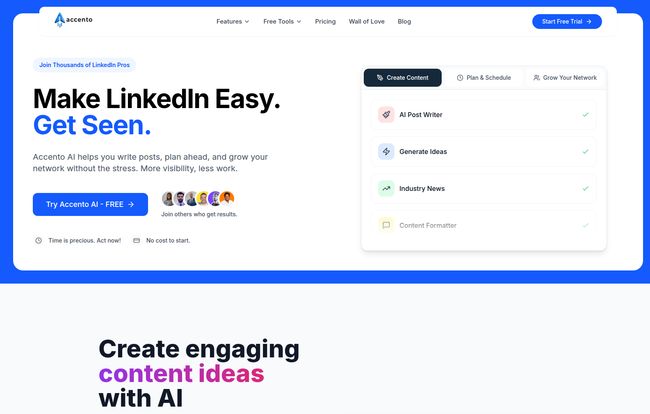
Strip away the marketing buzzwords, and Accento AI is basically a content co-pilot for your LinkedIn account. Think of it less as a robot that replaces you and more as a really, really efficient intern. Its main job is to help you with the three biggest headaches of LinkedIn: coming up with ideas, writing the actual posts, and posting them on a regular schedule.
It’s not trying to be an all-in-one social media behemoth like Hootsuite or Sprout Social. It’s hyper-focused on LinkedIn. And in my experience, tools that do one thing really, really well are often the ones worth paying attention to.
The Features That Actually Matter
A tool is only as good as its features, right? I went through Accento AI’s dashboard to see what’s under the hood. Here’s the breakdown of what I found most interesting.
Beating the Blank Page with the Idea Generator
We’ve all been there. Staring at the blinking cursor in the “Start a post” box on LinkedIn. It’s creative quicksand. This is probably where Accento AI shines brightest for most people. The platform has a dedicated Ideas Generator. But what I found more useful was its integration of Industry News. It pulls in fresh articles and developments from trusted sources related to your field. This is brilliant. Instead of just asking an AI to “write a post about marketing,” you can feed it a current event or a new report and ask it to generate a take. This immediately makes the content more timely and relevant. It’s the difference between shouting into the void and joining a conversation already in progress.
The AI GhostWriter: Friend or Foe?
Here’s the controversial part: the AI post generator. Can an AI really write a good LinkedIn post? My answer is a firm… maybe. If you just click “generate” and copy-paste, your content will likely sound generic. Let’s be honest. That’s the risk with any AI writer.
But that’s not how you should use a tool like this. Accento AI is a fantastic first-draft machine. It can take your seed of an idea—a bullet point, a link to a blog post, even a video—and structure it into a coherent LinkedIn post. It handles the formatting, adds some relevant hashtags, and gets you 80% of the way there. Your job is to come in and add that final 20%: your personal anecdotes, your unique voice, your spicy take. It’s a partnership.
Visit Accento AI
The Growth and Agency plans also have a feature called “Content style (mimic your content)” which is fascinating. The idea is that the AI learns from your previous posts to better match your voice. This is the holy grail for AI content tools, and while it’s never perfect, it’s a huge step toward solving the “robotic text” problem.
Finally, a Simple Scheduler
Consistency is king on LinkedIn. The algorithm favors people who show up regularly. Accento’s built-in scheduler is clean and straightforward. You can write your posts, polish them up, and then schedule them to go out over the next week or month. This allows for batching your content creation—a massive time-saver. Spend two hours on a Sunday afternoon planning your content for the whole week, and then you don’t have to think about it again. For busy founders or consultants, this feature alone could be worth the price of admission.
Okay, But Does It Actually Work? My Take.
In short: yes, but with a caveat. Accento AI works if you work with it. If you’re looking for a magic button to build a massive LinkedIn following with zero effort, this ain’t it. No tool is.
But if you’re looking to reclaim 5-10 hours a week from the content creation hamster wheel, it’s a powerful ally. The biggest benefit is overcoming inertia. It gets you from zero to one. It turns the daunting task of “creating a post” into the much easier task of “editing a post.” That mental shift is huge.
Some people will argue that relying on AI dilutes authenticity. And they have a point! If you let the AI do 100% of the work, your feed will look like a generic billboard. But as a professional who values efficiency, I see it differently. Accento AI automates the grunt work so I can focus on the high-value stuff: the strategy, the unique insights, and engaging with the comments. It’s about being smart with your resources.
Let’s Talk Money: Accento AI Pricing Breakdown
Price is always a factor, so let’s get into it. Accento AI has a pretty clear-cut pricing structure, which I appreciate. No hidden fees or confusing credit systems. They offer a free 7-day trial (no credit card needed, big plus) and you get 2 months free if you pay annually.
| Plan | Price (Monthly) | Who It’s For | Key Features |
|---|---|---|---|
| Starter | $14 | The solo professional or someone just getting serious about LinkedIn. | 50K words/month, 1 LinkedIn account, idea & post generation, post formatter. |
| Growth | $22 | Power users, consultants, or small businesses managing a few brands. | Everything in Starter, plus 120K words, 5 accounts, Content Style (mimics you), AI Personas, Industry News, and Auto Posts. |
| Agency/Team | $32 | Marketing agencies or teams managing a roster of client accounts. | Everything in Growth, plus 290K words, 20 accounts, client management, priority support, and an onboarding call. |
Honestly, the pricing feels very reasonable. The Growth plan at $22/month seems like the sweet spot for most serious users, especially for the content mimic feature. It’s a small investment for the amount of time it can potentially save.
Who is This Tool For (And Who Should Skip It)?
So, should you sign up for the free trial?
This tool is a great fit for:
- Solopreneurs and Consultants: Your time is your money. Automating content creation frees you up for billable work.
- Marketing Managers: You can manage your company page and maybe your own professional brand without pulling your hair out.
- Small Agency Owners: The Agency plan is a no-brainer for managing multiple client LinkedIn accounts efficiently.
- Anyone with Chronic Writer’s Block: If you know you need to post but just can’t get started, this is your perfect writing partner.
You might want to skip it if:
- You’re a Content Purist: If you genuinely love the process of writing every single word from scratch and have the time for it, you probably don’t need it.
- You Barely Use LinkedIn: If you only post once a month, a dedicated tool is likely overkill. Just stick with the native platform.
Frequently Asked Questions About Accento AI
- 1. How does Accento AI generate content ideas?
- It uses a combination of its AI model and an integrated Industry News feature. You can either give it a general topic to brainstorm on or, more effectively, provide a link to a recent news article for it to create a timely take on.
- 2. Can the AI really copy my writing style?
- The “Content Style” feature on the Growth and Agency plans aims to do this by analyzing your past content. It’s a learning process for the AI. It won’t be a perfect 1:1 clone of your brain, but it does a surprisingly good job of picking up your tone, sentence structure, and common phrasing to make the output feel much less generic.
- 3. Is Accento AI better than just using ChatGPT for LinkedIn posts?
- This is a great question. While ChatGPT is a powerful generalist, Accento AI is a specialist. It’s purpose-built for LinkedIn. Its templates, content formatters, built-in scheduler, and news integration are all tailored specifically for creating effective LinkedIn content, which can save you a lot of time on prompt engineering and formatting.
- 4. What happens after the free trial ends?
- After your 7-day free trial, you’ll need to subscribe to one of the paid plans to continue using the service. Your account will be paused until you choose a plan.
- 5. Is there a contract or can I cancel anytime?
- Based on their site, you can cancel anytime. This is standard for modern SaaS tools and it’s great to see they offer that flexibility. You’re not locked into a long-term commitment unless you choose the annual plan for the discount.
The Final Word on Accento AI
Look, the digital marketing world is swimming in AI tools. Most are forgettable. But Accento AI feels different. It’s a focused, well-designed tool that solves a very real, very annoying problem for a lot of professionals. It’s not about outsourcing your brain; it’s about buying back your time.
By handling the tedious parts of content creation, it frees you up to be more human—to engage, to connect, and to build the relationships that actually matter on a platform like LinkedIn. And for that reason alone, it’s certainly earned a spot in my digital toolkit.


