
Categories: AI Speech-to-Text, AI Subtitle Generator, AI Transcriber, AI Transcription, AI Translate, Audio To Text AI
AccurateScribe.ai Review: AI Transcription Worth It?

Transcription. The bane of every content creator’s existence. Or at least, it used to be. I still have flashbacks to my early days in marketing, hunched over a laptop with headphones on, trying to decipher what was said in a grainy webinar recording. Pause. Rewind. Type. Pause. Rewind. Type. It was a special kind of purgatory that I wouldn’t wish on my worst CPC competitor.
Thankfully, we’re living in the age of AI, and the transcription game has changed. Radically. We’ve been flooded with new tools, all promising lightning-fast, perfectly accurate transcriptions. One that kept popping up on my radar was AccurateScribe.ai. The name alone is a bold claim, right? So, being the curious (and slightly skeptical) SEO guy I am, I decided to put it through its paces. Is it just another tool in a sea of sameness, or is it something special?
First Impressions of AccurateScribe.ai
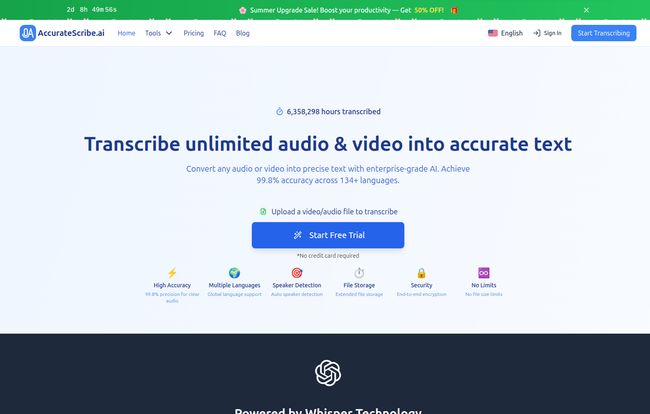
Landing on their homepage, you’re greeted with some pretty hefty claims. “99.8% Accuracy.” “Trusted by industry leaders worldwide” with logos like Apple, Netflix, and Microsoft staring back at you. It’s clean, professional, and gets straight to the point. No fluff. I appreciate that.
The sign-up for a free trial was straightforward. No credit card needed to just kick the tires, which is always a good sign. They want you to see the value before you open your wallet. The interface is minimal, almost sparse, but in a good way. It’s not cluttered with a million features you’ll never use. It’s built for one thing: uploading a file and getting text back.
Visit AccurateScribe.ai
Putting the “Accurate” in AccurateScribe to the Test
Okay, let’s get to the main event. That 99.8% accuracy claim. As someone who’s tested a lot of these platforms, I know that number is always… aspirational. It’s usually based on a perfect, studio-quality audio file where a professional voice actor reads a script. That’s not the real world.
The real world is a podcast interview over a spotty internet connection, a Zoom meeting where two people talk at once, or a YouTube video with background music. So I threw a few real-world files at it:
- A clean podcast snippet: One of my own, with me speaking clearly into a decent microphone.
- A chaotic team meeting: A 30-minute recording with four people, some crosstalk, and one person with a fairly thick accent.
- A YouTube tutorial video: With background music and some technical jargon.
The results? Honestly, pretty darn impressive. For the clean podcast audio, it was nearly flawless. I’d say it hit that 99% mark easily, only stumbling on a couple of specific brand names. For the messy team meeting, it did surprisingly well. It correctly identified the different speakers (more on that in a sec) and, while it needed some cleanup, it gave me a working document that was 90% of the way there. That saved me hours. The YouTube video was similar; it handled the jargon better than I expected but got a few words muddled by the music.
Now, is that 99.8% accuracy figure a hard and fast rule? Of course not. No AI is perfect, and anyone who tells you otherwise is probably selling you snake oil. Its a solid tool, but the quality of your output is always going to depend on the quality of your input. Garbage in, garbage out, as they say.
The Features That Actually Matter for SEOs and Content Creators
Accuracy is king, but the right features are what make a tool truly useful in a daily workflow. AccurateScribe.ai has a few that really stand out to me.
Speaker Recognition Is a Game Changer
This is huge. When I uploaded my team meeting, the transcript came back with “Speaker 1,” “Speaker 2,” etc. clearly labeled. For anyone transcribing interviews, meetings, or panel discussions, this feature alone is worth the price of admission. It turns an unreadable wall of text into a clean, easy-to-follow script. The time saving here is immense.
Language Support for Global Reach
The platform boasts support for over 134 languages. For a lot of us, we might just stick to English, but the implications for international SEO and global businesses are massive. Need to repurpose a video for a Spanish-speaking audience? Or transcribe an interview with a source in France? This tool can handle it. It’s a genuinely global-first approach, not just an afterthought.
All the Export Formats You Could Ever Need
This might seem like a small detail, but it’s critical. AccurateScribe lets you export your text in a bunch of formats: DOCX, PDF, TXT, CSV… but the most important ones for people like me are SRT and VTT. These are subtitle files. You can take a transcript, do a quick proofread, export it as an SRT file, and upload it directly to YouTube or Vimeo. This is a massive SEO boost for your videos, making them more accessible and crawlable by Google. Don’t sleep on this feature.
Also Read: AbiStudio Review: AI Chat with a Conscience?
Let’s Talk About Pricing. Is It a Good Deal?
Alright, the money question. A great tool is only great if you can afford it. AccurateScribe has a simple, transparent pricing model, which I love. No confusing credit packs or per-minute billing.
| Plan | Price | Key Features |
|---|---|---|
| Monthly | $19.99 / month | Unlimited transcription, 10-hour file limit, all features included. |
| Annual | $9.99 / month (billed as $119.99/year) | Same as monthly, but at a huge discount. This is the one. |
My take? The monthly plan is fine if you have a single, big project you need to burn through. But the annual plan at $9.99 a month is an absolute steal for what you get. Unlimited transcription is a powerful promise. Compared to some competitors who charge per minute, if you’re producing content regularly—say, a weekly podcast or a couple of YouTube videos—this pays for itself almost immediately. The 10-hour limit per file is also incredibly generous; most of us aren’t uploading files longer than that anyway.
The Not So Perfect Bits
No review is honest without a little criticism. While I’m largely impressed, there are a few things to be aware of. The free trial is quite limited; it’s more of a quick demo than a proper trial. It gives you a taste, but you can’t really integrate it into your workflow without upgrading.
And as mentioned, the accuracy, while excellent, is not magic. If you feed it a recording of a meeting in a loud coffee shop with a cheap laptop mic… you’re going to have to do some editing. The audio enhancement feature helps, but it can’t perform miracles. Set your expectations realistically and focus on getting the best source audio you can.
Who is AccurateScribe.ai Really For?
So, who should be clicking that ‘Go Unlimited!’ button? I see a few key groups:
- Podcasters & YouTubers: This is a no-brainer. For show notes, blog post repurposing, and video subtitles (SRT files!), the annual plan is a must-have.
- SEOs & Content Marketers: Perfect for transcribing expert interviews, webinars, and meetings to turn spoken content into written articles and social media snippets.
- Researchers, Students, and Journalists: Transcribing interviews and lectures is a core task. This tool will save you literally days of work over the course of a project.
- Businesses: For getting accurate, searchable minutes from team meetings or client calls. The speaker identification is clutch here.
My Final Verdict
So, after all this, is AccurateScribe.ai legit? Yes. It absolutely is. It delivers on its core promise of fast, highly-accurate AI transcription with features that are genuinely useful for creators and professionals. It’s not a magic wand that creates perfect text from any audio source, but it gets you 90-95% of the way there in minutes, which is an incredible time-saver.
For me, the value proposition of the annual plan is just too good to ignore. It’s an affordable tool that solves a very real, very tedious problem. It’s found a permanent place in my digital marketing toolkit, and I suspect if you give it a try, it’ll find a place in yours too. It’s not transcription purgatory anymore; it’s more like transcription paradise. Almost.
Frequently Asked Questions
How accurate is AccurateScribe.ai?
The platform claims up to 99.8% accuracy, which is achievable with high-quality, clear audio. In real-world tests with background noise or multiple speakers, you can expect slightly lower accuracy, but it’s still very high and provides an excellent draft that requires minimal editing.
What languages does it support?
AccurateScribe.ai supports over 134 languages, making it a powerful tool for global content creators, international businesses, and multilingual projects.
Can I transcribe long audio or video files?
Yes. On the paid plans, you can upload and transcribe files that are up to 10 hours long, which is more than enough for most podcasts, long interviews, webinars, and meetings.
What’s the main difference between the monthly and annual plans?
Both plans offer the exact same features, including unlimited transcription. The only difference is the price. The annual plan comes out to $9.99 per month (billed yearly), offering a significant saving over the $19.99 monthly plan.
Is there a free trial?
Yes, there is a free trial that lets you test the service with limited features. It’s a good way to see the transcription quality for yourself before committing to a paid plan.
What export formats are available for my transcripts?
You can export your transcripts in a wide variety of formats, including DOCX (for Microsoft Word), PDF, TXT, CSV, and, importantly for video creators, SRT and VTT for subtitles and captions.
Reference and Sources
- AccurateScribe.ai Official Website
- AccurateScribe.ai Pricing Page
- OpenAI Whisper Technology – For those interested in the underlying tech.


