
Categories: AI App Builder, AI Developer Tools, AI Website Builder, No-Code&Low-Code
Adalo Review: Build an App Without Writing a Single Line of Code

How many brilliant app ideas have you had? You know, the ones that pop into your head in the shower or during a boring meeting. The ones you scribble down on a napkin, convinced this is the one. The big one. And then… what happens? If you’re anything like me, that napkin gets buried under a pile of other napkins, and the idea dies a quiet death on the vine of a single, massive roadblock: “I don’t know how to code.”
For years, this was the great divide. On one side, the developers, the wizards who could speak in Python and Swift. On the other, the rest of us—the idea people, the marketers, the entrepreneurs—staring across a chasm of technical debt. But the ground is shifting. The rise of no-code platforms is like the construction of a massive bridge over that chasm, and honestly, Adalo is one of the most interesting architects leading the charge.
I’ve been in the SEO and traffic game for a long time, and I’ve seen countless tools promise the world. Some deliver, most don’t. So, when I started hearing the buzz about Adalo, I was skeptical. A drag-and-drop builder for real native mobile and web apps? Sure. But after spending some serious time with it, I’m ready to talk. And I’ve got some thoughts.
What Exactly is Adalo?
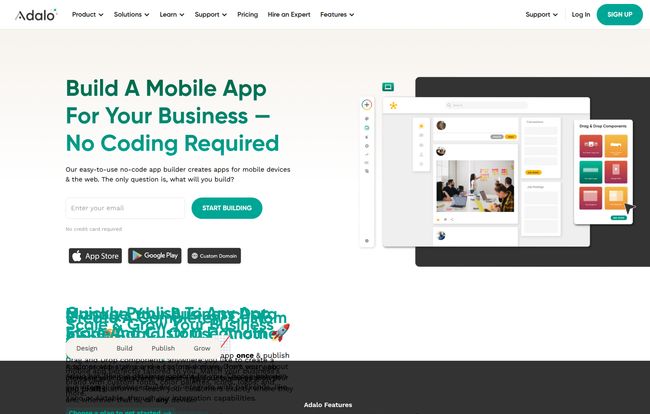
Let’s get the official description out of the way. Adalo is a no-code platform that lets you build and publish apps for iOS, Android, and the web. But that’s a bit like calling a Ferrari a “people mover.” What it feels like is a creative suite for app entrepreneurs. It’s a visual canvas where you design your app by dragging components onto a screen—buttons, lists, forms, images—and then wire them up with logic and a database without ever looking at a line of scary, indented code.
Think of it like building with digital LEGOs. You have all the bricks and specialty pieces (the components), you have an instruction manual (the tutorials), and you have a baseplate (the app screen). You snap them together to build your own creation. You’re not just building a static website brochure; you’re creating interactive, data-driven applications that users can log into, create content with, and engage with. That’s a pretty big deal.
Who Should Be Using Adalo? (And Who Shouldn’t)
This is not a one-size-fits-all solution. If you’re trying to build the next Fortnite or a high-frequency trading platform, my friend, you’re in the wrong place. Go hire a team of expensive developers. Godspeed.
But for a massive slice of the population, Adalo is a revelation. I’m talking about:
- Solo Founders & Entrepreneurs: You have an idea for a niche social network, a local directory, a booking app, or an internal tool for your team. Adalo is perfect for building a Minimum Viable Product (MVP) to test your idea in the market without sinking your life savings into it.
- Small Businesses: Want a loyalty app for your coffee shop? A simple inventory tracker for your store? A client portal? Yep. Adalo can handle that.
- Designers: If you’re a UI/UX designer who can mock up beautiful apps in Figma but can’t make them functional, Adalo is your new best friend. You can finally bring your designs to life.
- Marketers & Agencies: Need to quickly spin up a campaign-specific app or a tool for a client? This is way faster and cheaper than outsourcing development.
Basically, if your app idea centers around lists, user profiles, booking, messaging, or displaying data in a nice way, you’re in Adalo’s sweet spot.
Visit Adalo
The Features That Actually Got Me Excited
Every platform brags about its features. Most are just fluff. Here’s the stuff in Adalo that I think genuinely matters.
The Drag-and-Drop Builder is Like Finger Painting for Apps
The core of the Adalo experience is its builder, and it’s just… smooth. It feels less like a technical tool and more like Canva or Figma. You have your screens on the left, your components at the top, and you just drag what you need onto the phone-sized canvas. Want a list of users? Drag the list component over. Need a button to go to another screen? Drag a button, click the “Action” setting, and tell it which screen to link to. The learning curve is surprisingly gentle. You can go from zero to a semi-functional prototype in a single afternoon. That’s powerful.
Your Data, Your Way: Flexible Databases
This is where Adalo separates itself from simpler website builders. Every real app needs a database. Adalo gives you a built-in one that’s surprisingly capable. You can create different collections (like ‘Users’, ‘Posts’, ‘Appointments’), add properties to them, and create relationships. For example, a ‘Post’ can have a relationship to the ‘User’ who created it. It’s all done visually, no SQL queries required. Thank goodness.
Even better, if you outgrow the internal database or already have your data sitting in something like Airtable, you can connect to external data sources. With its Xano integration and the power of Zapier, you can pretty much pull data from anywhere.
From Your Screen to the App Store
This is the holy grail for most no-coders. Building something is one thing, but actually getting it onto someone’s phone is another. Adalo lets you publish your creation as a progressive web app (PWA) on any plan, which is awesome. But on their paid plans, they provide a streamlined process to get your app published natively to the Apple App Store and Google Play Store. Now, it’s not a single click—you still have to navigate the wonderful world of Apple and Google developer accounts—but Adalo does most of the heavy lifting for you, packaging the app in the right format.
The Elephant in the Room: No-Code vs. Real Coding
Let’s be real. There are trade-offs. Using a platform like Adalo means you’re building on their turf. You’re trading infinite flexibility for speed and simplicity. You won’t be able to implement some hyper-specific, graphically intense feature you dreamed up. Performance for an app with millions of records might not be the same as a custom-coded backend. Some purist developers might scoff. Let them.
But here’s my take: done is better than perfect. A real, working app in the hands of users is infinitely more valuable than a “perfect” app that only exists in your head because you’re still on lesson three of a “Learn to Code” course. For 80% of app ideas, Adalo is more than enough.
A Transparent Look at Adalo’s Pricing
Money talks. So let’s talk about Adalo’s pricing. They have a tiered structure that I think is pretty fair, scaling with your needs. It can be a little confusing at first glance, so here’s my breakdown.
| Plan | Price (per month) | Who It’s For | Key Features |
|---|---|---|---|
| Free | $0 | The Curious & Testers | Adalo branding, 50 database rows, 1 team member. Great for learning and building a simple prototype. |
| Starter | $45 | Hobbyists & Early MVPs | Custom domain for your web app, 2,000 database rows, 5 team members. Good for a soft launch. |
| Professional | $199 | Serious Startups | Publish to iOS & Android, 10,000 rows, custom fonts, priority support. This is the plan you need for a real app launch. |
| Business | $325 | Scaling Businesses & Agencies | 50,000 rows, dedicated support, more team members. For when your app is really taking off. |
Note: Prices are based on information available at the time of writing and may change. Always check the official Adalo pricing page for the most current details.
My opinion? The Free plan is genuinely useful for getting your feet wet. You can build out your entire app and test its logic. The Professional plan is where the magic happens for most founders, as it unlocks the app store publishing.
Unlocking Superpowers with Integrations
An app rarely lives in a vacuum. It needs to talk to other services. This is where Adalo’s integration with Zapier becomes its secret weapon. Zapier is like a universal translator for web apps. By connecting Adalo to Zapier, you can trigger actions in thousands of other tools.
Imagine this: a new user signs up in your Adalo app. A “Zap” automatically adds them to your Mailchimp newsletter, creates a new row for them in a Google Sheet, and sends you a celebratory notification in Slack. All of this, automated. No code. That’s the kind of leverage that saves you dozens of hours a week.
My Honest Verdict: Is Adalo the Real Deal?
So, after all this, what’s the final word? Is Adalo worth your time and potentially your money? In my experience, the answer is a resounding yes… with a qualifier. It’s worth it if you’re the right person with the right project.
Adalo isn’t a magic wand that will build a billion-dollar company for you. What it is, is a fantastic tool that removes one of the biggest barriers to starting. It democratizes app development. It puts the power to create back in the hands of the people with the ideas. There will be limitations and you might even outgrow it one day. But isn’t that a great problem to have?
For me, the ability to go from a simple idea to a functional web and mobile app that I can share with the world in a matter of days, not years, is nothing short of amazing. It’s a game-changer for lean startups, small businesses, and anyone who has ever said, “I wish there was an app for that.” Well, now you can go build it.
Frequently Asked Questions About Adalo
- What kind of apps can I build with Adalo?
- You can build a huge variety of apps, like internal business tools, customer portals, booking systems, simple social networks, directories, and marketplace-style apps. It’s less suited for high-performance games or extremely complex, data-heavy applications.
- Do I really need zero coding knowledge?
- Honestly, yes. You don’t write any code. However, you do need to learn how to think logically about how your app should work. Understanding concepts like databases and conditional actions (if this, then that) is very helpful, but Adalo teaches you this visually.
- Can I really publish to the Apple App Store and Google Play?
- Yes, you can. This feature is available on the Professional plan and higher. Adalo helps you generate the build files, but you’ll still need your own Apple and Google Developer accounts, which have their own fees and review processes.
- What happens if my app gets super popular and I outgrow Adalo?
- First of all, congratulations! That’s a great problem. While you can’t export the source code, you can use Adalo’s API and external database connections to migrate your data to a custom-coded solution when the time is right. You’re not completely locked in.
- Is the free plan actually useful, or just a teaser?
- It’s surprisingly useful. You can build and design your entire app, test all its functionality, and even launch it as a PWA with Adalo branding. It’s the perfect way to validate your idea and make sure the platform works for you before spending a dime.
The best way to know if Adalo is right for you is to simply try it. Stop letting that brilliant idea collect dust. Go sign up for the free plan and start building. What have you got to lose?
Reference and Sources
- Adalo Official Website: https://www.adalo.com/
- Adalo Pricing Page: https://www.adalo.com/pricing
- Zapier Integration Platform: https://zapier.com/
- Xano – No-Code Backend Platform: https://www.xano.com/


