
Categories: AI Bypasser, AI Checker, AI Content Detector, AI Detector, Humanizer AI, Undetectable AI
AI Detect Review: Can It Really Humanize Your Content?

The last couple of years in the content and SEO world have felt like a high-stakes game of cat and mouse. First, AI writers burst onto the scene, promising to end writer’s block forever. Then came the AI detectors, the digital bloodhounds sniffing out robotic text. And right on their heels? The big, scary Google updates, like the Helpful Content Update, leaving everyone wondering if their AI-assisted blog post is about to get them banished to the second page of search results. It’s exhausting.
It feels like we’re all caught in this weird AI arms race. We want the efficiency of AI, but we need the authenticity and, let’s face it, the ‘safety’ of human-written content. So when a tool like AI Detect pops up on my radar, claiming to not only detect AI but also humanize it, my curiosity is definitely piqued. But as a veteran of this industry, I’m also deeply skeptical. Is this the silver bullet we’ve been waiting for, or just another shiny object?
I decided to roll up my sleeves and take a proper look. No marketing fluff, just a real-world analysis of what this thing can actually do for those of us in the trenches.
What Exactly Is AI Detect Supposed to Do?
At its core, AI Detect sells itself as a two-for-one deal. On one hand, it’s a detective. You paste in some text, and it gives you a probability score—a percentage telling you how likely it is that a machine wrote it. It claims it can spot content from all the big players: ChatGPT, Claude, Google Gemini, you name it. On the other hand, and this is the interesting part, it’s a master of disguise. It offers an “AI Humanizer” that takes that robotic text and rewrites it to sound more human, allegedly making it undetectable.
So, it’s basically the cop and the getaway driver rolled into one clean, dark-mode interface. It also throws in Readability and Grade Level scores, which are nice little bonuses for any content creator focused on user experience.
My First Impressions: A Walkthrough of the User Experience
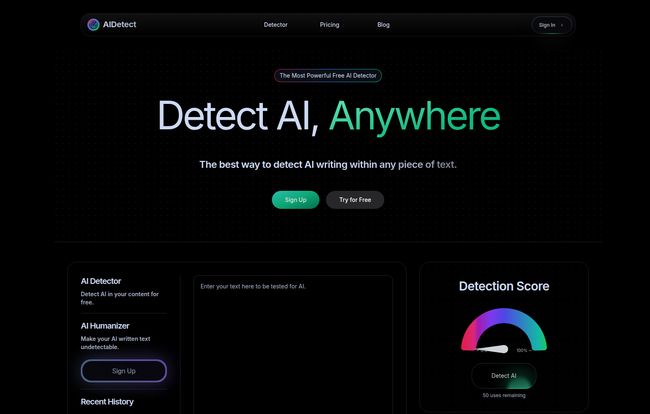
Hopping onto their website, the first thing I noticed was the clean design. It’s not cluttered. It’s straight to the point: a big box that says “Enter your text here to be tested for AI.” I like that. No need to hunt around. You can immediately get a feel for the tool without even signing up, which is a huge plus in my book.
Visit AI Detect
I grabbed a paragraph I had generated with ChatGPT-4 for another project—something intentionally a bit dry and formulaic—and pasted it in. The tool churned for a second and came back with a 98% AI score. Okay, not bad. It correctly identified the text as AI-generated. The interface also showed me I had “50 uses remaining,” which points to the limitations of the free plan. It’s a solid taster, enough to see if you like the flavor before you buy the whole meal.
The Core Features Under the Microscope
A pretty interface is one thing, but performance is what we’re paying for. So let’s break down the two main functions.
The AI Detector: How Accurate is 99%?
AI Detect throws around a big number: 99% accuracy. As someone who has tested a lot of these tools, that number makes my eyebrow twitch. AI detection is notoriously tricky. The best AIs are trained to mimic human writing patterns, and the best human writers sometimes fall into predictable patterns. False positives and negatives are the name of the game. I’ve seen some of my own, 100% human-written text get flagged as 50% AI before. It happens.
That said, in my informal tests with text from known AI sources, AI Detect did a pretty commendable job. It correctly flagged everything I threw at it from ChatGPT and Claude. It seems particularly well-tuned to the common tells of AI writing—the overly perfect grammar, the predictable sentence structures, that certain lack of soul. For a quick, first-pass check, it seems reliable enough.
The AI Humanizer: The Real Magic or Just a Spinner?
This is the feature everyone is really here for, isn’t it? The promise of making AI content ‘safe.’ I took the same 98% AI-flagged text and hit the “Humanize” button. The result was… interesting. It was definitely different from the original. The sentence structure was more varied, some of the more generic words were swapped out for better synonyms, and overall, it just felt a little less stiff.
But is it just a glorified article spinner from the old, dark days of SEO? I don’t think so. Modern spinners often just swap words, leading to nonsensical sentences. This felt more like a true paraphraser, focusing on changing structure and flow while attempting to maintain the original meaning. I ran the new “humanized” text back through its own detector, and it came back with a 12% AI score. A significant drop. The real question, which is harder to answer, is whether it would pass Google’s sniff test. And for that, the jury is still out. I’ve always felt that the best approach is to use AI for a first draft and then do a heavy human edit. A tool like this could potentially form a middle step in that process.
One of its boldest claims is that it “Beats Turnitin.” That’s a direct shot across the bow for the academic market, but for us marketers, it suggests a certain level of sophistication in its rewriting capability.
A Look at the AI Detect Pricing Tiers
So, what’s this going to cost you? AI Detect operates on a freemium model, which I appreciate. Here’s a quick breakdown of their plans:
| Plan | Price | Key Features |
|---|---|---|
| Free | $0 | 50 scans/day, 1 AI humanization/day, Basic AI Detection. |
| Detection Beginner | $9.99/month | 750 words/scan, 100 scans/day, 25 humanizations/day, Beats Turnitin. |
| Detection Pro | $14.99/month | Everything in Beginner + 1,000 words/scan, 150 scans/day, 50 humanizations/day. |
| Detection Ultimate | $24.99/month | Everything in Pro + 1,500 words/scan, 500 scans/day, 100 humanizations/day. |
The free plan is great for a quick check here and there. But with only one humanization per day, you’ll hit that wall fast if you’re serious. The paid plans seem reasonably priced, scaling up based on the volume of work you do. For a freelance blogger, the Beginner plan is probably the sweet spot. For an agency pumping out content, Pro or Ultimate makes more sense, especially with the higher daily limits on humanizations.
Who Is AI Detect Really For?
After playing around with it, I can see a few distinct groups getting real value here:
- SEO Pros and Bloggers: This is the obvious one. People who are leveraging AI to create drafts can use this to add a layer of humanization and check their work before it goes live. It’s a workflow enhancement, not a replacement for a good editor.
- Marketing Agencies: For teams that need to produce content at scale, this tool could standardize the “de-AI-ing” process, ensuring a more consistent, less robotic voice across different writers and projects.
- Students: Look, the “Beats Turnitin” feature is right there. While I would never condone academic dishonesty, it’s clear who they’re targeting. For students using AI as a research assistant, it could help them rephrase and structure their findings in their own voice.
The Unspoken Downsides and Caveats
No tool is perfect, and it’s important to go in with eyes wide open. My main reservation is the potential for this to become a crutch. Good writing isn’t just about sounding human; it’s about having a unique perspective, telling a good story, and providing genuine value. No humanizer can fake that. It can’t fact-check a hallucinating AI or add a personal anecdote that builds a real connection with the reader.
Also, the accuracy of any AI detector should always be taken with a grain of salt. Relying 100% on a tool’s score is risky. The goal should still be to create genuinely helpful, high-quality content, not just content that can trick an algorithm—whether that algorithm belongs to an AI detector or to Google.
Final Thoughts: A Useful Tool, Not a Magic Wand
So, where do I land on AI Detect? I’m cautiously optimistic. It’s a slick, well-designed tool that directly addresses a major pain point in the content industry right now. The detector is solid for a quick check, and the humanizer is more impressive than I expected it to be, serving as a powerful paraphraser rather than a simple word-swapper.
In my opinion, its a useful weapon to have in your arsenal in this ongoing, slightly bizarre world of AI-assisted content creation. But it’s not a magic wand. It won’t make bad content good. It won’t give your writing a soul. But it might just help you smooth out the robotic edges and make your AI-assisted workflow a little bit safer and more efficient. And in 2024, sometimes that’s all you can ask for.
Frequently Asked Questions (FAQ)
- What is AI Detect?
- AI Detect is a web-based tool that performs two main functions: it detects the likelihood of text being written by an AI (like ChatGPT), and it offers a “humanizer” feature to rewrite AI-generated text to make it sound more natural and bypass detection.
- Is AI Detect free to use?
- Yes, there is a free plan. It offers 50 detection scans and 1 AI text humanization per day. For higher limits and more features, there are several paid subscription plans available.
- How accurate is AI Detect?
- The company claims up to 99% accuracy in detecting AI-generated text. While my tests showed it to be quite effective at identifying obvious AI content, users should remember that no detector is 100% infallible and results can vary.
- Can AI Detect really bypass other detectors like Turnitin?
- AI Detect makes this claim for its paid plans. Its AI humanizer is designed to alter text structure and word choice significantly to evade detection algorithms. While it can be effective, success is not always guaranteed as detection technologies are constantly evolving.
- Does using an AI humanizer guarantee my content won’t be penalized by Google?
- No. Google’s policies focus on the quality and helpfulness of content, not just whether it was written by an AI. Using a humanizer to clean up an AI draft can be helpful, but if the core content is low-quality, unoriginal, or unhelpful, it can still be penalized. The focus should always be on creating excellent content for the user.
- Who should use AI Detect?
- It’s best for content creators, SEO professionals, students, and marketing agencies who use AI as part of their writing process and want to refine the output to sound more human and check it for an AI signature before publishing.


