
Categories: AI Checker, AI Checker Essay, AI Content Detector, AI Image Detector, AI Plagiarism Checker
Is Your PowerPoint AI? A Review of PPTDetector.com

You’re a professor grading final projects, or a manager reviewing a pitch from another department. You open up a PowerPoint presentation and… it’s just a bit too good. The structure is flawless, the text is impeccably written, and the images are suspiciously slick. A little voice in the back of your head whispers, “Did a human even make this?
A few years ago, that thought would’ve been absurd. Today? It’s a legitimate question. With the explosion of AI tools like Tome, Gamma, and even ChatGPT getting better at generating presentation outlines, the line between human effort and algorithmic output has blurred into oblivion. It’s created a new headache for anyone who cares about authenticity.
For years, we’ve had AI text checkers like Turnitin or Copyscape, but they have a glaring blind spot. They can’t really handle a PowerPoint file. You have to copy-paste text block by text block, and they completely ignore images and, crucially, the overall structure. It’s like trying to inspect a car by only looking at the lug nuts. This is the exact problem a tool I’ve been playing with, PPTDetector.com, aims to solve.
What Exactly is PPTDetector.com?
In a nutshell, PPTDetector.com is a specialized AI checker built from the ground up to do one thing and do it well: analyze entire PowerPoint (.PPT or .PPTX) files. It’s not a generalist tool trying to be a jack-of-all-trades. It’s a specialist, a digital detective trained specifically for the crime scene of a suspicious slide deck. Its whole purpose is to sniff out content generated by the big names in AI—we’re talking ChatGPT, Google’s Gemini, Grok, Claude, you name it.
This focus is what first caught my eye. In the SEO world, we know that niche tools often outperform general ones. It just makes sense. A tool designed to understand the unique DNA of a presentation file should, in theory, be way more effective than one that just sees a wall of text.
The Elephant in the Room: How Does It Actually Work?
This is where things get interesting. The platform boasts about its “multi-layered analysis,” which sounded like typical marketing fluff at first. But after using it, I get it. It’s not just running the text through a simple AI-or-not filter. It’s looking at the whole package.
Beyond Just Text Snippets
Of course, it analyzes the text on each slide. It checks for the classic tells of AI writing—the overly perfect grammar, the specific sentence structures, the slightly detached tone that models like GPT-4 can sometimes have. But it does this within the context of the entire presentation, which is a step up from just pasting a paragraph into a web form.
Analyzing the AI-Generated Imagery
This is a big one. With AI image generators like Midjourney and DALL-E 3 becoming ridiculously accessible, AI-generated images are flooding presentations. PPTDetector claims to analyze the images used in the slides to flag ones that have the digital fingerprints of AI creation. For educators trying to ensure students are using authentic visuals or creating their own, this feature alone is a massive win. I’ve seen so many decks recently with that tell-tale, hyper-realistic but slightly ‘off’ AI art style. This feature addresses that directly.
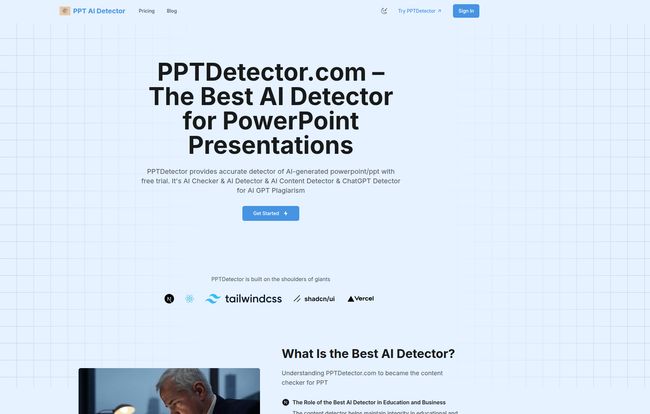
Visit AI Detector for PPT
The Ghost in the Machine: Structural Analysis
To me, this is the secret sauce. PPTDetector analyzes the structure of the presentation itself. Think about it: AI presentation tools often follow predictable patterns. They create a certain number of slides, use specific layouts, and generate titles and bullet points in a very logical, almost robotic, way. A human-made presentation is usually a bit messier, more idiosyncratic. There might be a weirdly formatted slide, an oddly placed image, or a sudden change in tone. It’s perfectly imperfect.
PPTDetector looks for the eerie perfection of an AI-generated structure. It’s a clever approach because even if a user heavily edits the AI-generated text, the underlying skeleton of the presentation might still give the game away. It’s a whole new layer of forensic analysis for the academic and corporate worlds.
Who is This Tool Actually For?
While anyone could use it, I see two main groups getting the most out of this.
For the Educators and Academics
This is the obvious one. From high schools to universities, maintaining academic integrity is a constant battle. PPTDetector gives teachers and professors a fighting chance to ensure the work they’re grading is genuine. It’s not just about catching cheaters, though. It’s also a tool to open up conversations with students about the responsible use of AI. You can’t just have a bot do your entire final project, and here’s why… and how we can tell.
For the Corporate World
Don’t sleep on the corporate use case. If you’re a manager, how do you verify the work submitted by your team or a freelancer is original? If you’re in marketing, are the pitch decks your agency is creating truly bespoke, or are they leaning a little too heavily on AI shortcuts? For HR departments dealing with training materials or internal reports, originality matters. It ensures you’re not paying for recycled, low-effort work and that your company’s internal knowledge base is built on genuine human expertise.
Let’s Talk Money: The Pricing Breakdown
Alright, so what’s the damage? The pricing is credit-based, which has its pros and cons. One credit equals one presentation scan. Here’s how it breaks down:
| Plan Name | Price | Credits | Key Features |
|---|---|---|---|
| Starter | $20 | 20 (Valid for 1 month) | Basic information & structure analysis. |
| Monthly Subscription | $19.90 / month | 40 (Valid for 1 month) | Everything in Starter, plus advanced text/image analysis & result visualization. |
| Annual Subscription | $199 / year | 500 (Valid for 1 year) | Everything in Monthly, plus Priority Technical Support. |
My take? The Starter plan is basically a one-off purchase to check a batch of assignments or if you’re just curious. The Monthly Subscription is the sweet spot for most professionals or educators who will use it regularly. For basically the same price as the Starter plan, you get double the credits and the more advanced analysis features, which, as I’ve argued, are the most important part. The Annual Subscription is the institutional plan for a school department or a company. The cost per credit drops significantly, making it the economical choice for high-volume use.
The Good, The Bad, and The AI-Generated
So, what’s the final verdict? I’m genuinely impressed. The biggest strength of PPTDetector is its specialization. By focusing only on PowerPoint files, it provides a level of analysis that generic tools just can’t match. The multi-layered approach—text, images, and structure—is smart and comprehensive. Plus, the promise of continuous algorithm updates is critical. The AI world moves at a breakneck pace; any detector that isn’t constantly learning is already obsolete.
Now, no AI detector is a magic bullet. It’s a cat-and-mouse game. As AI models get more sophisticated, so too must the detectors. There will always be a risk of false positives or negatives, and these tools should be used as a powerful guide, not an absolute judge and jury. Some might also balk at the credit-based system, prefering an unlimited plan. But for targeted, high-stakes verification, the model makes sense.
“In a world rushing toward AI-generated everything, tools that champion authenticity aren’t just useful; they’re necessary. They’re the guardrails on the new information highway.”
PPTDetector.com feels like one of those necessary guardrails. It’s a well-thought-out solution to a very modern problem.
FAQ: Your Questions Answered
- How accurate is PPTDetector?
- It’s designed to be highly accurate by using a multi-layered analysis that checks text, images, and presentation structure. Because it’s trained on a massive dataset and constantly updated, it stays effective against new AI models like Gemini and Claude.
- Is my data safe when I upload a presentation?
- Yes, the platform emphasizes security. It uses secure data transmission and processing, and the privacy policy states that your files are handled confidentially. Your intellectual property remains yours.
- What makes it better than a standard text-based AI checker?
- Its specialization. Standard checkers can’t analyze a full .PPTX file. They miss the context, the layout, and the images. PPTDetector is built to see the whole picture, not just bits and pieces of text.
- What AI models can it actually detect?
- It’s designed to detect content from a wide range of popular AI models, including those from the GPT family (like ChatGPT), Google’s Gemini, Anthropic’s Claude, xAI’s Grok, and Deepseek.
- Is there a free trial?
- Yes, according to the site, you can start with a free trial to test its capabilities before committing to a paid plan. It’s a great way to see if it fits your workflow.
- What happens when I run out of credits?
- You would need to purchase a new package or renew your subscription to continue scanning presentations. The plans are designed for different usage levels, so you can pick one that matches your expected needs.
Conclusion: A Necessary Tool for a New Reality
The rise of generative AI isn’t something to fear, but it is something we need to adapt to. For anyone in a position where they need to verify the originality of a presentation, the old methods just don’t cut it anymore. A specialized tool is no longer a luxury; its a necessity.
PPTDetector.com steps into this new reality with a focused, powerful, and easy-to-use platform. It addresses the specific challenges of AI in presentations in a way I haven’t seen other tools do. If you’re an educator shaping young minds or a professional trying to maintain standards of originality in your workplace, this tool is, without a doubt, worth a serious look.


