
Categories: AI Email Assistant, AI Email Generator, AI Email Writer, AI Text Generator, AI Writing, Large Language Models (LLMs)
AI Mailer Review: A Free GPT Email Writer Worth Your Time?

If I had a dollar for every time I’ve stared at a blank email draft, willing the right words to appear, I’d probably have enough money to hire someone to write my emails for me. The irony is not lost on me. Email is the backbone of modern business communication, yet it can feel like such a chore. The pressure to be professional, witty, concise, and persuasive all at once… it’s a lot.
We’ve all been there. You need to send a follow-up, a cold outreach, a thank-you note, or just a simple project update. And you just… can’t. The blinking cursor mocks you. This is the digital version of writer’s block, and it’s a productivity killer. So when I stumbled upon a tool called AI Mailer, which claims to be a free, AI-powered email generator, my professional curiosity was piqued. A free tool that writes my emails for me? Sounds too good to be true. Naturally, I had to put it to the test.
So, What Exactly Is This AI Mailer Thing?
On the surface, AI Mailer is a straightforward web tool. It uses OpenAI’s GPT (the same brain behind ChatGPT) to craft emails based on a simple prompt you provide. You type in a subject or a few keywords about what you need, and poof, it spits out a draft. Think of it less as a robot taking your job and more as a really, really fast intern who’s great at getting a first draft done. It’s designed for pretty much anyone who has to write emails regularly: marketers drowning in outreach, small business owners juggling a million tasks, students trying to sound professional when contacting professors, you get the idea.
The whole premise is to take that initial heavy lifting off your plate. It’s not about replacing you, but about giving you a solid starting point. A digital launchpad, if you will.
Visit AI Mailer
Putting It Through Its Paces: My First Spin
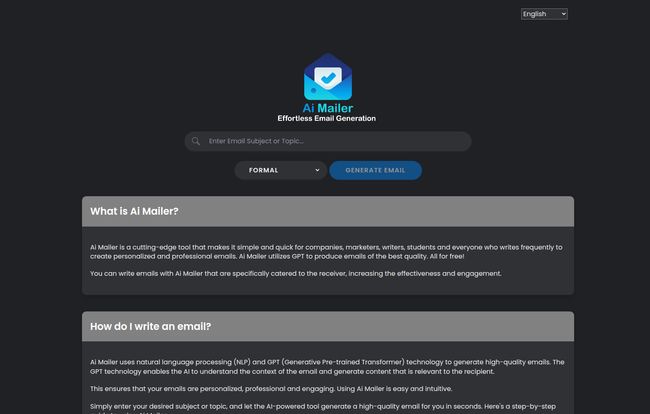
The interface is refreshingly simple. There are no complicated menus or a million settings to tweak. You’re greeted with a clean text box that says “Enter Email Subject or Topic.” That’s it. For my first test, I went with something common from my own workload:
“A friendly follow-up email to a potential client who I met at a conference last week. Mention we talked about improving their website traffic.
I hit “Generate Email,” and in about five seconds, I had a fully-formed draft. It was professional, it hit the key points, and it had a natural-sounding structure. It wasn’t perfect, mind you. The tone was a little more formal than I’d typically use, but editing a few words to inject my own personality took me maybe 30 seconds. Compared to the 10 minutes I might have spent agonizing over the opening line alone, that’s a massive win.
The Good, The Bad, and The AI-Generated
After playing around with it for a while, I’ve got some pretty solid feelings about where AI Mailer shines and where it, well, shows its robotic roots.
The Time-Saving Magic Is Real
This is the big one. The amount of time this tool can save is genuinely impressive. It completely eliminates that initial ‘blank page’ paralysis. For repetitive but necessary emails—like sending a standard welcome message, requesting a testimonial, or following up on an invoice—it’s an absolute godsend. It turns a 5-minute task into a 15-second one. That time adds up, folks.
Consistency is a Huge Plus
If you’re part of a team, maintaining a consistent brand voice can be tough. Sarah in marketing might be super bubbly, while David in sales is more direct and to-the-point. Using a tool like AI Mailer can help establish a baseline tone for common communications, ensuring that every client gets a similarly professional experience. You can always tweak it, but the foundation is solid and, more importantly, consistent.
But It Still Needs a Human Hand on the Tiller
Here’s the catch, and it’s an important one. Relying on AI Mailer 100% without any edits is a mistake. The output is directly tied to the quality of your input. If you just type “Follow up email,” you’re going to get something incredibly generic. It’s not a mind reader. The real skill is in learning how to give it a good prompt. Secondly, the AI doesn’t know your specific relationship with the recipient. It can’t replicate the nuance and personal touch that turns a good email into a great one. My advice? Always treat the generated text as a first draft. Read it, tweak it, add a personal anecdote or an inside joke. Make it yours.
Let’s Talk About the Price Tag
Okay, this section is going to be short and sweet. How much does AI Mailer cost? Nothing. It’s free. As of this writing, there’s no pricing page, no premium tier, no credit system. That’s pretty remarkable. In a world of freemium models and costly subscriptions, a genuinely useful and free tool is a rare find. Of course, the cynical SEO in me wonders about the long-term plan, but for now, it’s a powerful tool with zero financial barrier to entry.
Is This the Right Email Assistant For You?
Honestly, it depends on who you are. For a seasoned email marketer crafting a super-nuanced, multi-stage drip campaign, this might be a bit too simple. But for a huge chunk of people, it’s a perfect fit.
- Small Business Owners: You’re wearing all the hats. Use this to quickly handle customer service replies, vendor communications, and follow-ups so you can get back to, you know, running your business.
- Students: Need to email a professor or apply for an internship? This will help you draft a professional-sounding message that gets you taken seriously.
- Sales & Marketing Pros: It’s a fantastic tool for churning out first drafts of cold outreach emails or follow-ups. You can generate 10 variations in minutes, then pick and choose the best bits.
It’s not a silver bullet, but it’s a seriously useful weapon to have in your arsenal.
Frequently Asked Questions About AI Mailer
I’ve seen a few questions pop up, and the site has its own FAQ, so let’s tackle the big ones in my own words.
Is AI Mailer just a website or a full app?
It’s a web-based tool. There’s nothing to download or install, which I personally love. You just go to the website on your computer or phone (it’s responsive!) and start typing. Simple.
Honestly, how good are the emails it writes?
They’re surprisingly good! For most standard business communications, the quality is high. They are grammatically correct and professional. However, they can sometimes lack a bit of personality, which is where your editing comes in.
Is it safe to put my information into it?
As with any online tool, you should be cautious. I wouldn’t recommend putting highly sensitive or confidential information into the prompt. For general business topics like the examples I used, it’s fine. Think of it as public-facing communication.
Can it write any kind of email?
Pretty much. I’ve tested it with everything from a formal complaint to a casual thank you note. The more specific your prompt, the better the result. It’s particularly good at structured business emails.
Are there better free AI email writers out there?
The AI writing space is exploding. There are other tools, for sure. Some are integrated into larger platforms like HubSpot or have browser extensions. What makes AI Mailer stand out is its dedicated focus and simplicity. It does one thing, and it does it well, for free, with no strings attached. That’s hard to beat.
My Final Verdict: Should You Bother with AI Mailer?
Yes. Absolutely. Look, any tool that can genuinely give you back time in your day is worth a try, especially when it’s free. AI Mailer isn’t going to replace the strategic, human element of communication. It won’t build relationships for you. But what it will do is demolish that initial barrier of writer’s block and handle the grunt work of drafting routine emails.
It’s a fantastic co-pilot for your inbox. Use it to create your first drafts, save your mental energy for the more important tasks, and then swoop in to add your unique human touch. In the constant battle against the inbox, AI Mailer is a valuable, and free, ally. Give it a shot; what have you got to lose?


