
Categories: AI Image Generator, AI Image Upscaler, AI Inpainting, AI Outpainting, AI Photo Editor, AI Text Generator, AI Video Generator, Object Remover AI
AiCanvas Review: AI Image & Video Creation Made Simple?

If you’re in the marketing, blogging, or social media game, you know the content treadmill never, ever stops. You need visuals. Yesterday. You need a slick little video for Reels, a new blog header, and about a dozen social media graphics. And you need them all to look good without costing a fortune or taking up your entire week.
For years, this meant juggling a bunch of different tools. A photo editor here, a separate video tool there, a third site for stock images… it’s exhausting. Then, the AI wave hit, and suddenly we had these incredible text-to-image generators like Midjourney and DALL-E. Amazing, right? But often, they exist in a vacuum. You get a great image, but then you have to export it and pull it into another program to add text or remove that weird six-fingered hand the AI decided to create.
So when I stumbled upon AiCanvas, I was intrigued. It’s making a bold promise: to be an all-in-one, AI-powered creation and editing platform. A single canvas for your ideas. But does it stick the landing? I’ve spent some time playing around with it, and I’ve got some thoughts.
What Exactly is AiCanvas?
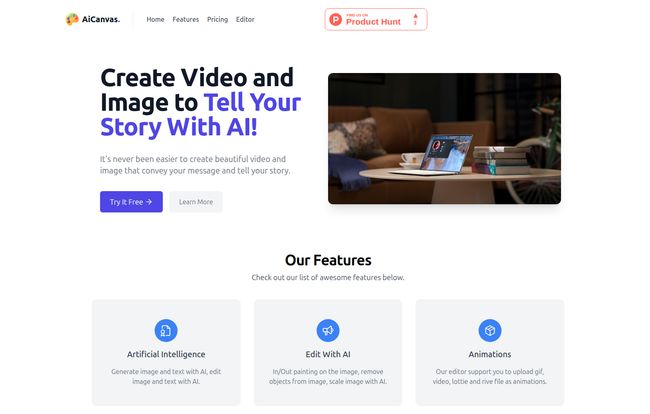
Think of AiCanvas not just as an image generator, but as a digital creative studio. At its core, it uses artificial intelligence to help you create images and text from simple prompts. Want a “a photorealistic image of a cat wearing a tiny wizard hat, sitting on a stack of books”? It can do that. But the magic, I think, is what comes next.
Instead of just spitting out a static image, AiCanvas drops it onto a versatile editor. It’s less like a high-end, untouchable art gallery and more like a fully-stocked, brilliantly lit workshop. You can immediately start tweaking, adding, removing, and animating. It’s this integration that caught my eye, because workflow speed is the name of the game for people like us.
A Closer Look at the AiCanvas Features
A tool is only as good as its features, right? Let’s break down what’s under the hood.
The Core AI Engine and Editor
The main attraction is, of course, the AI. You can generate images and text right on the canvas. But the editing part is where it gets practical. The platform boasts about its “In/Out painting” capabilities. This is huge. It’s basically an AI-powered ‘content-aware fill’ on steroids, letting you remove unwanted objects or extend the background of an image seamlessly. We’ve all had that perfect stock photo ruined by a stray object in the corner—this feature is built to solve that exact problem. No more clumsy clone-stamping in Photoshop for a simple fix.
Bringing Your Content to Life with Animation
This was a pleasant surprise. AiCanvas isn’t just for static images. It supports animations, and not just the standard GIFs and video clips. It specifically mentions support for Lottie and Rive files. If you’re not familiar, Lottie files are a godsend for web and app designers. They are small, scalable, and high-quality animations that don’t bog down your page speed. Seeing Lottie support in a tool like this shows they’re thinking about modern web and content needs, which I really appreciate.
Not Starting From a Blank Slate
Sometimes you don’t need the AI to create something from scratch. You just need a sticker, a shape, or a simple stock photo to complete your design. AiCanvas integrates free web resources directly into the platform. According to their site, you can search for GIFs, stickers, shapes, and photos from the ‘internate’ and just drag them onto your project. This little convenience factor saves you from the tedious task of opening a dozen browser tabs to find a simple arrow icon. It’s a small thing, but those small things add up.
Visit AiCanvas
My Hands-On Experience with the Platform
Okay, so how does it feel to actually use? I found the interface pretty straightforward. If you’ve ever used a tool like Canva, you’ll feel right at home. The layout is clean, and the tools are mostly where you’d expect them to be. The “Free Draw Mode” is a nice touch, allowing you to just doodle or erase things manually. It feels more organic than just relying on menus and prompts all the time.
One of the biggest claims is “fast export.” I can confirm it’s pretty quick. I created a simple animated graphic and was able to download it as a GIF in seconds, without any weird loading screens or processing queues. In a world of slow cloud rendering, this is a definite win.
Let’s Talk Money: AiCanvas Pricing
Alright, the all-important question: what’s this going to cost? AiCanvas uses a credit-based system, which has its pros and cons. You’re not paying a flat monthly fee for unlimited use; you’re buying a bundle of credits. This is great for occasional users who don’t want a recurring charge for a tool they only use a few times a month.
Here’s the breakdown as of my writing this:
| Plan | Credits | Price | Best For |
|---|---|---|---|
| Basic | 1500 Credits | $19 | Smaller teams and startups |
| Plus | 3500 Credits | $39 | Medium-sized companies |
| Pro | 8000 Credits | $79 | Larger and enterprise companies |
How far a credit gets you isn’t explicitly detailed, which is a common frustration with these systems. You’ll have to try it to see how quickly you burn through them. For a solo blogger, the Basic plan seems like a very reasonable entry point to test the waters.
The Good and The Not-So-Good
What I Liked
The biggest pro for me is the integrated workflow. Going from AI generation to editing to animation all in one place is fantastic. It’s a true time-saver. The support for modern formats like Lottie is also a huge plus, showing a forward-thinking approach. Overall, it’s just really easy to get started and create something that looks polished.
Room for Improvement
On the other hand, the credit system might be a deal-breaker for heavy users. If you’re churning out dozens of assets a day, you might prefer a flat-rate subscription for predictability. My other minor gripe is the lack of transparency about the underlying AI models. Are they using a proprietary model, or is it a fine-tuned version of Stable Diffusion or something else? For AI nerds and power users, this information matters for judging the quality and style of the output.
Who is AiCanvas Actually For?
After playing with it, I have a pretty clear idea of who would love AiCanvas. Social media managers, content marketers, bloggers, and small business owners—this tool feels designed for you. It’s for the person who needs to create good-looking visuals quickly without a steep learning curve or a massive budget.
Is it going to replace a professional digital artist’s full Adobe Suite setup? Probably not. Is it going to dethrone the hyper-realistic, artistic output of a power user on Midjourney? No. But it’s not trying to. It’s carving out a very useful niche as a practical, all-in-one creative tool for the everyday content creator.
So, What’s the Verdict?
I came in skeptical—the market is flooded with AI tools making big promises—but I’m leaving pleasantly surprised. AiCanvas is a genuinely useful platform that understands a key pain point: creative workflow fragmentation. It successfully brings generation and editing under one roof, with some thoughtful features that show it gets the needs of modern content creators.
If you find yourself constantly jumping between three or four different apps to get your visuals done, I’d say give AiCanvas a try. The entry-level plan is affordable, and it might just be the versatile co-pilot your content strategy has been missing.
Frequently Asked Questions
- What is AiCanvas in simple terms?
- AiCanvas is an online platform that combines an AI image and text generator with a powerful editor. It allows you to create visuals from scratch using text prompts and then immediately edit, add animations, and export them in various formats, all in one place.
- How does the credit system work in AiCanvas?
- You purchase a set number of credits (e.g., 1500 for $19). Different actions within the platform, like generating an image or using an advanced editing feature, will consume a certain number of these credits. It’s a pay-as-you-go model rather than a monthly subscription.
- Can I use images I create on AiCanvas for commercial projects?
- Typically, AI art platforms allow commercial use of the images you generate, especially on paid plans. However, you should always check the most current terms of service on the official AiCanvas website to be 100% certain about licensing and usage rights.
- What kind of animations does AiCanvas support?
- It supports a range of animation formats, including standard GIFs and videos. Notably, it also supports Lottie and Rive files, which are modern, lightweight vector animation formats popular for web and app design.
- Is AiCanvas a replacement for Canva or Midjourney?
- It’s more of a hybrid. It’s not as template-heavy as Canva, nor is it as purely focused on high-fidelity AI art generation as Midjourney. AiCanvas tries to find a middle ground, offering the AI generation of Midjourney with the practical, multi-asset editing environment of Canva. It’s a good choice if you want the power of both without paying for two separate services.


