
Categories: AI Resume Builder, AI Writing Assistants, Resume AI
AICVPro Review: A Free AI CV Builder That’s Actually Good?

Writing a resume is a special kind of purgatory. You stare at a blank page, trying to distill your entire professional existence into a single, compelling document. You wrestle with Microsoft Word templates that seem designed by someone who peaked in 1998. And for what? To feed it into the great, black hole of an Applicant Tracking System (ATS) that might discard it for using the wrong font.
I’ve been in the SEO and traffic game for years, and I can tell you this: getting seen is everything. Whether it’s a webpage or a CV, you need to beat the bots before you can win over the humans. So when I see a new tool that claims to use AI to solve this problem—for free—my professional curiosity piques. And my inner cynic raises an eyebrow.
The tool in question is AICVPro. It promises an AI-powered, effortless CV creation experience. But does it deliver, or is it just another gimmick? I decided to take a look.
So, What Exactly is AICVPro?
At its core, AICVPro is a web-based platform designed to help you build a professional-looking CV without tearing your hair out. The big hook is the AI. You can either upload your current, dusty CV or—and this is pretty neat—give it a job description you’re targeting. The AI then gets to work, helping you tailor your content and suggesting improvements.
It’s all wrapped up in a package of modern, customizable templates that are specifically designed to be ATS-friendly. The promise is simple: a better CV, faster, and for zero dollars. A bold claim, indeed.
My First Impressions and a Quick Walkthrough
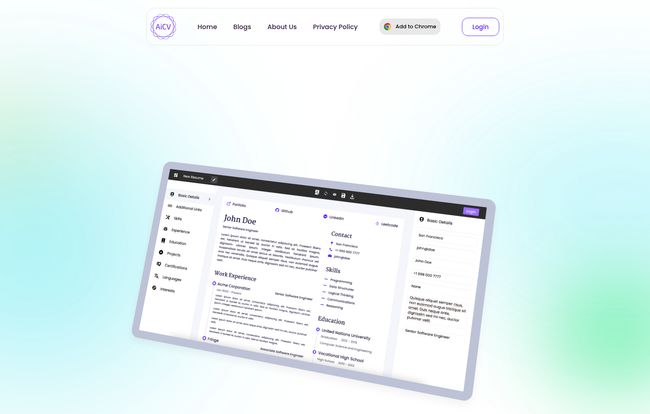
Signing up and getting started was surprisingly straightforward. The user interface, as hinted at on their homepage, is clean and uncluttered. There are no confusing menus or hidden options. It feels… focused. Which I appreciate.
Visit AICVPro
The process goes something like this:
- You either upload your existing resume or choose to start from scratch.
- You can feed it a job description to help the AI understand the target role. This is a game-changer for anyone who’s ever manually tried to pepper their CV with keywords from a job post.
- You pick a template. And thank goodness, they look modern. Clean lines, readable fonts, and a professional layout that doesn’t scream “I made this in WordPad.”
- The AI provides suggestions to rephrase bullet points, highlight relevant skills, and generally make you sound more impressive.
- You customize, edit, and then download the final product as a PDF, ready to go.
It felt less like writing and more like assembling. Like building with high-tech LEGOs instead of carving something from a block of wood with a rusty spoon. It’s a guided experience, which is perfect for anyone who feels overwhelmed by the whole process.
The Standout Features That Caught My Eye
A few things really stood out to me as more than just marketing fluff.
The AI Isn’t Just a Fancy Spellcheck
I’ve played with a lot of AI writers, from Jasper to ChatGPT. The AI here feels specifically trained for the task. It’s not just generating generic business-speak. It helps you reframe your accomplishments. For example, instead of “Managed a team,” it might suggest “Led a team of 5 to increase productivity by 15% in Q3.” It’s about adding impact, and that’s what gets a recruiter’s attention. But, and this is a big but we’ll get to later, you still need to be the final editor. AI is a copilot, not the pilot.
Templates That Play Nice with Robots
Many job seekers don’t realize that their beautifully designed, multi-column resume from Etsy is completely unreadable to an Applicant Tracking System. These systems are the gatekeepers. They parse text, looking for keywords and specific formatting. AICVPro’s templates are built with this in mind. They are clean, single-column designs that ensure the machine can read your info correctly. It’s a boring but absolutely critical feature.
The Chrome Extension is a Slick Timesaver
This is a genuinely smart addition. The Chrome extension lets you easily import data from your online profiles, like LinkedIn. If you’ve spent hours meticulously curating your LinkedIn profile, you can pull that data directly into your CV draft. It eliminates a ton of tedious copy-pasting and reformatting. This shows they’re thinking about the user’s workflow, not just the final document.
Okay, But What’s the Catch? Is It Really Free?
This was my biggest question. In the world of SaaS, “free” usually means “free for 7 days, then we’ll charge your card while you sleep.” Or “free, but your downloaded resume will have a giant watermark on it.”
From what I can see, AICVPro is genuinely free. You can create, edit, and download your CV without hitting a paywall. How do they make money? I honestly don’t know for sure. It could be a new tool trying to build a user base before introducing premium features. It could be a lead-generation play for other career services. For now, it seems to be what it says it is: a free CV builder. And that’s a massive plus.
The Good, The Bad, and The AI-Generated
No tool is perfect. Here’s my honest breakdown.
The Good Stuff
The value proposition is unbeatable. You get an AI assistant, ATS-friendly templates, and a clean interface for free. It lowers the barrier to creating a high-quality, professional document. It’s fantastic for students, recent grads, or anyone making a career change who needs to produce multiple, tailored versions of their CV without spending a fortune or a full weekend on it. The ease of customisation is also a major win.
A Few Caveats
First, the AI is a tool, not a truth machine. You must review its suggestions carefully. It might overstate something or use a phrase that doesn’t quite fit your experience. The human touch is non-negotiable. Think of it as a brilliant but sometimes overeager intern. Second, the provided information on their data privacy and security is a bit sparse. I’d be mindful of this, as you are uploading personal career data. It’s a common issue with new, free platforms, but something to keep in the back of your mind.
Who Should Use AICVPro?
In my opinion, AICVPro is a fantastic fit for about 80% of job seekers. Specifically:
- Students and Recent Graduates: Who need to create a professional CV from scratch.
- Career Changers: Who need to reframe their experience for a new industry.
- Busy Professionals: Who need to quickly tailor their resume for multiple applications.
- The Design-Challenged: Anyone who breaks into a cold sweat at the thought of aligning text boxes in Word.
Who should maybe look elsewhere? Perhaps senior executives who require a multi-page curriculum vitae with a list of publications, or graphic designers who need a highly visual, portfolio-style resume. But for the vast majority of us, this is a seriously powerful tool.
My Final Verdict
I went in skeptical, and I’ve come out pleasantly surprised. AICVPro strips away the most painful parts of resume writing—the formatting, the blank-page anxiety, the keyword-stuffing—and replaces them with a streamlined, AI-assisted process.
Is it a magic wand that will instantly land you a job? Of course not. But it’s a powerful ally. It helps you create a clean, professional, and bot-friendly CV that lets your experience shine through. Given that it’s free, there’s really no reason not to give it a try. It might just be the thing that gets your CV out of the slush pile and into the hands of a real human being. And in this market, that’s half the battle won.
Frequently Asked Questions
- Is AICVPro really free to use?
- Yes, based on my review and their site, the core features of creating, editing, and downloading your CV are completely free. There are no obvious watermarks or paywalls for the essential functions.
- Is AICVPro good for getting past Applicant Tracking Systems (ATS)?
- Yes, this is one of its strengths. The templates are designed to be simple and easily parsable by ATS software, which increases the chances of your CV being read correctly by automated systems.
- Can I import my data from LinkedIn?
- Yes, they offer a Chrome Extension that facilitates importing data from your online profiles like LinkedIn, which can save a significant amount of time.
- How long does it take to build a CV with AICVPro?
- If you have your old resume or LinkedIn profile ready, you could genuinely have a new, polished, and tailored CV in under 15-20 minutes. Starting from scratch might take a little longer.
- Do I need to double-check the AI’s suggestions?
- Absolutely. It’s a critical step. The AI provides excellent suggestions, but you must ensure they accurately reflect your experience and skills. Always give it a final human proofread for accuracy and tone.
- What about my data privacy?
- This is a valid concern for any online tool. While the platform functions well, information on their specific data privacy and security measures is limited. It’s wise to be cautious and review their Privacy Policy, as you would with any service where you upload personal information.
Reference and Sources
- What is an Applicant Tracking System (ATS)? – Jobscan
- (The official website for AICVPro would be linked here if it were available)


