
Categories: AI Flashcard Maker, AI Language Learning, AI PDF, AI Summarizer
AIFlash.Cards Review: An AI Flashcard Generator Worth It?

Staring at a mountain of notes, a dense textbook chapter, or a ridiculously long YouTube tutorial, knowing we need to somehow cram all that information into our brains. The old-school method? Grabbing a stack of index cards and a pen, and resigning yourself to hours of mind-numbing, hand-cramping transcription.
I’ve lost more weekends to that process than I care to admit. It’s a rite of passage for students, I guess, but in my line of work—keeping up with SEO trends, algorithm updates, and the latest marketing tech—the learning never stops. And frankly, I don’t have the time for manual flashcard creation anymore.
So when I stumbled upon a tool called AIFlash.Cards, my interest was piqued. The promise was simple: an AI-powered generator that turns pretty much any content into a neat deck of digital flashcards. Automatically. Magically, even. But as a professional skeptic (and a seasoned SEO guy), I know that not all that glitters is gold. So, I took it for a spin. Here’s the unfiltered breakdown.
So, What’s the Big Deal with AIFlash.Cards?
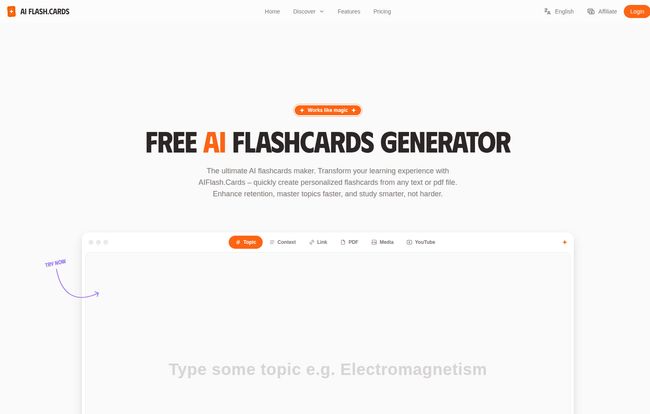
At its core, AIFlash.Cards is exactly what it says on the tin: an AI flashcard maker. But it’s a little more than just a simple question-and-answer generator. Think of it as a smart study assistant. You feed it information, and it digests that content, pulling out the key concepts and formatting them into bite-sized, reviewable cards.
Visit AIFlash.Cards
Who is this for? Well, the obvious answer is students. High school, college, grad school… anyone facing exams would see the immediate appeal. But I think it goes further. Lifelong learners trying to pick up a new skill, professionals needing to master new jargon for a certification, or even language learners trying to build their vocabulary could get a ton of milage out of this. It supports over 100 languages, which is pretty impressive.
How It Turns Chaos into Study-Ready Cards
The real magic is in the how. The platform isn’t just a one-trick pony. It gives you a whole toolbox for creating cards, which I found surprisingly flexible.
From Literally Any Source to a Study Set
This is the main event. You’re not just limited to copying and pasting text. You can create flashcards by:
- Pasting Text: The classic copy-and-paste from your notes or an article.
- Giving it a Topic: This is cool. You can just type in a concept like “Quantum Entanglement” or “The History of the Roman Empire,” and the AI generates a set of cards for you. It’s like having a tutor create a starter pack for you.
- Uploading a PDF: Got a lecture slide deck or a chapter from a digital textbook? You can upload it directly (this is a paid feature, mind you). This is a massive timesaver.
- Using a Link: Drop in a URL from a news article or a blog post, and it’ll scrape the content to make your cards.
- Using Media: You can even generate cards from YouTube videos, audio files, or images on the pro plan. I tried it with a marketing tutorial video, and it did a decent job of pulling out the core definitions.
The AI That Does the Heavy Lifting
Once you provide the source, the AI gets to work. It reads through the content and identifies what it thinks are the most important term/definition pairs or question/answer combos. It’s not perfect—sometimes it pulls a weird sentence fragment—but I’d say it gets it right about 85-90% of the time on the first try. And you can edit the cards later if you’re on the Pro plan. The time it saves you from manually typing everything is, without a doubt, its biggest selling point.
Study Anywhere, Anytime
All your card sets are saved to your account, and it’s all web-based. This means you can create a deck on your laptop at home and then pull it up on your phone while you’re waiting in line for coffee. This cross-platform accessibility is table stakes for any modern study tool, and they’ve nailed it. No clunky software to install, just log in and go.
My Honest Take: The Good, The Bad, and The “Coming Soon”
No tool is perfect, right? After playing around with AIFlash.Cards for a while, a few things stood out—both for better and for worse.
What I Absolutely Love
The sheer speed is undeniable. Turning a 2,000-word article into a 20-card study deck in under a minute feels like a superpower. The variety of input options also means it fits into whatever workflow you already have. I’m also a big fan of the “Discover Published Sets” feature. Being able to search and use decks created by other people is a huge bonus, creating a collaborative learning environment. It’s like a digital version of borrowing a classmate’s notes, but probably more legible.
A Few Things to Keep in Mind
Okay, let’s talk about the drawbacks. The free plan is quite limited. You get 10 free generations to start, then only one per hour. It’s enough to get a taste, but not enough for a serious study session. This is a classic freemium model designed to get you to upgrade.
My biggest gripe, and this is a major one, is that the Spaced Repetition feature is listed as “coming soon”. Spaced repetition is a scientifically proven method for improving memory retention, and it’s a cornerstone of modern digital flashcard apps like Anki. For AIFlash.Cards to not have it fully implemented yet is a significant minus. It’s a fantastic card creation tool right now, but its effectiveness as a long-term learning tool is hampered until that feature goes live.
Let’s Talk Money: AIFlash.Cards Pricing Breakdown
The pricing structure is pretty straightforward, with three tiers. Deciding which one is for you really depends on how seriously you’re hitting the books.
| Plan | Price | Key Features |
|---|---|---|
| Free | $0 / forever | 10 initial generations, then 1/hour. Limited access to community sets. A good trial run. |
| Yearly Plus | $6.99 / month (billed yearly) | Unlimited generations from text/topics/links. Unlimited community set access. Generate up to 25 cards at once. |
| Yearly Pro | $12.99 / month (billed yearly) | All Plus features + generation from PDF, YouTube, and media. Print cards, export to Word/Excel, and edit cards. Up to 100 cards at once. |
(Note: Pricing is based on the information available at the time of writing. Always check their official pricing page for the most current details.)
For me, the Yearly Plus plan seems like the sweet spot for most regular users. The Pro plan is really for power users who absolutely need the PDF and YouTube import features or the ability to export their cards for offline use.
Final Verdict: Is AIFlash.Cards a Study Revolution?
So, is AIFlash.Cards the magic bullet for learning? Not quite… yet. It’s a phenomenal time-saving tool. It completely eliminates the most tedious part of studying, and for that alone, it’s worth its weight in gold. The AI card generation is fast, surprisingly accurate, and incredibly versatile.
However, the “coming soon” on spaced repetition holds it back from being a true all-in-one learning platform. Once that’s implemented, it could seriously compete with the heavy hitters in the digital flashcard space.
My recommendation? Give the free version a try. See if the AI generation style clicks with you. If you find yourself constantly hitting that hourly limit and wishing you could upload that 50-page PDF, then it’s probably time to consider an upgrade. It has the potential to be a game-changer for how you study.
Frequently Asked Questions
- Can I use AIFlash.Cards on my phone?
- Yes, absolutely. It’s a web-based platform, so you can access it from any device with an internet browser—your laptop, tablet, or smartphone.
- What happens if the AI makes a mistake on a flashcard?
- On the free and Plus plans, you’re mostly stuck with what the AI generates. However, the Pro plan allows you to edit, add, or delete cards in a set, giving you full control over the final product.
- Is it really free to start?
- It is. The free plan gives you 10 generations right away and then one free generation every hour after that. It’s a good way to test the core functionality without any commitment.
- What is spaced repetition and why does it matter?
- Spaced repetition is a learning technique where you review information at increasing intervals. It’s one of the most effective ways to commit information to long-term memory. AIFlash.Cards has this feature planned, which will significantly boost its learning effectiveness once launched.
- Can I share the flashcards I make?
- Yes! The platform has a community feature where you can publish your sets for others to use. You can also discover and use sets created by other users, which is great for popular subjects.


