
Categories: AI Assistant, AI Design Generator, AI Productivity Tools
AIGardenPlanner Review: An AI for Your Backyard?

We all have that one spot in the yard. You know the one. For me, it was a sad, sun-scorched patch of dirt where grass went to die. I’ve pinned hundreds of gorgeous gardens on Pinterest, dreaming of a lush English cottage vibe or maybe a sleek, modern oasis. The problem? I have the horticultural knowledge of a goldfish and the budget of, well, a blogger.
Every trip to the nursery ended the same way: I’d buy a bunch of beautiful, expensive plants that the tag promised were “easy to care for,” only to watch them slowly give up the ghost over the next few months. It was a cycle of hope and horticultural homicide. So when I stumbled across AIGardenPlanner, I was skeptical but intrigued. An AI that designs your garden for you? Sounds like something out of science fiction. But hey, I figured, it couldn’t be worse than my own track record.
So What Exactly is AIGardenPlanner?
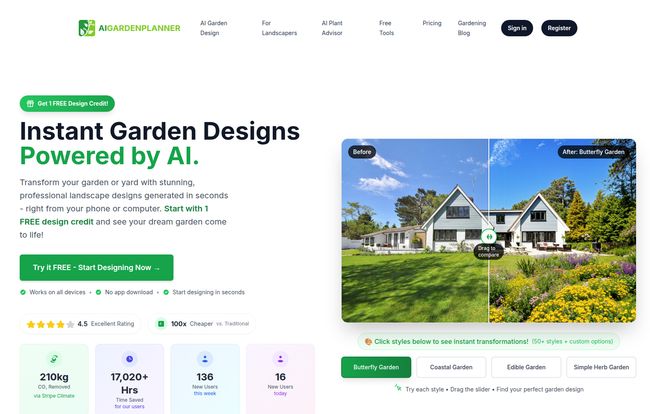
Think of it like having a landscape architect, a botanist, and a ridiculously fast artist all bundled into one web app. You don’t download anything, you just go to their site. The basic idea is simple: you feed it a photo of your current, maybe-a-little-sad outdoor space, and it uses artificial intelligence to spit out a fully realized, professional-looking landscape design in seconds. Literally, seconds.
It’s not just throwing random pretty flowers on the screen. It aims to be a whole ecosystem for your project, from the initial spark of an idea to telling you exactly what plants to buy and how to care for them. For anyone who’s ever felt overwhelmed by the sheer number of choices at a garden center, this is a breath of fresh, non-pollen-filled air.
Visit AIGardenPlanner
How It Turns Your Yard From ‘Meh’ to ‘Wow’
The process is genuinely as simple as they claim. I’m always wary of a “three simple steps” promise, but this one actually holds up. It boils down to this:
- Capture: You take a picture of your yard, patio, or balcony. I just used my phone. They suggest natural lighting, which makes sense. No one’s garden looks great under a single, harsh floodlight at 2 AM.
- Upload: You upload the image to their platform. This part was quick and painless.
- Transform: This is the fun part. You choose from over 50 different garden styles—things like ‘Butterfly Garden’, ‘Coastal’, ‘Edible Garden’, or even ‘Moon Garden’ (which sounds amazing). You hit the button, and the AI does its thing. A few moments later, you get a before-and-after view that is pretty darn impressive.
The Standout Features I Actually Used
Okay, a pretty picture is one thing. But what really got me hooked were the tools that go beyond the initial “wow” factor. These are the features that make it feel less like a toy and more like a genuine planning tool.
An AI Plant Advisor That Knows Your Zone
This is the killer feature for me. The AI doesn’t just pick plants that look good; it picks plants that will actually survive where you live. It analyzes your climate zone, soil type, and local weather patterns to give you personalized recommendations. It even tells you why a certain plant is a good fit. No more accidentally trying to grow a tropical hibiscus in chilly Northern California. Ahem. Not that I’ve ever done that.
It Identifies What You’re Looking At
Here’s something cool for subscribers. Once you have your beautiful AI-generated design, the platform can actually identify every single plant in the image. It gives you their names (common and scientific), maps out their location in the design, and provides detailed care information. This turns a pretty concept into an actionable shopping list and a care guide. It’s the bridge between the dream and the dirt-under-your-fingernails reality.
More Than Just a One-Trick Pony
While I was mostly focused on my own backyard disaster zone, I noticed some features that would be incredibly useful for professionals. The Pro and Premium plans offer things like batch generation (creating up to 16 designs at once) and the ability to add your own business logo as a watermark. That’s a smart touch for landscapers who want to quickly show clients a range of possibilities without spending hours in complex CAD software.
Let’s Talk Money: The AIGardenPlanner Pricing Breakdown
Alright, the all-important question: what’s this going to cost? The pricing structure is actually pretty flexible, which I appreciate. You’re not locked into a huge yearly commitment if you dont want to be.
| Plan | Price | Best For |
|---|---|---|
| Pay As You Go | Free to start (1 credit), then $15 for 15 credits | The curious homeowner with a single project in mind. |
| Starter | $9/month (billed annually at $99/year) | Garden enthusiasts who love to experiment with different ideas and styles. |
| Pro | $21/month (billed annually at $249/year) | Freelance landscapers and serious designers. |
| Premium | $42/month (billed annually at $499/year) | Design agencies and businesses that need high volume and branding. |
Note: The AI Plant Advisor and Plant Identification features are available on the Starter, Pro, and Premium plans. It’s worth checking their site for the most up-to-date details, as these things can change.
The Good, The Bad, and The Green
No tool is perfect, right? After playing around with it for a while, here’s my honest take.
What I Love
The speed is mind-blowing. Going from a photo to a full design concept in under a minute feels like magic. It’s also an incredible time and money saver, especially when you compare it to the cost of hiring a landscape designer for an initial consultation. The ease of use is a huge plus; there’s virtually no learning curve. But for me, the personalized plant recommendations are the real MVP. It takes the guesswork out of gardening.
A Few Things to Keep in Mind
To really get the most out of it, you’ll need a subscription. The free credit is a great taste, but the best features, like the plant identification and advisor, are behind the paywall. That’s pretty standard for SaaS tools, but its something to be aware of. Also, the AI Plant Advisor uses something called “generation tokens,” so you’ll want to be mindful of how you use those depending on your plan. It’s not a completely unlimited free-for-all.
My Final Verdict: Should You Try AIGardenPlanner?
Honestly, I’m sold. For a DIY-er like me, AIGardenPlanner is a fantastic starting point. It broke me out of my creative rut and gave me a tangible vision for my sad patch of yard. It’s not going to physically dig the holes and plant the shrubs for you, but it removes the most intimidating barrier: the blank canvas.
If you’re a homeowner who wants a beautiful garden but doesn’t know where to start, give the free trial a shot. If you’re a professional landscaper, the Pro plan could seriously streamline your initial client mockups. It’s a powerful, fun, and genuinely useful application of AI that solves a very real problem. My backyard is already looking a whole lot more hopeful.
Frequently Asked Questions
- 1. Do I need any design experience to use AIGardenPlanner?
- Absolutely not. That’s the whole point! If you can take a photo with your phone and click a button, you have all the skills you need. It’s designed for beginners.
- 2. Can I really create a custom garden style?
- Yes. While there are over 50 pre-made styles to choose from, the paid plans allow you to create, save, and reuse your own unique style packs. So if you have a very specific vision, you can bring it to life.
- 3. Are the designs realistic?
- For the most part, yes. The AI is impressively good at understanding space, lighting, and scale. The Ultra HD enhancement makes the images look crisp and detailed. It’s a visualization tool, so think of it as a hyper-realistic concept board, not a construction blueprint.
- 4. Can I use the designs I create commercially?
- The Pro and Premium plans come with a commercial license, so you can use the designs for your business presentations and client work. The free and Starter plans are for personal use only.
- 5. What if I don’t like the first design it gives me?
- Just try again! Each design generation uses one credit. You can try different styles, or even re-upload a photo from a slightly different angle to see what the AI comes up with.


