
Categories: AI Copywriting, AI Email Assistant, AI Email Generator, AI Email Writer, AI Grammar Checker, AI Paraphraser, AI Reply, AI Summarizer, AI Writing, Large Language Models (LLMs)
AImReply Review: The AI Email Writer You Actually Need?

For most of us, our email inbox is a special kind of digital purgatory. It’s a never-ending to-do list dictated by other people’s priorities. And the worst part? Replying. Crafting that perfect response—professional but not robotic, friendly but not too friendly, concise but not rude—can suck hours out of your week. I’ve been in the SEO and traffic generation game for years, and let me tell you, my inbox looks like a warzone most days.
So, like every other tech-savvy person in this AI gold rush, I’m always on the lookout for a tool that can genuinely give me some of that time back. I’ve tried a bunch. Some are clunky, some are just glorified template-fillers. But recently, I stumbled upon a Chrome extension called AImReply, and after using it for a bit, I have… thoughts.
So, What is AImReply, Really?
On the surface, AImReply bills itself as an “AI Email Writer and Grammar Checker Tool.” Okay, cool. But that’s a bit like calling a smartphone a “portable telephone.” It technically’s true, but it misses the point. From my experience, it’s more like a little communication co-pilot that lives in your browser.
It’s not just about spitting out a pre-written email. It’s designed to help you generate, refine, and perfect your writing. Think of it as a mashup of a creative ghostwriter, a stern grammar teacher (the good kind), and a multilingual diplomat, all rolled into one slick extension. It aims to tackle that blank-page paralysis and the endless second-guessing that comes with important emails.
Breaking Down the AImReply Features I Actually Used
A tool is only as good as its features, right? Here’s a rundown of what AImReply brings to the table, and my take on each.
The AI Email Writer: Your First Draft Lifesaver
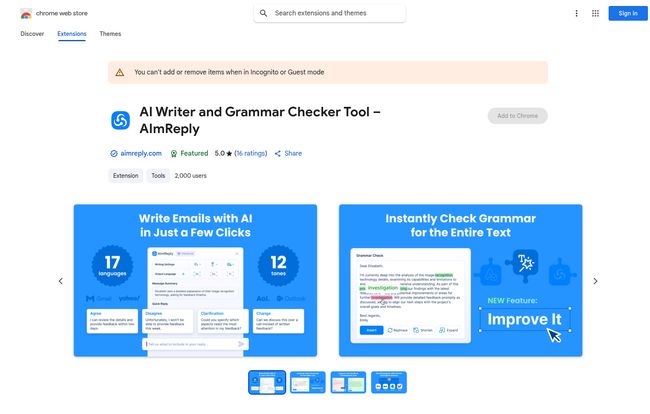
This is the main event. You pop in a few prompts—like “write a follow-up email to a potential client asking for a decision”—and it generates a solid draft. The first time I used it, I was genuinely surprised. It wasn’t the robotic, soulless text I’ve seen from some other tools. It was… human. It understood the context and produced something that was about 80% of the way there, which, for a first draft, is a massive win. That last 20% is where I add my personal flair, but it saves me from the agony of starting from scratch.
More Than Writing: The ‘Improve It’ Button and Grammar Checks
This might actually be my favorite part. You can highlight any text—not just emails, any text on a webpage—and AImReply’s little assistant pops up. Its “Improve It” function is like a magic wand for clumsy sentences. It rephrases things for clarity, conciseness, and impact. And of course, the grammar checker is solid. It catches those sneaky typos and grammatical slip-ups that make you look unprofessional. It’s a safety net that has already saved me from a few embarrassing mistakes.
Your Personal Email Butler: Tone, Length, and Language
This is where the real nuance comes in. AImReply lets you adjust the tone of your email. Need to be formal for a C-suite executive? Done. Want to be friendly and casual for a colleague? Easy. You can also specify the length. No more accidentally sending a novel when a quick paragraph would do. And for my international clients and colleagues, the multi-language support is a game-changer. It’s not just a direct translation; it seems to understand cultural nuances in communication, which is incredibly valuable.
The User Experience: How Does It Feel to Use?
Look, I don’t have time for complicated software. If a tool has a steep learning curve, I’m out. AImReply is thankfully simple. Since it’s a Chrome extension, it integrates directly into your workflow. When you’re in Gmail, a little AImReply icon appears, ready to help.
Visit AImReply
The interface is clean and intuitive. There are no confusing menus or a million settings to tweak. You write, you highlight, you click. That’s it. It feels lightweight and doesn’t slow down my browser, which is a big plus. Some extensions can be real resource hogs, but this one has been pretty chill so far.
Also Read: Qubinets Review: Your Kubernetes Painkiller?
Let’s Talk Money: The AImReply Pricing Situation
Ah, the all-important question. What’s this going to cost me? This is where things get a tad… interesting. The official Chrome Web Store page says it “Offers in-app purchases.” The tool’s own info mentions a “Free unlimited access” pro, but also a con about “Daily limits on free plan.”
So what’s the deal? Based on my use, it’s a classic freemium model. You get a generous amount of use for free every day, which is probably enough for the average person. But if you’re a power user—someone in sales, marketing, or support who lives in their inbox—you’ll likely want to upgrade to a premium plan to remove those daily limits and access all the bells and whistles. As of writing this, specific pricing tiers aren’t publicly listed on their site, so you’ll discover the upgrade options once you’re using the tool. It’s a “try before you buy” scenario, which I actually prefer.
The Honest Truth: AImReply Pros and Cons
No tool is perfect. After kicking the tires, here’s my honest breakdown.
The biggest advantage is the sheer amount of time it saves. The mental energy I used to spend on crafting emails is now being used for more important things, like SEO strategy and analyzing traffic trends. The customization options are fantastic; being able to switch tones from ‘formal’ to ‘confident’ is a small detail that has a huge impact. It’s also genuinely user-friendly and supports multiple languages, which is a major bonus.
On the flip side, the free plan does have those daily limits. If you have one of those days where you need to send 50 carefully crafted emails, you might hit a wall. To get the most out of it, a subscription is pretty much required for any serious professional. But that’s the price of convenience, isn’t it?
Who Is AImReply For? (And Who Should Probably Skip It?)
I see this tool being a lifesaver for a few key groups:
- Sales and Marketing Professionals: Crafting outreach and follow-up sequences just got 10x faster.
- Freelancers and Small Business Owners: When you’re the CEO and the customer support rep, time is money. This saves time.
- Non-Native English Speakers: A fantastic way to ensure your communication is clear, professional, and grammatically perfect.
- Anyone Who Hates Writing Emails: If you find yourself staring at a blinking cursor for 20 minutes just to write a simple reply, this is for you.
Who might not need it? If you send less than five emails a day and enjoy the process of writing them, you can probably pass. But for the rest of us mortals, it’s definitely worth a look.
Frequently Asked Questions
- Is AImReply free to use?
- Yes, it has a free plan that offers a good amount of daily usage. For heavy users or to access all features without limits, you’ll need to subscribe to a premium plan.
- How does AImReply work?
- It’s a Chrome extension that uses artificial intelligence to analyze your prompts and generate text. It integrates with your browser, allowing you to use it directly within Gmail or on any other website by highlighting text.
- Is AImReply safe for my data?
- According to their privacy disclosure on the Chrome Web Store, they do handle some data like user activity to function. However, they explicitly state that your data is not being sold to third parties and is not being used or transferred for purposes that are unrelated to the item’s core functionality. As always, review the privacy policy for yourself!
- Does AImReply work with just Gmail?
- While it’s fantastic with Gmail, its text improvement and grammar checking features can be used on almost any text you can highlight in your Chrome browser, making it a versatile writing assistant.
- What languages does AImReply support?
- It supports multiple languages, making it a powerful tool for international communication. You can generate and improve text in languages other than English.
My Final Verdict on AImReply
So, is AImReply just another piece of AI hype? In my opinion, no. It’s a genuinely practical tool that solves a real, everyday problem. It’s not here to take over your job; it’s here to do the grunt work so you can focus on the parts of your job that require your actual human brain.
It has smoothed out my daily workflow, made my communications sharper, and honestly, just made the whole process of managing my inbox less of a chore. If you’re looking to reclaim some of your day from the email monster, I’d say giving the AImReply free plan a spin is a no-brainer. It might just become your new favorite co-pilot.


