
Categories: AI Face Swap Generator, AI Image Enhancer, AI Photo Editor, AI Video Editor, AI Video Enhancer, AI Video Generator
AISaver Review: The AI Face Swap Tool Worth Your Time?

Another day, another AI tool pops up promising to change the world, or at least, change your face onto a dancing cat video. Seriously, trying to keep up with the AI scene right now feels like trying to catch confetti in a hurricane. Every time you turn around, there’s a new generator, a new enhancer, a new something that claims to be the next big thing. Most of them? A little clunky, a bit confusing, and they usually slap a giant, ugly watermark on your creation unless you fork over your credit card details for a subscription you’ll forget about.
So, when AISaver landed on my radar, I was skeptical. The name itself is pretty straightforward, but the promises of one-click face swaps and easy video creation sounded familiar. But as an SEO guy who lives and breathes this stuff, I had to give it a spin. And I’ve gotta say… I’m pleasantly surprised. This might be one of the few that actually sticks the landing.
So What Exactly Is AISaver?
Let’s get the official stuff out of the way. AISaver is a platform loaded with AI tools for messing with—I mean, processing—videos and images. Its main claim to fame is its AI face swap feature, but it’s not a one-trick pony. It also packs in an AI video generator, video downloader, and a bunch of enhancers to make your content look crisp and clean. The whole idea is to take what used to be complicated editing work and boil it down to a few simple clicks. No need for a degree in visual effects or a supercomputer that sounds like a jet engine. Just upload, click, and download.
First Impressions and Getting Started
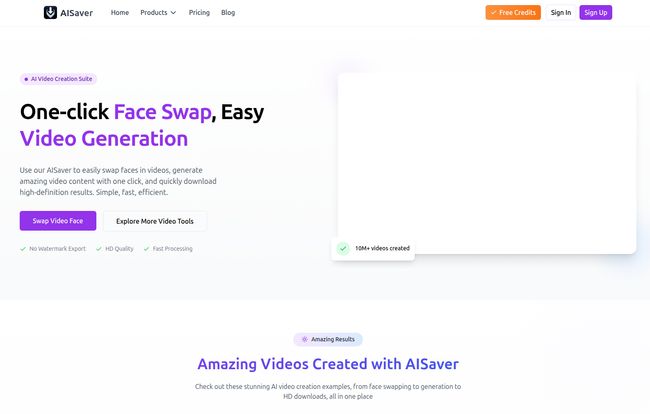
Logging in, the first thing I noticed was… quiet. No pop-ups screaming at me to upgrade. No confusing dashboard with a million cryptic icons. It’s clean. The layout is incredibly intuitive, guiding you straight to what you want to do. You want to swap a face in a video? There’s a big button for that. It’s a breath of fresh air compared to some interfaces that look like the flight deck of the Starship Enterprise.
Visit AISaver
The process is dead simple. For a face swap, it’s literally a 4-step process laid out for you: Upload your video, upload the face image you want to use, click ‘Generate’, and then download. That’s it. I’ve always been wary of “one-click” solutions, as they usually mean “one-click-to-a-pretty-average-result”. But the output quality here genuinely caught me off guard.
The Main Event: A Look at The Features
Okay, let’s get into the nitty-gritty. What can this thing actually do? Turns out, quite a bit.
The AI Face Swap Everyone’s Talking About
This is the star of the show, and for good reason. It works on videos, single photos, and even GIFs. I threw a few test files at it, from a short video clip to a reaction GIF, and the results were impressively smooth. The AI does a solid job of matching lighting and head angles, which is where a lot of other tools fall flat. The multi-person face swap is also a blast—perfect for those cursed family photo edits you know you want to make. Don’t lie.
More Than Just a Pretty (Swapped) Face
While face swapping is the main draw, the other tools are far from being just filler. The AI Video Generation lets you create clips from text prompts or by animating still images. It’s not going to replace a full-blown video production team, but for creating quick social media content or animated memes, it’s fantastic. I’ve seen some pretty wild stuff come out of text-to-video lately, and while this is more on the simple, fun side, it works.
There are also some fun, niche generators like the AI Dance Generator and the AI Kiss Generator. Are they silly? Absolutely. Are they fun to play with? You bet. They’re perfect for creating viral-style content without needing to convince your friend to do a ridiculous dance on camera.
The Big Questions: Watermarks and Privacy
Now for two of the most important factors for me, and probably for you too. When I’m testing a tool, these are often the deal-breakers.
First, watermarks. The bane of every content creator’s existence. I’m happy to report that AISaver offers seamless video downloads with no watermarks. Let me repeat that. No watermarks. This is a huge win. You can create content and actually use it without having a big, ugly logo plastered over your work.
Second, privacy. In an era where we’re all a bit (or a lot) concerned about where our data is going, this is crucial. AISaver states that it uses local processing technology. This means your images and videos are handled on your device, not uploaded to some mysterious server in a country you can’t pronounce. For a tool that involves uploading pictures of faces, this is a massive sigh of relief. It shows they actually thought about user security, which builds a ton of trust.
Let’s Talk Money: The AISaver Pricing Model
Alright, so how much does all this cost? This is where AISaver gets interesting again. It doesn’t use the dreaded monthly subscription model that bleeds our bank accounts dry. Instead, it operates on a credit system.
Here’s a quick breakdown:
| Plan | Features | Cost Model |
|---|---|---|
| Free User | Basic face swap, limited access, daily credit reset. | Free |
| Paid User (VIP) | Unlock all features, priority processing, multiple swaps, no ads. | One-time payment for a credit bundle. |
The free plan is decent for just trying things out, but the credits resetting daily is a classic freemium tactic to get you hooked. The real value is in the paid plan. As of writing, they have a deal for $19.99 which gets you 7,000 credits (5,000 + a 2,000 bonus). And the best part? It’s a one-time payment. You buy the credits, they’re yours to use whenever, and they don’t expire. No subscription fatigue. Hallelujah. This model feels much more respectful of the user, especially for people who might use the tool heavily one month and not at all the next.
The Good, The Bad, and The AI
No tool is perfect, so let’s break it down. No fancy lists, just my honest take.
On the plus side, the user experience is top-notch. It’s simple, fast, and the results are high-quality. The no-watermark policy is a gigantic plus, and the one-time payment for credits is a model I wish more companies would adopt. The focus on privacy with local processing is also a huge selling point in my book.
On the other hand, the credit system, while fair, means you’re always aware of your usage. Every generation dips into your balance. And the free plan is quite limited, with the daily credit reset feeling a bit like a tease. It’s clearly designed to push you towards a purchase, which is fine—they have to make money somehow—but it’s something to be aware of. It’s not a free-for-all buffet.
Is AISaver The Right Tool For You?
So, should you use it? It depends on who you are.
If you’re a social media manager, a content creator, a meme lord, or just someone who wants to have some fun with AI without a steep learning curve, then absolutely. It’s an incredible tool for quickly generating funny, high-quality content. The cost is reasonable, and the lack of a watermark makes it immediately useful for professional or semi-professional work.
If you’re a high-end VFX artist working on a feature film, you’re probably going to stick with your more complex, node-based software. This tool is built for accessibility and speed, not for granular, frame-by-frame control. And that’s perfectly okay. It knows its audience.
Frequently Asked Questions (FAQ)
Is AISaver safe to use for face swapping?
Yes. AISaver emphasizes its use of local processing technology, meaning your photos and videos aren’t uploaded and stored on unknown servers. This makes it one of the safer options out there for privacy.
Does AISaver put a watermark on my final video?
No! This is one of its best features. All generated content, whether from a free or paid plan, is watermark-free.
Is AISaver a monthly subscription?
Nope. It uses a credit-based system. You make a one-time payment to buy a bundle of credits, and there are no recurring monthly fees.
What can I do with the free version of AISaver?
The free version gives you access to basic features with a limited number of credits that reset daily. It’s a great way to test the platform’s capabilities before deciding to buy credits.
What happens when I run out of credits?
Once your credits are used up, you’ll need to purchase another credit pack to continue using the VIP features. The good news is that purchased credits never expire.
Can AISaver handle swapping faces in a group video?
Yes, it has a multi-person face swap feature that allows you to swap multiple faces within the same photo or video clip.
My Final Verdict
In a sea of overhyped and under-delivering AI tools, AISaver is a genuine find. It does what it says on the tin, does it well, and does it with a business model that respects the user. It’s fast, fun, and the results are frankly amazing for how little effort is involved. For content creators and social media enthusiasts, it’s a powerful addition to the toolkit. It’s earned a permanent spot in my bookmarks, and that’s not something I say lightly.
Reference and Sources
- AISaver Official Website: https://aisaver.io/
- AISaver Pricing Information: https://aisaver.io/pricing


