
Categories: AI API, AI Developer Tools, AI Document Extraction, AI OCR, AI PDF, Large Language Models (LLMs)
AnyParser Review: The Future of Document Parsing?

If you’ve worked in any office job in the last decade, you’ve probably developed a special kind of twitch. The one that starts right before you have to manually copy-paste data from a 50-page PDF into an Excel sheet. We’ve all been there, staring at a scanned document, wondering if ‘1’ is an ‘l’ or a ‘I’, and slowly losing our will to live. For years, OCR (Optical Character Recognition) was our only savior, and honestly? It was a pretty mediocre one.
It was the tech equivalent of a well-meaning but slightly tipsy intern—it tried hard, but the results were often… creative. But I’ve been hearing a lot of buzz lately about a new generation of tools. I saw AnyParser by CambioML pop up as #1 on Product Hunt, and my curiosity was officially piqued. They’re not just talking about OCR; they’re talking about Vision LLMs. Is this just another fancy acronym, or is it the solution to our data entry nightmares? I had to find out.
The Old Way: Why We Have a Love-Hate Relationship with OCR
Before we get into the new shiny thing, let’s pour one out for traditional OCR. It was revolutionary for its time, don’t get me wrong. The ability to turn a picture of text into actual text was magic. But its limitations became painfully obvious really fast. Throw a complex table, a chart, or a document with a weird layout at it, and the whole thing would just fall apart. You’d get a wall of garbled text that was somehow even less useful than the original image.
We spent more time cleaning up the data than it would’ve taken to just type it out by hand. It was a classic case of the cure being almost as bad as the disease. The core problem? OCR reads, but it doesn’t understand. It sees characters, not context.
So, What on Earth is AnyParser?
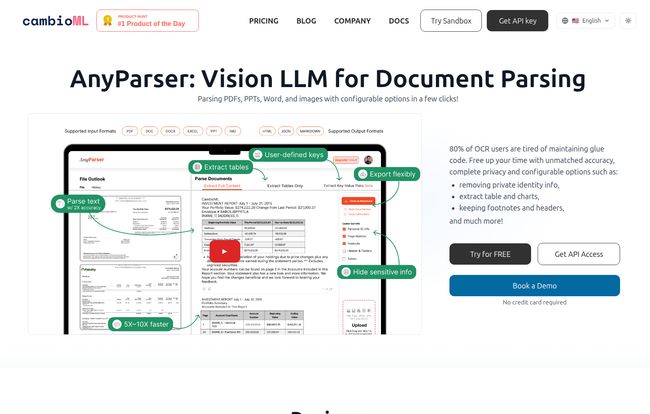
This is where AnyParser steps onto the stage. Instead of basic OCR, it uses what’s called a Vision Language Model (VLM). The best way I can describe it is this: traditional OCR is like someone reading a book out loud one word at a time, without paying attention to paragraphs, pictures, or chapter titles. A Vision LLM, on the other hand, is like a person who looks at the whole page—the text, the layout, the images, the charts—and actually understands how they all fit together. It sees the whole picture.
Visit AnyParser
This means AnyParser isn’t just ripping text from a document. It claims to accurately extract text, tables, charts, and even understand the layout from all sorts of files—PDFs, PowerPoint presentations, and plain old images. According to their site, this can boost document retrieval accuracy by up to 2x. That’s a bold claim, and one that could genuinely change workflows.
The Features That Actually Caught My Eye
A tool can have a million features, but only a few usually matter for day-to-day use. Here’s what stood out to me about AnyParser.
It Understands Structure: Tables, Charts, and Layouts
This is the big one. The ability to pull a perfectly formatted table from a PDF and drop it into a database or Excel without manual intervention is, frankly, the dream. So many financial reports, scientific papers, and business invoices are built around tables and charts. A tool that can’t handle them is a non-starter. I saw a review from Cassis at Scientia that specifically mentioned this: “parsing table between text and image” was a key benefit. That’s a real-world problem solved right there.
“AnyParser’s advanced multimodal AI architecture is specifically designed for complex documents that require this fusion of sight and language.”
– Jon C., AWS
Your Data Stays Yours: A Focus on Privacy
In an age where data privacy is everything, this is huge. AnyParser makes a point of highlighting its privacy preservation options. You can configure it to automatically redact Personally Identifiable Information (P.I.I.). For anyone handling contracts, HR documents, or medical records, this isn’t just a nice-to-have; it’s a legal and ethical necessity. Thinking about GDPR and CCPA compliance gives me a headache, so seeing a tool built with that in mind from the ground up is a massive relief.
It Actually Connects to Your Systems
Extracting data is only half the battle. If you’re just left with a pile of information, you haven’t solved the problem. AnyParser’s promise of seamless enterprise integration is crucial. It uses AI mapping to connect the extracted data directly to your IT systems, whether that’s a big-boy database or a trusty Excel spreadsheet. The goal is to automate the entire pipeline, from document to database, and that’s what makes a tool like this powerful.
Putting It To The Test: The Good and The…Quirks
Alright, so what’s the real story? Based on the info and reviews from folks who’ve used it, here’s my breakdown.
The Good Stuff
The standout strength is its accuracy. The move from OCR to VLM tech seems to be paying off, with users reporting much cleaner and more reliable data extraction. This higher accuracy, combined with its ability to handle various document formats like PDFs and PPTs, makes it incredibly versatile. It’s also reportedly faster and more cost-efficient than setting up and maintaining older, clunkier OCR models. You’re not just saving time on manual entry; you’re saving time and money on the backend tech, too. I’ve gotta say, I’m a big fan of anything that saves me from configuration hell.
A Couple of Caveats
No tool is perfect, right? A couple of potential hiccups to be aware of. First, like many powerful platforms, there might be some initial setup and configuration required to get it just right for your specific documents and systems. This isn’t a one-click-and-you’re-done kind of magic wand. Second, its reliance on AI mapping means you need to be careful. If the AI mapping isn’t configured properly for your target system, you could introduce errors. It’s a classic “garbage in, garbage out” situation. You need to invest a little time upfront to make sure the data flows correctly.
What About The Price Tag?
Ah, the million-dollar question. Or, hopefully, a lot less than that. As of writing this, AnyParser doesn’t have a public pricing page. This is pretty common for enterprise-grade B2B tools. It usually means pricing is either usage-based (i.e., you pay per document or per page) or based on a custom quote tailored to your company’s needs. Your best bet is to hit the ‘Book a Demo’ or ‘Get API Access’ button on their website to have a chat with their team. It’s an extra step, but it often ensures you don’t pay for features you dont need.
Is AnyParser the Right Tool For You?
So, who should be seriously looking at this? I can see a few groups getting really excited:
- Finance and Accounting Teams: Imagine automating the processing of thousands of invoices, receipts, and financial statements. Yes, please.
- Legal Professionals: Speeding up contract review and analysis by extracting key clauses, dates, and entities from dense legal documents.
- Researchers and Academics: Pulling structured data, tables, and citations from scientific papers and reports without losing your mind.
- Healthcare Administrators: Securely processing patient forms and records while automatically redacting sensitive information.
If your job involves looking at a document and then typing information from that document into another program, AnyParser is probably for you.
Conclusion: A Smarter Way to Handle Documents
So, is AnyParser the OCR killer I was hoping for? In many ways, yes. It represents a fundamental shift in how we approach document processing. It’s not just about reading text anymore; it’s about understanding information in context. While there’s a bit of a learning curve, the potential to save countless hours and eliminate soul-crushing manual data entry is immense.
This is more than just a parsing tool; it’s a workflow automation engine. For any business drowning in a sea of PDFs and scanned images, AnyParser looks like a very, very sturdy lifeboat. It’s definitely a platform I’ll be keeping a close eye on.
Frequently Asked Questions
How is AnyParser different from standard OCR?
Standard OCR just converts images of text into machine-readable text, often struggling with layouts and tables. AnyParser uses a Vision Language Model (VLM) that understands the document’s structure, allowing it to accurately extract not just text but also tables, charts, and layout information in context.
What file types does AnyParser support?
AnyParser is designed to work with a variety of common business documents, including PDFs, PowerPoint presentations (PPTs), and image files like JPG and PNG.
Is AnyParser secure for sensitive documents?
Yes, security and privacy are core features. AnyParser includes configurable options to automatically find and redact Personally Identifiable Information (P.I.I.), making it a strong choice for handling sensitive or confidential data in compliance with regulations like GDPR.
Do I need to be a developer to use AnyParser?
It depends on your use case. The platform appears to have a user-friendly interface for general use, but to leverage its full power—like integrating it into custom applications or workflows—you’d likely use its API, which would require some development knowledge.
Where can I find AnyParser pricing?
AnyParser’s pricing is not listed publicly on their website. This typically means they offer custom quotes based on your specific needs and usage volume. The best way to get pricing information is to contact their sales team through the ‘Book a Demo’ option on their site.
What is a Vision Language Model (VLM)?
A VLM is a type of AI that can process and understand information from both images (vision) and text (language). This allows it to ‘see’ a document like a human does, understanding how text, images, and layout work together to convey meaning, leading to much more accurate data extraction.


