
Categories: AI Image Generator, AI Inpainting, AI Logo Generator, AI Models
Artify.gg Review: Is This the AI Art Tool for Your Brand?

As a blogger and SEO guy, I spend an ungodly amount of time staring at a screen. And a huge chunk of that time is spent on visuals. Finding the right featured image, creating decent social media graphics, or even just a simple icon… it’s a time-suck. You either spend hours scrolling through stock photo sites trying to find something that doesn’t scream “I’m a stock photo!”, or you get into that endless back-and-forth loop with a designer. It’s exhausting.
So, when I stumbled upon artify.gg, my first thought was, “Oh, another AI image generator.” I’ve seen a dozen of them, and they’re fun toys. But the headline—”Automate your imagination”—and the stuff underneath about solving business problems like resource management and inconsistent quality? That got my attention. It wasn’t just promising pretty pictures; it was promising to solve a genuine business headache. I had to see for myself.
So What Is Artify.gg Anyway?
At its core, Artify is an AI art and logo generator. You type in a prompt, and it spits out a visual. Simple enough. But that’s where the similarities to a lot of other tools end. Artify seems built from the ground up with businesses and creators in mind. It’s not just for generating a wild image of an astronaut riding a unicorn (though I’m sure it can). It’s designed to be part of a workflow.
The platform explicitly mentions features like inpainting (fixing or changing parts of an image), retexturing, and depth conditioning. These aren’t just ‘fun’ features; they are practical tools for refining a visual until it’s just right. The biggest promise, though, is the ability to train your own custom AI models. More on that in a sec, because that’s the part that really raised my eyebrows.
First Impressions and The Standout Features
Signing up was painless. Standard Google login or email, no hoops to jump through. The interface, from what I can see in their demos, looks clean and straightforward—a dark mode dashboard with clear options like ‘Icon’, ‘Image’, and ‘Remove_bg’. It feels less like a mad scientist’s lab and more like a professional’s workbench.
Custom AI Training: The Real Game-Changer?
This is it. This is the feature that separates Artify from the pack. Most AI generators pull from a massive, general dataset. That’s why you can get amazing variety, but also why it’s so hard to get a consistent look and feel that matches your brand. You can’t just tell Midjourney to “make it more like my brand”. It doesn’t know your brand.
Artify’s custom training feature is designed to fix that. The idea is you feed it your existing brand assets, logos, and illustrations, and it learns your specific style. Think of it like hiring a junior designer and giving them your brand style guide and a folder of past work. Eventually, they learn to create new things that feel perfectly on-brand. Artify wants to be that junior designer, but one that works instantly and never needs a coffee break. For any business that cares about brand consistency, this is a massive deal.
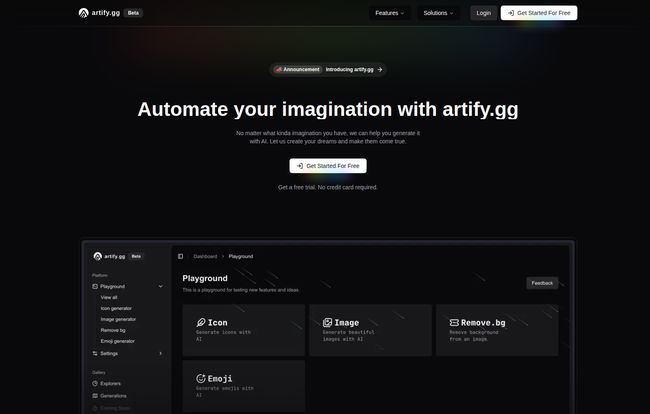
Visit Artify.gg
A Workflow, Not Just a Toy
I was really struck by how Artify frames itself. It talks about solving “Communication Gaps,” “Inconsistent Quality,” and “Resource Management.” These are the nightmares of every marketing manager and small business owner. The endless email chains to tweak a design, the logo that looks slightly different every time it’s used, the sheer cost and time of creating assets.
By positioning itself as an “AI Workflow,” Artify is making a bold claim: it can be a reliable part of your team. It can generate icons that all match, product mockups that follow the same lighting and style, and social posts that are instantly recognizable as yours. It’s an ambitious goal, and I’m genuinely curious to see how well it delivers in practice.
Let’s Talk Money: The Artify.gg Pricing Structure
Okay, the part everyone always scrolls to first. The pricing. I’ve got to say, it seems pretty reasonable, especially for what’s on offer. They’ve got a three-tiered system that makes a lot of sense.
| Plan | Price | Key Features | Best For |
|---|---|---|---|
| Free | $0 / month | 40 credits, standard image generation, inpainting, etc. | Curious individuals and people wanting to test the waters. |
| Basic | $9 / month | 800 credits, Train your own models, Advanced AI. | Solopreneurs, bloggers, small businesses who need brand consistency. |
| Pro | $20 / month | 2000 credits, all Basic features, plus 24/7 support. | Marketing teams, agencies, and power users. |
The Free plan is a no-brainer for just trying it out. 40 credits is enough to get a feel for the tool. But the real magic, in my opinion, starts with the Basic plan. For nine bucks a month, you get a huge jump in credits and, most importantly, the ability to train your own models. This is the plan I’d recommend to most people. The Pro plan is for the heavy hitters who need a ton of assets and the peace of mind of dedicated support.
The Good, The Bad, and The AI
No tool is perfect, right? Based on my analysis and years of messing with similar platforms, here’s my take.
What I’m Excited About
The ease of use for people who aren’t designers is a huge plus. The barrier to creating professional-looking visuals is basically obliterated. The focus on business workflows and solving real-world production bottlenecks is a smart move, it gives the tool a clear purpose. But again, it’s that custom AI training that stands out. That single feature could be worth the price of admission alone for so many small businesses.
Potential Downsides to Keep in Mind
There’s always a trade-off. Relying heavily on AI can sometimes limit fine-tuned creative control. You’re a co-pilot, but the AI is still flying the plane. There’s also the potential cost. While the plans are affordable, if you’re an agency churning out thousands of images, those credit-based systems can add up. Finally, the custom training feature, while amazing, isn’t magic. It will require you to have some good, consistent training data (your existing assets) to work effectively. Garbage in, garbage out, as they say.
Who Is Artify.gg Actually For?
So, who should drop what they’re doing and sign up? I see a few clear winners here:
- Startups and Solopreneurs: Need a logo, social media assets, and website icons fast and on a budget? This is for you.
- Content Creators and Bloggers: Struggling to create unique, eye-catching featured images for every single post? Problem solved.
- Marketing Teams: Want to empower your team to create on-brand visuals without bogging down your lead designer? This could be a powerful addition to your toolkit.
Who might want to stick with their current methods? Probably large corporations with massive, established design teams and very rigid, complex brand systems. Or, freelance artists and illustrators who pride themselves on a 100% handcrafted approach. This tool is about efficiency and consistency, not necessarily replacing high-concept human artistry.
Frequently Asked Questions about Artify.gg
What exactly is Artify.gg?
It’s an AI-powered design platform that helps you create logos, images, icons, and other brand assets. Its key differentiator is the ability to train the AI on your specific brand style for consistent visuals.
Is Artify.gg really free to use?
Yes, there is a free plan that gives you 40 credits per month to test out the core features. For more credits and advanced features like custom AI model training, you’ll need one of the paid plans.
How does the custom AI training work?
You upload a set of your own images, logos, or illustrations that represent your brand’s style. Artify’s AI analyzes these visuals to learn your aesthetic, color palette, and shapes. Then, when you generate new images, it creates them in that learned style.
Can I use the images I create for commercial purposes?
Generally, AI art generators allow commercial use on their paid plans. However, you should always check the most current Terms of Service on the Artify.gg website to be 100% sure about the licensing for your specific plan.
Is Artify.gg better than a tool like Midjourney?
It’s not about being better, it’s about being different. Midjourney is an incredible tool for artistic exploration and creating stunning, imaginative one-off pieces. Artify.gg is designed to be a workflow tool for creating consistent, on-brand assets for a business efficiently.
What are ‘credits’ and how do they work?
Credits are like tokens you use to perform actions on the platform, like generating an image. The free plan gives you 40 a month, while paid plans offer significantly more (800 or 2000), catering to higher volume needs.
My Final Verdict
I’m genuinely impressed with the thinking behind Artify.gg. It’s one of the first AI art tools I’ve seen that isn’t just a novelty. It’s a thoughtfully designed platform that addresses a real, persistent pain point for countless businesses and creators. The promise of combining the raw power of AI with the specific needs of a brand is incredibly compelling.
If you’ve ever felt the friction of content creation or wished you had a designer on-call 24/7, you owe it to yourself to check out the free plan. It might just be the creative co-pilot you’ve been waiting for.


