
Categories: AI Art Generator, AI Drawing, AI Image Generator, AI Painting Generator, AI Style Transfer, Image to Image
ARTROBOT Review: AI Art from Your Photos? (2024)

It feels like every time I blink, another AI tool pops up promising to change my life. Or at least, change how I create content. As someone who’s been swimming in the digital marketing soup for years, I’ve seen a lot of trends come and go. But the AI art explosion? That one’s got legs. We’ve all seen the hyper-realistic, sometimes nightmarish, creations from big players like Midjourney. But what if you don’t want to learn a whole new language of prompts and parameters? What if you just want to make your boring photo… well, less boring?
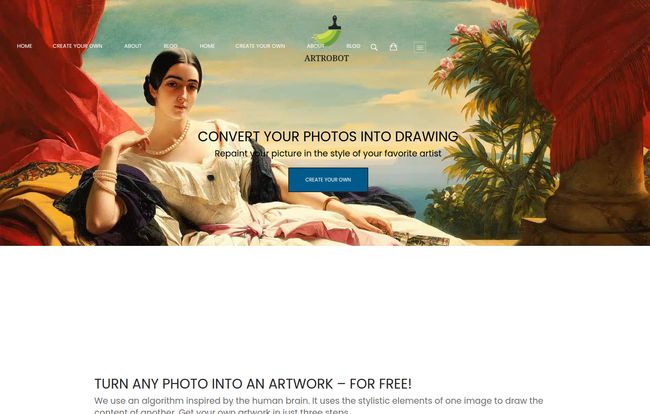
That’s the exact question I had when I stumbled upon ARTROBOT. Their pitch is simple: “Convert your photos into drawing.” No complicated prompts, no Discord servers. Just you, your photo, and a little bit of AI magic. It sounds almost too good to be true, doesn’t it? So, naturally, I had to put it to the test.
So, What Exactly Is ARTROBOT?
Let’s get one thing straight. ARTROBOT isn’t like DALL-E or Stable Diffusion, where you type ‘an astronaut riding a unicorn on mars in the style of Picasso’ and see what happens. It’s a different beast entirely. Think of it less as a blank canvas and more as a digital alchemist.
It uses a technology often called neural style transfer. In simple terms, it takes the ‘content’ of one image (your photo) and applies the ‘style’ of another (a famous painting, a cool texture, etc.). The website claims its algorithm is “inspired by the human brain,” which is a classic, charmingly vague bit of tech marketing. The bottom line is, it repaints your picture to look like it was created by someone or something else. It’s your personal Rembrandt-bot, ready to turn that picture of your cat into a cubist masterpiece.
The Three-Step Dance: How It Works
The homepage boasts a dead-simple three-step process, and I have to admit, they deliver on that promise. It’s about as straightforward as it gets.
- Upload Photo: You pick the picture you want to transform. A selfie, a landscape, your dog looking goofy. Whatever.
- Choose Style: This is the fun part. They have a gallery of predefined styles—think impressionism, abstract patterns, that sort of thing. The cool part is you can also upload your own style image. Want your portrait to have the texture of a rusty piece of metal? Go for it.
- Submit: You hit the button. Here’s the catch—it doesn’t happen instantly. The request gets sent to their servers, which do the heavy lifting. You then get an email when your new artwork is ready.
Visit ARTROBOT
It’s an elegantly simple workflow. No sign-up is immediately required to start the process, which is a big plus in my book. It removes that initial barrier to just trying the thing out.
My First-Hand Experience (And a Quirky Discovery)
I grabbed a recent photo from a hiking trip—decent lighting, clear subject, nothing too complex. The upload was a breeze. I scrolled through the styles and picked one that looked sort of like a messy, colorful oil painting.
Then I hit submit and… waited. The email submission part is where I paused for a second. We’re all a bit guarded with our email addresses these days, aren’t we? It’s a necessary evil for a process like this, since the rendering happens offline, but it’s still a point of friction. I gave them my semi-public work email and carried on.
While I was waiting for my masterpiece to bake, I did what any good SEO nerd would do: I snooped around the site. I noticed footer links for things like ‘My Account’, ‘Shopping Cart’, and currency options. Interesting. But when I tried to click on a few deeper pages, including anything that looked like a pricing page… I hit a wall. A big, fat “404 Not Found” error. It’s a small thing, maybe a temporary glitch, but it adds a layer of mystery to the whole operation. It feels very ‘work-in-progress,’ which is both charming and a little concerning.
The Good Stuff
Let’s not bury the lede. For a free tool, there’s a lot to like. The sheer ease of use is its biggest selling point. My grandma could use this, and she still calls WiFi ‘the web’. The ability to upload a custom style is a genuine game-changer that puts it a step above many other simple style-transfer apps. It opens up infinite possibilities beyond the pre-canned Van Gogh or Monet filters. When my final image arrived in my inbox about 15 minutes later, it was genuinely cool! The AI had done a pretty impressive job of blending my mountain photo with the painterly style I chose. It wasn’t perfect, but it was unique and definitely eye-catching.
The Not-So-Good Stuff
Of course, nothing’s perfect. The main drawback for me is the black box nature of it all. You send your photo and email into the ether and hope for the best. The wait time can be a drag in our instant gratification world, though 15 minutes isn’t terrible. My biggest hesitation, as mentioned, is the email requirement. It’s a trade-off: your contact info for a free piece of art. For some, especially those concerned with privacy, that might be a deal-breaker. You also have to agree to the Terms and Conditions before submitting, and let’s be honest, who really reads those?
The Million-Dollar Question: Is ARTROBOT Really Free?
Ah, the eternal question of the internet. The homepage screams “FOR FREE!” and my first test run didn’t cost a dime. But the signs point to a more complex story. The inclusion of a shopping cart feature and currency selectors (USD, EUR, etc.) is a dead giveaway that they have, or plan to have, a monetization strategy.
My best guess? They’re operating on a freemium model. Perhaps you get a certain number of free conversions, or maybe lower-resolution images are free, with high-res downloads or commercial licenses available for a fee. The broken pricing page (that 404 error again) suggests this part of the platform is either under construction or has been taken down temporarily. For now, you can get some cool art for free, but I’d expect that to evolve.
Who Is This AI Art Tool Actually For?
This is not a tool for the serious digital artist or the hardcore AI prompt engineer. They’re going to want more control, more options, and more power. But that’s okay! Not every tool needs to be for the pros.
I see ARTROBOT being perfect for:
- Social Media Users: Want a unique profile picture that stands out? This is your ticket.
- Bloggers and Content Creators: Need a quick, stylized featured image for an article without paying for a stock photo? Perfect.
- Casual Creatives: People who just want to have some fun with their photos and make cool stuff to share with friends and family.
- Anyone Curious about AI: It’s a fantastic, low-stakes entry point into what AI can do with images, without the steep learning curve.
ARTROBOT vs. The Titans like Midjourney
Comparing ARTROBOT to Midjourney is like comparing a go-kart to a Formula 1 car. They both have four wheels and an engine, but they serve wildly different purposes. Midjourney creates entire worlds from your imagination. It’s about generation. ARTROBOT is about transformation. It’s a specialized tool for one specific task: applying a new style to an existing image.
Frankly, trying to get Midjourney to perfectly replicate a photo in a specific art style can be incredibly frustrating. Sometimes, the simpler tool is just the better tool for the job. If your goal is to reimagine a photo you already love, ARTROBOT is far more direct and, dare I say, more efficient.
Final Thoughts: Your Pocket-Sized Digital Artist?
So, is ARTROBOT worth your time? In my opinion, yes. It’s a fun, simple, and currently free way to breathe new life into your photos. It neatly fills a gap in the market between basic photo filters and hyper-complex AI generators. It’s not perfect—the wait times and email submission will put some people off—but the results can be surprisingly delightful.
It feels like a platform with potential, even if it has a few rough edges like that mysterious 404 page. Give it a try. The worst that can happen is you get a funky-looking picture of your lunch. The best that can happen? You create something you genuinely love. And in this digital age, that’s a pretty good deal.
Frequently Asked Questions
What is ARTROBOT?
ARTROBOT is an online tool that uses AI to transform your uploaded photos into artworks, mimicking various artistic styles. It uses a technique called style transfer to apply the look of one image to the content of another.
Is ARTROBOT free to use?
Currently, the basic service appears to be free. However, the website includes features like a shopping cart and currency options, which suggests that paid features or premium versions might exist or are planned for the future.
How long does it take to get my image?
Since the AI processing is done on their servers, it’s not instant. After you submit your photo and style, you’ll receive an email with the final image once it’s ready. In my test, this took about 15 minutes, but it could vary.
Do I need an account to use it?
You don’t need an account to create your first image, but you do need to provide an email address to receive the result. The site does have account registration features, which likely allow you to track your creations or access other features.
Can I use my own art styles?
Yes! This is one of its best features. Alongside their predefined styles, you can upload your own image to be used as the style reference, giving you a huge amount of creative control.
Is it safe to upload my photos and email?
Like any online service, you have to weigh the benefits against the potential privacy risks. The platform requires an email and you must agree to their Privacy Policy before using it. It’s always a good idea to be cautious with personal photos and use an email address you’re comfortable with sharing.
Reference and Sources
For more information or to try the tool yourself, you can visit the official website:
- ARTROBOT Official Website: artrobot.com


