
Categories: AI Assistant, AI Mental Health, AI Productivity Tools, AI Workflow
Asa.Team Review: The AI Your Team Actually Needs?

Managing a team in this day and age can feel like you’re trying to juggle cats. On fire. In the middle of a hurricane. Whether you’re fully remote, stuck in a hybrid model, or back in the office, the core challenges are the same: Are people engaged? Is anyone heading for burnout? And for the love of all that is holy, did everyone clock in correctly?
I’ve been in the trenches of team management and traffic generation for years, and I’ve seen more ‘game-changing’ platforms than I can count. Most of them promise the world but just end up being another login to forget, another app to drain your phone battery. So when I stumbled upon Asa.team, with its promise of being an AI-powered workplace solution that lives inside the tools you already use, my curiosity was piqued. Not just interested, but genuinely curious.
Could this be the thing that finally simplifies things instead of adding another layer of complexity? Let’s take a look.
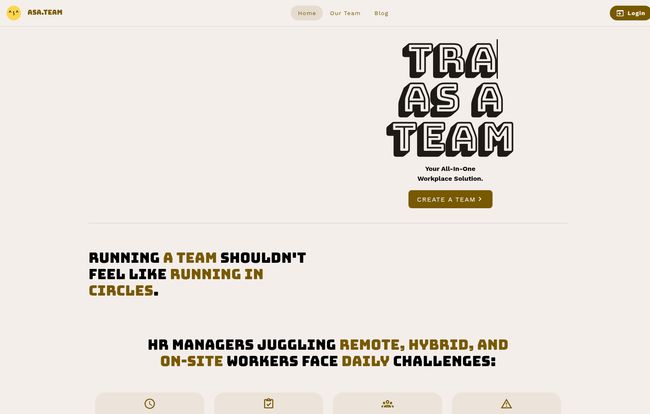
Visit Asa.Team
So, What is Asa.Team, Really?
On the surface, Asa looks like another AI chatbot. But it’s trying to be something more. Think of it less as a robot and more as a helpful, slightly nerdy team coordinator that hangs out in your Microsoft Teams or Telegram chat. Its whole reason for being is to tackle those daily grinds for HR managers and team leads: clock-ins, productivity tracking, engagement, and the big one—burnout.
Instead of forcing your team to adopt a whole new piece of software, Asa integrates into your existing communication flow. This, for me, is its first major win. The friction to adoption is incredibly low if your team is already living in MS Teams or Telegram. It’s not another tab to open; it’s a conversation you’re already having.
The Core Features That Actually Matter
A tool is only as good as what it can do. Asa focuses on a few key areas that, frankly, are the ones that keep managers up at night.
Effortless Time Tracking (Without the Big Brother Vibe)
I physically cringe when I hear the word ‘timesheet.’ It conjures up images of clunky software and nagging emails. Asa’s approach is… well, effortless. That’s the word they use, and it fits. There’s no separate hardware or app installation. Your team members can clock in and out directly from their workspace chat. Simple. It’s a small change, but it removes a daily point of friction. For remote or hybrid teams, this is a godsend for keeping track of who’s working when without feeling like you’re electronically babysitting.
Keeping a Pulse on Team Wellbeing
Okay, this is the feature that really got my attention. Burnout isn’t just a buzzword; it’s a silent team killer. Asa has a built-in mental health check-in that periodically and privately asks team members how they’re doing. The example on their site shows a simple prompt: “How are you feeling this week?” with an option like, “I’m feeling burnt out 😥”.
This isn’t about collecting data for the sake of it. It’s about creating a safe channel for people to raise a hand when they’re struggling before it becomes a crisis. It gives managers a gentle, non-intrusive way to gauge team morale and spot potential issues. In a world where we talk a lot about mental health, this feels like a practical step in the right direction.
AI Automation and Workflows: The New Kid on the Block
Asa is rolling out AI-powered automation and workflows. Now, their site has a slightly confusing message about this—mentioning an “August Release” but then a signup for a December launch. Maybe it’s a phased rollout? Either way, the promise is huge. Imagine automating repetitive check-ins, report requests, or common team questions. This is where AI moves from being a novelty to a genuine time-saver, freeing up managers to focus on, you know, managing people instead of processes.
Playing Nice with Others: Teams and Telegram Integrations
I mentioned this before, but it bears repeating. A tool that doesn’t fit into your existing stack is a dead tool. By integrating directly with Microsoft Teams and Telegram, Asa becomes part of the daily conversation. This is smart. It means higher engagement and less ‘tool fatigue’ for your team. It becomes the friendly ghost in the machine, not an annoying new program to learn.
The Real-World Experience: My Take on Asa
Alright, no tool is perfect. As a professional, I’m always looking at both sides of the coin. Asa is incredibly promising, but there are things to consider.
What I really like is the potential to genuinely improve team communication and collaboration. The wellbeing feature alone could open up conversations that teams are often too awkward to have. And automating the boring stuff? Yes, please. This gives managers back time and mental energy. The integrations are a massive plus, making it feel less like an imposition and more like an enhancement to tools you’re already paying for.
However, let’s talk about the potential hurdles. The biggest one is that its effectiveness really relys on team participation. If your team doesn’t engage with the prompts, it’s just shouting into the void. This isn’t a silver bullet; it’s a facilitator, and you still need a culture where people feel comfortable participating. Also, since it works through external apps, you’re dependent on those platforms. The website is also a bit light on specifics regarding data privacy and security. For a tool handling sensitive information like employee wellbeing, I’d want to see a very clear, detailed policy. That’s a question I’d be asking their sales team right away.
So, How Much Does This AI Magic Cost?
This is the million-dollar question, isn’t it? As of my writing this, the Asa.team website is pretty coy about pricing. There’s a big, friendly “GET STARTED” button that states “No credit card required,” which suggests a freemium model or a generous free trial. This is great for letting people kick the tires without commitment. But for long-term planning, the lack of a clear pricing page is a bit of a mystery. I’d expect this to be clarified as they get closer to their full feature launch.
Who is Asa.Team For?
I see Asa being a fantastic fit for a few specific groups:
- HR Managers in small to medium-sized companies who are juggling a million tasks.
- Team Leads and Department Heads who want a better pulse on their team’s capacity and morale without micromanaging.
- Startups and Modern Companies with remote or hybrid work cultures who already live in platforms like Microsoft Teams.
- Any leader who genuinely believes that employee wellbeing is directly tied to productivity and retention (which should be all of them, honestly).
If you’re a massive enterprise with deeply entrenched, complex HR systems, this might be too lightweight. But for the rest of us? It seems right on the money.
Frequently Asked Questions
What platforms does Asa integrate with?
Currently, Asa.team integrates directly with Microsoft Teams and Telegram, allowing you to manage your team within the chat platforms you’re already using.
Do I need to install a separate app for Asa?
Nope! That’s one of its main selling points. Asa operates within your existing workspace chat, so there’s no separate application for your team to download or learn.
How does Asa monitor team wellbeing?
Asa sends periodic, private check-in messages to team members asking them to share how they’re feeling. This gives employees a simple, low-pressure way to communicate their mental state and helps managers identify signs of burnout or overwork early.
Is Asa suitable for fully remote teams?
Absolutely. In fact, it’s arguably ideal for remote and hybrid teams. Its features help bridge the physical distance by providing clear time tracking and a channel for monitoring engagement and wellbeing, which can be difficult to gauge when you’re not sharing an office.
What about data privacy with Asa?
The website doesn’t currently provide extensive details on its data privacy and security protocols. For any business considering the tool, especially given the sensitive nature of wellbeing data, it would be important to reach out to the Asa.team directly for more specific information on how they handle and protect user data.
Is Asa free to use?
You can get started with Asa for free without a credit card. This suggests either a free trial or a freemium plan. The complete pricing structure for more advanced features or larger teams is not yet published on their website.
Final Thoughts: Is Asa Your Team’s New Best Friend?
I’ve seen a lot of tools come and go, but Asa.team has a certain something. It’s not trying to reinvent the wheel; it’s just trying to make the wheel roll a whole lot smoother. By focusing on low-friction, high-impact areas like wellbeing and simple time tracking, and by living where your team already works, it has a real shot at being genuinely useful.
It’s not a magic wand. You’ll still need to foster a good team culture. But Asa could be a powerful ally in that effort. It’s a tool that seems to understand that a team isn’t just a collection of assets on a spreadsheet; it’s a group of humans. And helping those humans feel seen and supported? That’s an ROI you can’t always measure, but you can definitely feel.
Reference and Sources
- Asa.Team Official Website: https://asa.team


