
Categories: No-Code&Low-Code
Atomic Fusion Review: Your Bubble Superpower?

Alright, let’s have a real chat. If you’ve spent any serious time in the no-code world, you’ve been there. You’re deep into a Bubble project, the logic is flowing, the database is structured beautifully… but your app looks like it was designed in 2007. The padding is all wrong, the buttons are clunky, and you’ve spent three hours just trying to make a user profile card that doesn’t look completely tragic.
It’s the classic Bubble developer paradox: you can build almost anything, but making it look good is a whole other battle. A battle that can suck up hours, days, even weeks. I’ve personally lost weekends to wrestling with responsive settings and component design.
So when a tool comes along promising to be a “game-changer” that gives you “Bubble development superpowers,” my inner cynic immediately kicks in. We’ve all seen those promises before. But I kept hearing whispers about Atomic Fusion in dev communities, and the buzz was… different. So, I decided to check it out. And honestly? I’m kind of annoyed I didn’t find it sooner.
Visit Atomic Fusion
So What Is Atomic Fusion, Really?
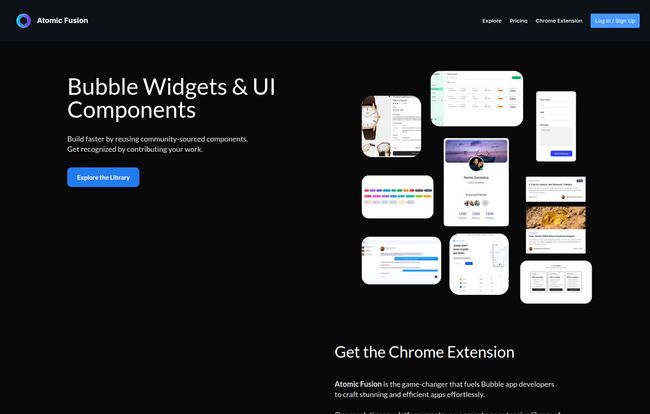
On the surface, Atomic Fusion is a library of UI components for Bubble. But that’s like saying a Michelin-starred restaurant is just a place with a kitchen. It misses the point entirely. Think of it more like a professional toolkit and workflow system built directly into your Bubble environment via a slick Chrome Extension.
Instead of building every single element from scratch—every card, every dashboard menu, every sign-up form—you get access to a massive, ever-growing library of professionally designed, pre-built assets. It’s not just about saving time; it’s about starting with a baseline of quality that most of us (let’s be honest) would struggle to achieve on our own. It’s like having a senior UI designer on your team, but one that doesn’t demand a six-figure salary.
The Standout Features That Actually Matter
A long list of features can be overwhelming. Let’s cut through the noise and talk about what really makes a difference in your day-to-day workflow.
The Component Library: A Visual Feast
This is the heart of Atomic Fusion. We’re talking slick dashboards, modern pricing tables, clean navigation bars, and hundreds of other components that just work. The quality is consistently high. You can tell these aren’t just slapped together; they’re designed with modern aesthetics in mind. You can grab a single component or entire page layouts and just drop them into your app. The fact that many are community-sourced but curated means there’s a constant stream of fresh ideas coming in.
The Chrome Extension is a Workflow Dream
This is where the magic happens. The extension lives right in your browser, integrating directly with the Bubble editor. No more flicking between a dozen tabs to find your inspiration, copy elements, and paste them in. You can browse the library, search for components, and add them to your app without ever leaving the Bubble environment. This small detail completely changes the development experience, keeping you in the zone and focused on building.
Team Collaboration and Design Systems
For freelancers working with clients or agencies with multiple developers, this is huge. Atomic Fusion lets you save your own customized components, styles, and even code snippets into shared libraries. What does that mean in practice? It means you can create a consistent design system for a project. No more slightly different shades of blue or inconsistent button padding across pages built by different people. Everyone on the team pulls from the same source of truth. It’s a simple concept that solves a massive headache.
Who Is This For? Freelancers, Entrepreneurs, and Agencies, Listen Up.
Atomic Fusion is pretty clear about who they’re targeting, and for good reason. Each group gets something slightly different out of it.
- For Bubble Freelancers: It’s all about speed and polish. You can take on more projects because you’re finishing them faster. Your final products look more professional, which means you can charge higher rates and get better referrals. Time is literally money, and this tool saves you a ton of it.
- For Entrepreneurs: You’re probably not a designer, but you want your MVP to look credible. Atomic Fusion lets you build a beautiful, functional app without hiring a design agency right out of the gate. It gives you design freedom and a high-quality result, letting you focus on the business logic and user acquisition.
- For Agencies: It’s about standards and efficiency. You can onboard new developers faster by giving them a pre-approved set of components to work with. It ensures brand consistency across all client projects and dramatically speeds up the development lifecycle, improving your profit margins.
Let’s Talk Money: Atomic Fusion Pricing
Okay, the all-important question: what’s it gonna cost? The pricing structure is refreshingly straightforward, and I appreciate that there’s a genuinely useful free tier.
| Plan | Price | Best For |
|---|---|---|
| Starter | FREE | Trying it out. You get limited access to the library and a cap on how many assets you can copy per day. Perfect for seeing if it fits your workflow. |
| PRO Monthly | $17.99 / month | Short-term projects or those who want to go all-in without a long-term commitment. You unlock everything. |
| PRO Annual | $13.33 / month (billed annually) | Serious Bubble developers, freelancers, and agencies. This is the best value by far. If you’re building with Bubble regularly, the time saved in just one month will probably pay for the whole year. |
In my opinion, the Free plan is great for a test drive. But if you’re serious about Bubble, the PRO Annual plan is a no-brainer. The cost is negligible compared to the hours you’ll save and the improved quality of your work.
The Good and The Not-So-Good
No tool is perfect, and a real review isn’t a sales pitch. So here’s my honest breakdown.
What I Absolutely Love
The speed is the number one thing. The ability to lay out a complex page in minutes instead of hours is just incredible. Secondly, the aesthetic quality. My apps just look better, period. It raises my own design game just by being exposed to such well-made components. Finally, the team collaboration features are a lifesaver for anyone who doesn’t work in a total vacuum.
Where There’s Room for Improvement
The reliance on community-sourced components is both a strength and a potential weakness. While the quality is generally high, you might occasionally find a component that needs a little tweaking to be production-ready. It’s not a huge deal, but something to be aware of—always check your copied elements. Also, the most powerful features are, understandably, locked behind the Pro version. While the free tier is great, you’ll quickly hit the limits if you’re working on a real project. Lastly, if you’re brand new to Bubble itself, there might be a small learning curve to understand how to best integrate and customize teh components.
Conclusion: Is Atomic Fusion a Must-Have Tool?
So, back to my inner cynic. Is Atomic Fusion truly the “superpower” it claims to be? After using it on a few projects, I’d have to say… yeah, it kinda is. It’s not going to write your app’s logic for you, but it completely removes one of the biggest bottlenecks in the Bubble development process: high-quality UI/UX design.
It’s not just a component library; it’s a workflow accelerator. It saves time, reduces frustration, and elevates the final product. For any serious Bubble developer, freelancer, or agency, I don’t see it as a luxury anymore. I see it as part of the essential stack. It’s an investment that pays for itself almost immediately.
Frequently Asked Questions
How exactly does Atomic Fusion help me build on Bubble.io?
It provides a library of pre-built, professionally designed UI components (like menus, forms, cards) and full page templates. Using a Chrome extension, you can copy these assets directly into your Bubble editor, saving you from having to design and build every single element from scratch. This massively speeds up development time and improves the visual quality of your app.
Can I share my own designs on Atomic Fusion?
Yes! With the Pro plan, you can save your own components, designs, and styles into your personal or team libraries. This is perfect for creating a reusable design system for your projects or sharing common elements with your team to ensure consistency.
Is there a learning curve to using Atomic Fusion?
If you’re already comfortable with Bubble, the learning curve is very small. The Chrome extension is intuitive, and the process of copying and pasting elements is straightforward. The main thing to learn is how to best adapt the pasted components to your specific app’s database and workflows, which is standard practice in Bubble anyway.
Is the Pro version worth the money?
In my experience, if you are building with Bubble more than a few hours a month, yes. The time you save on even a single project will likely cover the cost of a subscription. The access to unlimited assets, entire UI kits, premium templates, and team features moves it from a helpful utility to a core part of an efficient development workflow.
What is the AI Copy feature?
The AI Copy feature is a tool within Atomic Fusion that helps generate text content for your Bubble pages or sections. It’s great for quickly creating placeholder text that looks realistic or even for generating first drafts of marketing copy, saving you time on content creation.


