
Categories: AI Agent, AI Code Assistant, AI Code Generator, AI Developer Tools
Augment Code Review: Is This AI Copilot Worth a Look?

Alright, let’s have a real chat. The endless boilerplate, the cryptic variable names, the PR comment that just says “fix this.” It’s the glamorous life of a software developer, right?
For the past few years, AI coding assistants have been popping up like mushrooms after a rainstorm, all promising to be our knight in shining armor. Some are pretty good at autocompleting a function. Others… not so much. They often feel like a backseat driver who has only seen the last 20 feet of road. They don’t have the full picture.
So when I heard about Augment Code, my inner cynic perked up. Another AI tool? Great. But then I looked closer, and my curiosity got the better of me. This one claims to be different. It’s not just an autocompleter; it’s an AI platform designed to understand your entire codebase. And that, my friends, is a bold claim.
So, What is Augment Code, Really?
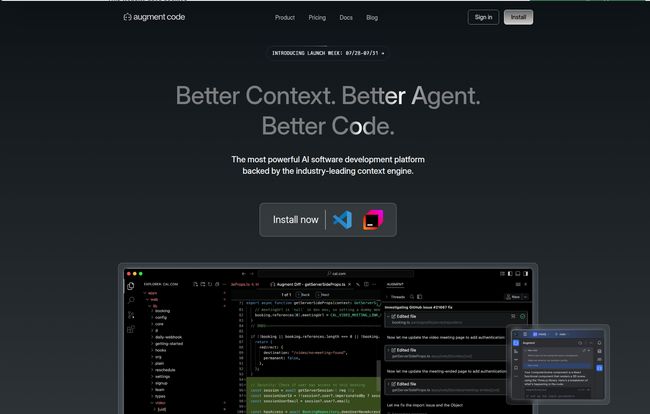
Think of it this way. Most AI coding tools are like having an intern who’s a whiz at syntax. Augment Code is more like pairing with a senior engineer who has already read every single file, every PR, and every piece of documentation in the project. It has context.
Visit Augment Code
At its core is something they call the Context Engine. This isn’t just scanning the file you have open. It’s actively analyzing your entire codebase—or even multiple repositories—in real-time. This means when you ask it to refactor a function or explain a snippet of code, it’s not just guessing. It knows how that function is used across the entire application, what its dependencies are, and what conventions the team follows. It’s a pretty huge difference in practice.
The Features That Actually Matter to a Coder
A fancy feature list is nice, but what does it actually do for you when you’re deep in the trenches, trying to hit a deadline? Let’s break down the parts that caught my eye.
The All-Knowing Context Engine
I can’t stress this enough. This is the secret sauce. The ability to pull context from multiple files or even entire repositories is a game-changer for complex tasks. I’m talking about those gnarly SDK migrations or big refactoring jobs that touch dozens of files. Instead of you having to manually search and replace across the project, Augment Code understands the connections and can propose changes with a much higher degree of accuracy. It turns a multi-day headache into a much more manageable task.
Smart Apply & Code Checkpoints: An AI with a Safety Net
One of my biggest fears with AI suggestions is that they’ll silently introduce a bug. Augment Code seems to get this. Their “Smart Apply” feature lets you intelligently merge AI suggestions into your code, and the “Code Checkpoints” are a lifesaver. Think of them as mini, automatic git commits. If the AI goes off the rails and suggests something wild, you can instantly revert back to a previous state without having to untangle the mess yourself. It builds a little bit of trust, which is crucial.
It Plays Nice with Your Existing Tools
No one wants to completely change their workflow for a new tool. The team behind Augment Code clearly understands this. With over 100 integrations for native and MCP (Multi-Code-Project, I assume) tools, it fits right into your existing environment. Whether you live in VS Code, JetBrains, or have your life organized in Slack, it aims to connect the dots, helping you go from a ticket to a pull request with less friction. This is key for team adoption.
Debugging with… Images?
Okay, this one is pretty cool. It has multi-modal support, meaning you can literally feed it screenshots or wireframes to give it more context. Stuck on a weird front-end bug? You could potentially show it what the UI is supposed to look like versus what it’s actually doing. It’s a bit futuristic, but I can see it being incredibly useful for bridging the gap between design and implementation.
The Good, The Bad, and The Code-y
No tool is perfect. Let’s weigh the pros against the cons from a practical standpoint. What’s great is that it can genuinely speed things up, especially on repetitive or complex refactoring tasks. The improved code quality is a real benefit—it can spot patterns and suggest improvements you might have missed. For teams, it acts as a knowledge repository, helping new members get up to speed by simply asking the AI to explain a complex part of the system.
On the flip side, there are some things to consider. First, it requires an installation and some setup; it’s not a simple browser extension. And to get the really good stuff, like data privacy, you’re going to have to open your wallet. But the biggest point of discussion for me is the free Community plan. It’s generous, but there’s a catch in the fine print: they are allowed to use your data for AI training. For a personal hobby project? Fine. For your company’s proprietary code? Absolutely not. This makes the paid plans almost mandatory for any serious commercial use.
“Augment Code is the rare platform that lives up to, and surpasses, AI hype.”
– Chintan Shah
Also Read: Typiq Review: AI Font Pairings in a Flash?
Let’s Talk Money: Augment Code Pricing
The pricing structure is based on tiers and a concept called “user messages.” A user message is essentially a prompt or a command you give the AI. It’s a consumption-based model layered on a monthly subscription.
| Plan | Price | Who It’s For | Key Details |
|---|---|---|---|
| Community | Free | Students, Hobbyists, the Curious | 50 user messages/month. Allows data collection for AI training. |
| Developer | $50/month | Freelancers, Small Teams | 600 messages/month, team management, and most importantly, no training on your data. |
| Pro | $100/month | Growing Teams | 1500 messages/month, adds email support. |
| Max | $250/month | High-Demand Teams | A whopping 4500 messages/month. |
| Enterprise | Custom | Large Organizations | Custom limits, SSO, dedicated support, Slack integration. The full package. |
My take? The Developer plan is the real entry point for any professional. The peace of mind from knowing your code stays your code is worth the $50 alone. The higher tiers are simply for teams with heavier usage needs.
My Final Take: Is It Just Another Copilot Clone?
I don’t think so. While it operates in the same space as tools like GitHub Copilot, its philosophy is different. The emphasis on the whole-codebase Context Engine sets it apart. It’s less about just spitting out code and more about being a true partner in understanding and manipulating complex systems. It feels more like a strategic tool than just a tactical code-completion utility.
It won’t write your entire application for you (and you wouldn’t want it to). But it can significantly reduce the cognitive load of modern software development. It handles the tedious stuff, letting you focus on the interesting architectural problems. For me, that’s a win.
Frequently Asked Questions
What exactly counts as a ‘user message’?
A user message is typically any significant interaction you have with the AI. This could be asking it to explain a block of code, generate a new function, or perform a refactor. Simple code completions usually don’t count, but the bigger, more thoughtful interactions do.
Do user messages for a team get pooled together?
Yes, based on the information available, user messages are typically pooled at the team level for the paid plans. This means if one person has a light month and another has a heavy one, it balances out across the team’s total allowance.
What happens if I use the free plan? Is my code public?
Your code doesn’t become public, but Augment Code states that on the Community (free) plan, they are allowed to collect your data to train their AI models. This is a critical privacy consideration. If you’re working on anything sensitive or proprietary, you should absolutely opt for a paid plan where this is explicitly disallowed.
How does the security and compliance look?
The paid plans (Developer and up) come with SOC 2 Type II compliance, which is a standard for data security and privacy. The Enterprise plan adds even more advanced security features like SSO and OIDC support, which are necessary for large organizations.
Is it hard to integrate into an existing project?
It’s designed to work with your existing IDEs and toolchains. While there is an installation process, it’s not meant to be disruptive. The goal is to augment your current workflow, not replace it entirely.
Can I try before I buy?
Yes, the Community plan is essentially a free trial. It’s a great way to test out the features on a personal or non-sensitive project to see if the workflow and capabilities are a good fit for you before committing to a paid subscription.
Conclusion: A Worthy Addition to the Toolkit
Look, the world of AI is moving at a breakneck speed, and it’s easy to get fatigued by the hype. But every now and then, a tool comes along that feels genuinely useful. Augment Code, with its powerful context engine and thoughtful developer-first features, feels like one of those tools.
It’s not a magic wand, but it is a powerful force multiplier. It can make good developers faster and help teams untangle complex codebases with more confidence. The biggest hurdle is the privacy-for-a-price model, but for any professional team, the cost of the Developer plan is a small price to pay for the boost in productivity and security. If you’re feeling the pain of codebase complexity, it’s definitely worth taking for a spin.


