
Categories: AI Agent, AI Email Assistant, AI Reply
Auto Gmail Review: An AI That Writes Emails For You?

If your inbox gives you a tiny spike of anxiety every time you open it, you’re not alone. Mine used to be a digital nightmare. A never-ending list of demands, questions, and “just looping you in” notifications. I’ve tried everything: the zero-inbox method, complex filtering systems, fancy apps that promised a revolution. Some helped, for a bit. But the emails, they just kept coming.
I’ve been in the SEO and traffic game for years, and communication is everything. But the sheer volume can be draining. It’s the digital equivalent of death by a thousand papercuts. So when I heard about a tool called Auto Gmail that claimed its AI could write “80% of my emails, for me,” my ears perked up. Skeptical? Oh, absolutely. But also… intrigued.
So, What Exactly is Auto Gmail?
Think of it less as a tool and more like an invisible intern. An intern who’s already read all your mail and prepped a response for every single one before you’ve even had your morning coffee. That’s the core idea behind Auto Gmail. It’s an AI assistant that plugs into your email client—not just Gmail, despite the name—and works in the background.
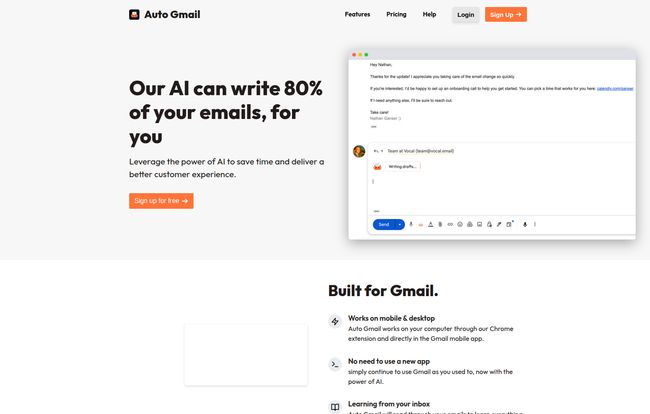
This isn’t like other AI writing tools where you have to copy an email, paste it into a prompt, and ask it to write a reply. Nope. Auto Gmail is proactive. You open an email from a client, and—bam—there’s already a draft sitting there, waiting for you. It reads the incoming message, understands the context, and uses what it knows about you and the sender to write a reply. It’s a bit spooky at first, in the best way possible.
How This Thing Actually Works Its Magic
I was curious about the mechanics. Was it just a glorified template machine? Turns out, it’s a bit more clever than that.
The Automatic Drafting Engine
The main selling point is its “no-input-needed” approach. Once installed (it’s a Chrome extension for Gmail), it just… works. It scans new emails as they arrive and gets to writing. The goal is that by the time you sit down to clear your inbox, a huge chunk of the cognitive load is already gone. You’re not starting from a blank slate; you’re editing and approving. It’s a subtle shift, but it changes everything. It turns a creative task (writing) into a much simpler executive one (reviewing).
It Learns Your Voice. Really.
This was the part I was most cynical about. Every AI tool promises to match your tone, but they often sound like a robot trying to be “cool.” Auto Gmail takes a different path by training its AI on your entire inbox (on the Pro plan). It analyzes how you’ve replied to people in the past. Do you use emojis? Are you formal? Do you start emails with “Hey” or “Dear”? Over time, the drafts it produces start to sound unnervingly like you. It’s not perfect, but it gets pretty darn close.
Visit Auto Gmail
It Plays Nice with Others
Despite the name, Auto Gmail isn’t just for Google loyalists. The Pro and Business plans also support Outlook, and it generally works with clients like Apple Mail and even the productivity-focused Superhuman. This was a smart move, acknowledging that not everyone lives inside the Google ecosystem.
The Good, The Quirks, and The AI Reality
No tool is perfect, right? Especially one that’s trying to automate something as personal as communication. After using it for a while, here’s my honest breakdown.
What I Absolutely Love
The time saving is real. Replying to common questions, acknowledging receipt of a document, or scheduling a quick call—Auto Gmail handles these with frightening efficiency. The draft is usually 90% of the way there. A quick once-over, a small tweak, and hit send. It’s taken my time spent on routine emails down from an hour a day to maybe 15 minutes.
And here’s a feature some might see as a flaw: it doesn’t send emails automatically. And thank goodness for that. The last thing I want is an AI going rogue and sending a weirdly-worded email to a major client. This system keeps you firmly in the driver’s seat. You are the final checkpoint, which is exactly how it should be.
“It’s not about replacing you. It’s about giving you back the time you spend on the repetitive stuff, so you can focus on the emails that actually matter.”
The Potential Sticking Points
Let’s talk about the elephant in the room: the price. This isn’t a $5-a-month gimmick. It’s a professional tool with a professional price tag. More on that in a second. For a freelancer or a small business just starting out, the monthly fee might be a tough pill to swallow.
Also, it’s still AI. It can misunderstand nuance. It might be a little too formal or a bit too casual sometimes. You still need your human brain to catch those subtle cues, especially with important, sensitive conversations. Don’t fire your frontal lobe just yet.
A Look at Auto Gmail’s Pricing Tiers
Alright, let’s get down to brass tacks. How much does this magic intern cost? The pricing is structured to fit different levels of email agony.
| Plan | Price | Who It’s For | Key Features |
|---|---|---|---|
| Free | $0 /mo | The Curious | Up to 5 messages/day to test the waters. Very limited. |
| Starter | $27 /mo | The Solopreneur | Up to 600 drafts/month, can train on your own documents. |
| Pro | $47 /mo | The Power User | Up to 1000 drafts/month, trained on your whole inbox, Gmail integration. This is the sweet spot. |
| Business | $97 /mo | The Team | 80 emails/day, Outlook integration, and a dedicated account manager. |
My take? The Free plan is just a demo. The real power is unlocked in the Pro plan, where it gets to know you by reading your past emails. Is $47 a month a lot? Maybe. But if it saves you even 3-4 hours of work a month, what’s your hourly rate? For most professionals, it pays for itself pretty quickly.
So, Is Auto Gmail a Worthy Investment?
After a few weeks, I’ve moved from skeptic to quiet evangelist. It’s not a silver bullet that will solve all your problems. You still have to think. You still have to manage relationships. But it’s an incredible force multiplier. It automates the boring, predictable parts of my day, freeing up mental bandwidth for the stuff that actually grows my business—strategy, creative thinking, and connecting with people on a deeper level.
If you’re a consultant, a manager, a salesperson, or anyone who feels like they’re losing a battle against their inbox, I think it’s worth a serious look. Compare the monthly cost to the cost of your own time and frustration. For me, it’s a no-brainer.
Frequently Asked Questions About Auto Gmail
I had a bunch of questions myself, so here are some answers to what you’re probably wondering.
- 1. Will Auto Gmail send emails without my permission?
- Nope. Never. It only ever creates drafts. You have to manually review and click ‘Send’ on every single email, keeping you in full control.
- 2. Is my email data safe and private?
- This is critical. According to their privacy policy, they use your data to train your personal AI model but don’t sell it or use it for other purposes. As with any cloud service, you should review their terms, but they appear to follow standard industry security practices.
- 3. How is this different from just using ChatGPT?
- The biggest difference is automation. With ChatGPT, you’re constantly copying and pasting. Auto Gmail works in the background automatically, so the drafts are ready and waiting for you with zero effort. It’s proactive vs. reactive.
- 4. I use Outlook at my company. Can I use it?
- Yes, you can! You’ll need the Business plan for official Outlook integration, which also comes with a higher daily email limit and an account manager.
- 5. How long until the AI drafts actually sound like me?
- In my experience with the Pro plan, it started getting noticeably better after a few days of use and analyzing my sent folder. I’d give it a solid week to really hit its stride. The more you use it and edit its drafts, the faster it learns.
Final Thoughts
Auto Gmail is a prime example of AI done right. It’s not here to take over the world or even your job. It’s a practical tool designed to sand down one of the roughest, most time-consuming edges of modern work. It gives you leverage. It frees you from the tyranny of the mundane. And in today’s world, that might be the most valuable thing a piece of software can offer.


