
Categories: AI Dating Assistant, AI Productivity Tools, AI Social Media
AutoSwipe Review: Is Automated Swiping Worth It?

If you’ve been in the online dating world for more than a week, you know the feeling. The thumb ache. The eye strain. The soul-crushing realization that you’ve just spent an hour of your life swiping through a sea of faces, and you’re no closer to finding a decent conversation, let alone ‘the one’. Swipe fatigue. It’s a real thing, and it’s brutal.
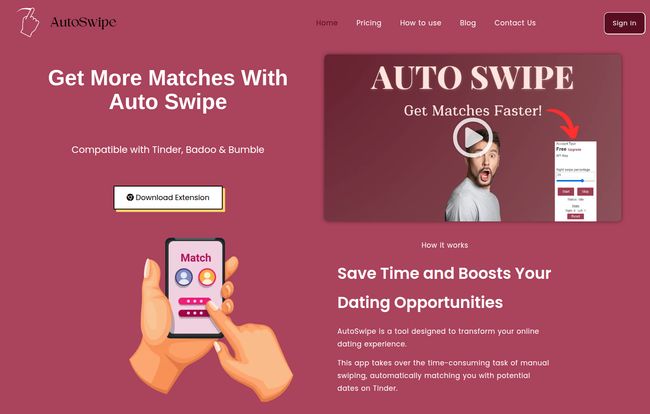
For years, we’ve joked about hiring a PA to manage our dating profiles. Well, what if I told you there’s a tool that’s pretty darn close to that? I stumbled upon AutoSwipe, a Chrome extension that promises to automate the whole swiping ordeal on Tinder, Badoo, and Bumble. My first thought? Skepticism. My second thought? Sign me up.
Visit Auto Swipe
So What Exactly is AutoSwipe?
In the simplest terms, AutoSwipe is your personal robotic wingman. It’s a lightweight extension you add to your Google Chrome browser. Once it’s set up, it takes over the mind-numbing task of swiping on dating apps. You give it some rules, and it goes to work, swiping right on profiles that fit your criteria, leaving you free to, you know, live your life.
The whole idea is to treat dating as a numbers game—which, lets be honest, it often is. By automatically swiping, you’re basically casting a wider net without spending hours doing the manual labor. You just check back in later to see who you’ve matched with and start the actual conversations. It’s a time-saver, a thumb-saver, and maybe, just maybe, a sanity-saver.
Getting Started Was Surprisingly Simple
I was expecting a clunky, complicated setup, but I was pleasantly surprised. It’s a three-step process that even the most tech-averse person could handle. Seriously.
- Install the Extension: You just find AutoSwipe in the Chrome Web Store and click ‘Add to Chrome’. Easy enough.
- Set Up Your Account: This part happens on their website. You make a quick account, and they give you a unique API key. This key is what connects the extension to your account, so it knows what to do.
- Plug and Play: You open up Tinder.com (or Badoo, or Bumble) in a new tab, click the little AutoSwipe icon in your browser bar, paste in that API key, and… that’s it. You’re ready to let the bot do its thing.
The whole thing took me maybe three minutes. No complicated coding, no weird permissions. It just worked.
The Features That Actually Matter
An auto-swiper is only as good as its controls. If it just swipes right on everyone, you’re gonna have a bad time. Luckily, AutoSwipe gives you some decent levers to pull.
Customizing Your Swipes
This is the most important part. You can set a specific right swipe percentage. So, if you want to be a bit more selective, you can set it to, say, 70%. The bot will then swipe right on 7 out of 10 profiles that fit your other criteria. You can also set the classic age range, just like you would in the app itself. This ensures you’re not just getting a firehose of random matches but a slightly more targeted stream.
Controlling the Pace
Ever worried that swiping too fast will get you flagged as a bot by the dating app gods? Me too. AutoSwipe has a swipe speed control feature. You can slow it down to mimic human behavior more closely. It’s a small detail, but a smart one. It shows they’ve thought about how these platforms actually work.
Checking the Scoreboard
For the data nerds among us (guilty), there’s a swipe statistics dashboard. It tells you how many swipes it’s done for you. It’s not a super deep analytics suite, but it’s satisfying to see the work your little bot has been doing while you were busy making dinner or watching Netflix.
The Big Question: Does It Actually Work?
Okay, here’s the part you’ve been waiting for. I let this thing run for a few days, and here’s my honest take. Yes, it works. But there are trade-offs.
The upside is undeniable. I saved a ton of time. I’d open my laptop in the morning, let AutoSwipe run in a background tab while I worked, and then check my dating apps on my phone later in the day. I definitely had more matches waiting for me than usual. It felt like I’d outsourced the most tedious part of online dating. A huge win.
However, there are some downsides to consider. First, you have to keep your browser open and the dating site active in a tab for it to work. It’s not a ‘set it and forget it’ mobile solution; it’s tied to your desktop activity. Second, automation is, by definition, less nuanced. I definitely matched with a few people I would have swiped left on myself. You’re trading careful, manual curation for sheer volume. It means you still have to do some filtering on the back end, sifting through your matches. Finally, you do lose that chance for a “serendipitous” find—that one profile slightly outside your usual preferences that catches your eye. But then again, how often does that really happen?
Let’s Talk Money: AutoSwipe Pricing
This is probably the best part. For most people, AutoSwipe is completely free. The free plan is incredibly generous and seems to be the main offering.
| Plan | Price | Features |
|---|---|---|
| Free Download | $0 / month | 150 swipes per day, Swipe Speed Control, Right Swipe Percentage, Set Age range, Swipe Statistics. |
| Premium | Contact for Pricing | Details not specified on the site. |
Honestly, 150 swipes a day on the free plan is more than enough for the average person. It hits the daily swipe limit on some platforms anyway. The ‘Premium’ plan is a bit of a mystery, with a ‘Contact for Pricing’ button. This is a little strange for a consumer tool, but for the vast majority of users, the free version has everything you’d need.
Who Is This For? (And Who Should Skip It?)
So, should you use AutoSwipe? In my opinion, it comes down to your personality and your goals.
This is perfect for you if:
- You’re a busy professional who doesn’t have an hour a day to dedicate to swiping.
- You’re experiencing major swipe fatigue and are close to deleting the apps altogether.
- You view dating as a numbers game and want to maximize your potential matches efficiently.
You should probably skip it if:
- You genuinely enjoy the process of browsing profiles and discovering people manually.
- You’re extremely particular and prefer to curate every single swipe yourself.
- The idea of a bot representing you feels inauthentic to you.
There’s no right or wrong answer. It’s just a tool, and like any tool, it’s about how you use it.
Frequently Asked Questions
Is my data safe with AutoSwipe?
According to their FAQ, they prioritize data security. The extension runs locally in your browser, and the API key is for connecting your settings. As always, it’s good practice to be cautious with any browser extension and review its permissions.
So I really have to keep my computer on?
Yep. Since it’s a Chrome extension, it only works when Chrome is running on your computer and the dating site is open in a tab. It’s a tool for when you’re at your desk, not a 24/7 service.
What do I do if I match with someone I’m not interested in?
The same thing you’d do normally: simply unmatch them. Using AutoSwipe means you’ll probably do a bit more unmatching than usual, but it’s a small price to pay for the time saved on swiping.
Could I get banned from Tinder or Bumble for using this?
This is the million-dollar question. Most dating platforms’ terms of service prohibit the use of bots or scripts. However, tools like AutoSwipe try to fly under the radar by mimicking human behavior (like with the speed control). There’s always a risk, but it seems to be a low one if you’re sensible about it. Don’t set the speed to ‘ludicrous’ and you’ll likely be fine.
Is the free version of AutoSwipe good enough?
Absolutely. In my experience, the free version offers all the core functionality you need to automate your swiping effectively. 150 swipes a day is a pretty solid amount.
My Final Verdict on AutoSwipe
Look, AutoSwipe isn’t going to magically find you a soulmate. It’s not a romance bot. What it is is a ridiculously efficient tool for tackling the most time-consuming part of modern dating. It’s a productivity hack for your love life.
If you’re feeling the burn from endless swiping and want to reclaim some of your time, I’d say give it a shot. The free version is robust, it’s easy to set up, and it genuinely does what it promises. It might just be the little robotic wingman you never knew you needed.
Reference and Sources
- AutoSwipe Official Website: https://autoswipe.io/
- AutoSwipe Pricing Information: https://autoswipe.io/pricing/


