
Categories: AI 3D Model Generator, Image to 3D Model, Text to 3D
Backflip AI Review: Is It the Future of 3D Modeling?

If you’ve ever worked in product design, engineering, or even just serious 3D printing, you know the grind. You know those long, dark, coffee-fueled nights spent meticulously reverse-engineering some random part from a 3D scan. Or the blank-canvas-dread of starting a new model from scratch. It’s a process. A long one.
For years, we’ve been hearing the drumbeat of AI changing everything. And honestly? I’ve been a little skeptical. As someone who’s spent over a decade watching digital trends, I’ve seen more than a few ‘game-changers’ fizzle out. But every now and then, something pops up that makes you lean in a little closer. For me, right now, that’s Backflip AI.
It’s not just another text-to-image generator; it’s a suite of tools aimed squarely at the physical world of CAD and 3D modeling. And the kicker? It’s from the guys who founded Markforged. Yeah, that Markforged. This isn’t their first rodeo, which, in this wild west of AI startups, says a lot.
What Exactly is Backflip AI?
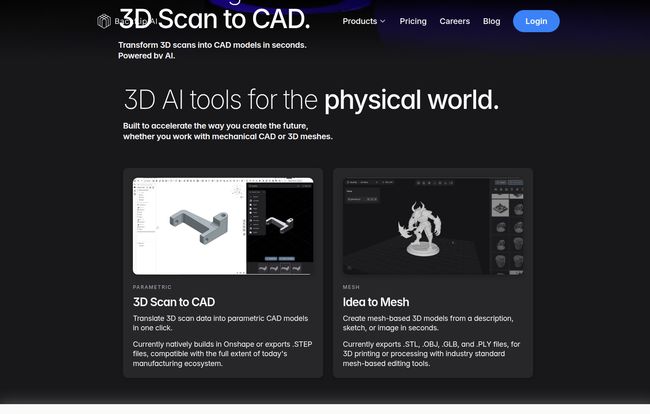
So what’s under the hood? Backflip isn’t one single thing. It’s a platform built to be a co-pilot for designers and engineers, aiming to chop down the most tedious parts of 3D creation. Right now, it’s split into two main tools that tackle very different, but equally frustrating, problems.
AI3D Scan to CAD: Reverse Engineering on Steroids
Imagine this: you have a broken plastic bracket for an old machine. The company that made it went bust in 2005. Your options are to either spend hours measuring it with calipers and remodeling it from scratch, or… you could just scan it. The problem has always been that turning a ‘dumb’ mesh scan into an editable, parametric CAD model is a special kind of digital torture. This is the problem Scan to CAD aims to solve. It takes your 3D scan data and, using AI, converts it into a proper CAD model. A huge deal. Right now, it builds natively in Onshape, but it exports .STEP files, which means you can pull it into SolidWorks, Fusion 360, Inventor, you name it.
MeshIdea to Mesh: Your Imagination’s 3D Printer
This is the more ‘creative’ side of the coin. Think Midjourney, but for 3D objects. You give it a description, a sketch, or even just a photo, and it generates a mesh-based 3D model. We’re talking .STL, .OBJ, .GLB files – the bread and butter for 3D artists, game developers and 3D printing enthusiasts. Need a ‘sci-fi cargo crate with glowing blue panels’? Type it in. Want a ‘stylized low-poly fox for a mobile game’? Upload a sketch. It’s built for rapid ideation, getting you from zero to a usable base mesh in minutes, not hours. You can then take that mesh into Blender or ZBrush for the fine-tuning. It’s about killing the tyranny of the blank screen.
Visit Backflip AI
Who Are The Brains Behind This? A Quick Detour
I mentioned this before, but it’s worth repeating. The founders are Greg Mark and David Benhaim. If those names ring a bell, it’s because they founded Markforged, the company that basically brought industrial-grade carbon fiber 3D printing to the mainstream. They’ve built machines used by companies like Airbus, Bosch, and even Blue Origin. These guys don’t just understand software; they understand manufacturing, engineering, and the real-world headaches that come with making physical things. That context is incredibly important. It tells me they’re not just chasing the AI hype, they’re building a tool to solve a problem they know intimately.
So, How Does It Actually Work in Practice?
This all sounds great on a website, but what does it mean for your actual day-to-day? Let’s paint a picture.
You’re a product designer at a small company. You need a custom enclosure for a new PCB. Instead of starting from scratch in your CAD program, you might use Idea to Mesh with a prompt like “sleek, minimalist project box 100mm x 60mm x 25mm with rounded corners.” You get a dozen concepts in minutes. You pick one, export it, and then use your traditional CAD skills to add the mounting holes and specific cutouts. The grunt work of getting the basic form right? Done.
Or, you work in a machine shop and a client brings in a worn-out gear they need to replicate. You grab a quick 3D scan, upload it to Scan to CAD, and in less time than it takes to finish your coffee, you have a parametric .STEP file ready for tweaking and CNC machining. The hours of manual measurement and modeling have just been compressed into a few clicks. That’s not just a time-saver; it’s a money-maker.
Let’s Talk Money: Backflip AI Pricing Breakdown
Alright, the all-important question: what does it cost? Backflip AI runs on a credit system, which feels a bit like an arcade for 3D modeling. One 3D model generation costs about 40 credits, while an image generation is about 20. The pricing is pretty transparent, which I appreciate.
Here’s a quick look at their plans:
| Plan | Price | Credits & Generations | Best For |
|---|---|---|---|
| Standard | $20 / mo | 2,000 credits (~50 models) | Hobbyists & Freelancers |
| Pro | $40 / mo | 5,000 credits (~125 models) | Power Users & Small Shops |
| Business | $200 / mo | 35,000 credits (~875 models) | Design Teams & Agencies |
| Credit Pack | $20 (one-time) | 2,000 credits, they roll over | One-off projects |
| Enterprise | Contact Us | Custom allocation | Large Organizations |
Important note: All plans come with a 7-day free trial, which gives you 250 credits to play with. Also, credits from the monthly plans expire each month, but the one-time Credit Pack credits roll over. That’s a great option if your workload is inconsistent.
My Unfiltered Thoughts: The Good, The Bad, and The AI
Okay, so what’s my final take? For my money, the potential here is massive. The biggest pro is simply speed. Shaving hours, or even days, off a project’s timeline is a tangible benefit that directly impacts the bottom line.
But it’s not perfect. Nothing is. The biggest hurdle I see for some people is the Scan to CAD tool building natively only in Onshape. Yes, the .STEP export makes it widely compatible, but a direct, native plugin for SolidWorks or Fusion 360 would be the holy grail for a lot of mechanical engineers. I suspect that’s on their roadmap, but for now, it’s an extra step in the workflow.
Also, the platform is still clearly growing. The pricing page mentions a “Mesh to CAD” feature is “coming soon,” which points to their ambition to create a more unified ecosystem. That’s exciting, but it also means users are getting in on a platform that’s still evolving. Not necessarily a bad thing, just something to be aware of.
Who Should Actually Use Backflip AI?
This isn’t a tool for absolutely everyone, but for certain people, it could be a godsend.
- Mechanical Engineers & Product Designers: Absolutely. For reverse engineering, creating fixtures from existing parts, or quickly iterating on new designs, the Scan to CAD feature alone could justify the cost.
- Game Developers & 3D Artists: The Idea to Mesh tool is a fantastic way to quickly generate base assets and props for concepting or for worlds that need a lot of varied objects. A real creativity booster.
- Hobbyists & Makers: If you’re more of an ideas person than a CAD wizard, this lowers the barrier to entry significantly. It helps you get your concepts out of your head and into a printable .STL file fast.
- Small Businesses: Time is money. Backflip allows small teams to iterate on physical product designs with the speed of a much larger R&D department.
Frequently Asked Questions about Backflip AI
- Do I need to be a CAD expert to use Backflip AI?
- Not necessarily. The Idea to Mesh tool is very beginner-friendly. For Scan to CAD, you’ll get the most value if you have CAD software like SolidWorks or Fusion 360 to work with the exported .STEP files, but the conversion itself is automated.
- What file types does Backflip AI support?
- For the Scan to CAD tool, it creates native Onshape models and exports .STEP files. The MeshIdea to Mesh tool exports .STL, .OBJ, .GLB, and .PLY files, which are compatible with most 3D software and slicers.
- Is Backflip AI free?
- There is a 7-day free trial with 250 credits to get you started. After that, it’s a paid service with several subscription tiers and a one-time credit pack option.
- Can I use Backflip AI with SolidWorks or Fusion 360?
- Yes. While the Scan to CAD tool integrates natively with Onshape, you can export your models as .STEP files, which can be imported and edited in virtually any professional CAD package, including SolidWorks and Fusion 360.
- What’s the difference between the monthly plans and the Credit Pack?
- It’s simple: credits on the monthly Standard, Pro, and Business plans expire and refresh at the end of each billing cycle. Credits you buy with the one-time $20 Credit Pack roll over until you use them. Perfect for sporadic projects.
- Is this AI going to take my design job?
- I really don’t think so. I see Backflip AI as a powerful assistant. It’s a force multiplier. It automates hte boring, repetitive tasks, which frees you up to focus on the things that require real human intelligence: problem-solving, creativity, and understanding client needs. It’s a tool, not a replacement.
The Final Word
Look, the world of 3D design is changing. Tools like Backflip AI are at the forefront of that shift. It’s not a magic button that will do your entire job for you, but it is an incredibly powerful accelerator that handles the grunt work. The fact that it’s backed by a team with a proven track record in the demanding world of industrial manufacturing gives me a lot of confidence in its trajectory.
If you spend any significant amount of time creating 3D models, I think you owe it to yourself to at least grab the free trial and see how it fits into your workflow. You might just find you get a whole lot of your time back. It feels like we’re finally getting the smart, genuinely helpful tools we were promised years ago, and I, for one, am excited to see where it goes.
Reference and Sources
- Backflip AI Official Website
- Backflip AI Pricing Page
- Markforged (Company founded by Backflip AI’s creators)
- Onshape CAD Platform


