
Categories: AI Face Swap Generator, AI Face Swap Video, AI GIF Generator, Gender Swap AI
BeArt AI Face Swap: Free, Fun & Frighteningly Good

The AI boom has been a wild ride. One minute we’re talking about AI writing complex code, the next we’re using it to see what we’d look like as a renaissance painting. And somewhere in that beautiful, chaotic middle is the art of the face swap. I’ve been in the SEO and digital trends game long enough to remember the dark ages—the days of clunky Photoshop jobs that looked more like a Picasso nightmare than a seamless swap. They were funny, sure, but mostly because of how bad they were.
So when another AI face swap tool slides across my digital desk, I’m usually a bit skeptical. The promises are always the same: “fast,” “easy,” “realistic.” Most of the time, you get one, maybe two, of the three. But when I stumbled upon BeArt AI Face Swap, something felt different. The big, bold claim of being 100% free with no watermarks? Okay, you have my attention.
So, What’s the Deal with BeArt AI Face Swap?
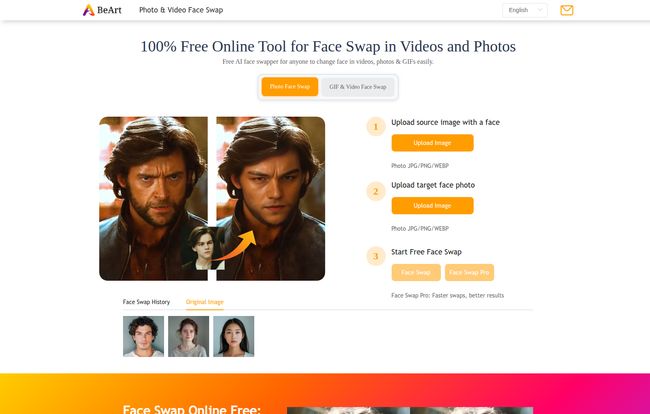
In a nutshell, BeArt is a web-based tool that lets you swap a face from one photo, video, or GIF onto another. The biggest selling point, right out of the gate, is that there’s nothing to download. You just go to their website, upload your files, and let the AI robots do their thing. No installs, no plugins, no giving some random app permission to access your entire life. It’s a breath of fresh air, honestly.
Visit BeArt AI Face Swap
It’s designed for simplicity. You don’t need to be a graphic designer or a tech wizard. The whole process is literally three steps. This kind of accessibility is what separates a gimmick from a genuinely useful tool, even if its main purpose is generating laughs.
I Put It To The Test: My Bizarre Experiment
Naturally, I had to try it. For my test, I decided to use a regal-looking photo of my cat, Mochi, and a classic, stoic portrait of Abraham Lincoln. Why? Because the internet, that’s why.
The process was exactly as advertised.
1. I uploaded the source photo (a very unimpressed Mochi).
2. I uploaded the target photo (Honest Abe).
3. I clicked the “Start Face Swap” button.
And it was fast. Shockingly fast. I was prepared to go make a coffee, but before I could even push my chair back, it was done. The result? Abraham Lincoln with the unmistakable, fluffy face of my cat staring out from a 19th-century portrait. It was seamless. The lighting was matched, the skin (er, fur) texture was blended, and the edges were clean. It was legitimately impressive and more than a little unsettling. My group chat loved it.
The Features That Genuinely Stand Out
Plenty of tools can stick one face on another. But a few things about BeArt make it rise above the noise.
It Goes Way Beyond Still Photos
This isn’t just a static image tool. The ability to face swap on videos and GIFs is a complete game-changer for meme culture and content creation. Think about it: you can insert your friend’s face into that classic blinking guy GIF, or put your own face into a scene from your favorite movie. It turns a simple joke into a full-blown production, and you can do it in a matter of seconds. That’s powerful stuff for social media managers, content creators, or just anyone who wants to win the group chat.
The Glorious Lack of Watermarks
This is a big one for me. Nothing, and I mean nothing, ruins a perfectly good creation like a giant, ugly watermark slapped right in the middle. So many “free” tools use this as a tactic to force you into a paid plan. BeArt doesn’t. The images, GIFs, and videos you create are yours, clean and ready to go. It feels less like a trap and more like a genuine tool offered for people to use and enjoy, which I really respect.
Are The Results Suprisingly Natural?
The AI does some heavy lifting here. It’s not just a clumsy cut-and-paste operation. The tool analyzes the lighting, angle, and expression of the target face to make the swap look as believable as possible. I saw some testimonials on their site, and a user named Sarah Chen mentioned the results were “surprisingly realistic for an online tool.” I have to agree. While you can certainly tell my cat isn’t actually the 16th US president, when you use two human faces, the effect is uncanny.
What’s the Catch? Let’s Talk Price
Okay, this is the part where the other shoe usually drops, right? A tool this good and this fast can’t possibly be free. I went looking for the pricing page, ready to find the hidden subscription tiers. Funnily enough, the link seems to be broken—it just returns an XML error. So, for now at least, all signs point to it being completely free. There are no credit packs, no premium features behind a paywall, no “pro” version mentioned anywhere. It’s just… free. How they sustain this, I have no idea. Maybe it’s a promotional period, maybe it’s ad-supported, but for right now, you can go wild without spending a dime.
The Good, The Bad, and The AI-Generated
No tool is perfect, so let’s get real. The upsides are obvious: it’s free, blazing fast, incredibly user-friendly, and gives you clean, watermark-free results. It’s pretty much the dream for casual users.
But there are a couple of things to be aware of. First, any images you upload are automatically cleared from their servers in 1 day. On one hand, this is a bit of a hassle if you want to come back to a project later. On the other hand, I actually see this as a huge privacy positive. They’re not hoarding your data or your weird cat-president creations. You create, you download, and it all vanishes. I like that. Just remember to save your work!
The only other “con” is that it requires JavaScript to be enabled in your browser. For 99.9% of us, this is a non-issue, it’s on by default. But if you’re browsing from a high-security work computer or have it turned off for some reason, the tool won’t work.
So, Should You Try BeArt AI Face Swap?
Look, in an ocean of AI tools that are either too complicated, too expensive, or too restrictive, BeArt feels like a hidden gem. It does one thing, and it does it exceptionally well, without asking for anything in return. It’s fun, it’s functional, and the results are far better than a free online tool has any right to be.
Whether you’re a serious content creator looking for a quick tool for social media posts or just someone looking to have a five-minute laugh, it’s a no-brainer. Give it a shot. The worst that can happen is you’ll spend a few minutes creating something wonderfully weird.
Frequently Asked Questions
- Is BeArt AI Face Swap really free to use?
- Yes, as of right now, the tool is completely free. There are no hidden fees, subscriptions, or watermarks on your final images, videos, or GIFs.
- Do I need to download any software?
- Nope! BeArt is a fully online tool. You can use it directly from your web browser on a computer or a mobile device, which is super convenient.
- Are my uploaded photos and data safe?
- The platform states that all uploaded files are automatically deleted from their servers after one day. This is a great feature for privacy, as your images aren’t stored long-term. Just make sure you download your creations!
- Can I swap faces in videos and GIFs too?
- Absolutely. This is one of its best features. It supports face swapping in static photos, video clips, and animated GIFs, making it much more versatile than many other simple face swap tools.
- How good is the quality of the face swap?
- For a free online tool, the quality is excellent. The AI does a great job of matching lighting, skin tones, and angles to create a natural-looking result. It’s perfect for memes and fun social media content.


