
Categories: AI Speech Synthesis, AI Text-to-Speech, AI Voice Generator, AI Voice Over
beepbooply Review: AI Voice Generator That Sounds Human?

Alright, let’s have a little chat. If you’ve been in the content creation game for more than five minutes, you know the struggle. You’ve just finished editing the perfect video, or written a killer blog post you want to turn into a podcast. Now you need a voice. But hiring voice talent is expensive and, frankly, a whole process. So you turn to text-to-speech (TTS) tools. And what do you get? Stephen Hawking’s cousin reading your script with all the emotion of a microwave oven. We’ve all been there.
It’s a pain I know all too well. For years, I’ve searched for a TTS that doesn’t sound, well, robotic. Something that doesn’t make my audience’s ears bleed. So when I stumbled upon a tool with the delightfully quirky name beepbooply, my curiosity was piqued. It claims to have 900+ realistic voices. Nine hundred! That’s… a lot. But is it just quantity over quality? I had to find out.
So, What Exactly is beepbooply?
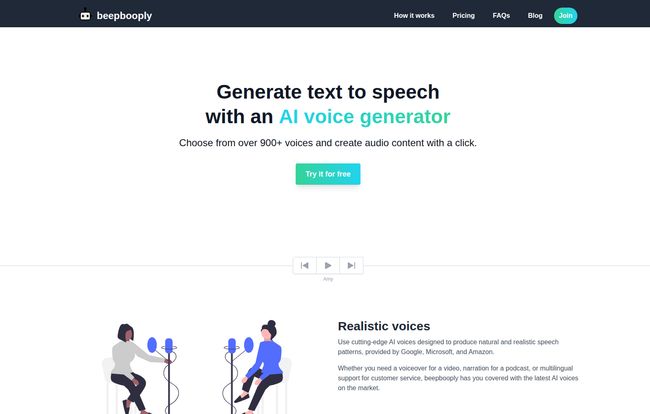
In a nutshell, beepbooply is an AI voice generator. You feed it text, and it spits out an audio file. Simple. But the secret sauce, they claim, is the quality. They’re not using some dusty old engine from 2005. Instead, they’re piggybacking on the serious AI muscle of giants like Google, Amazon, and Microsoft. This means you’re getting access to the same sophisticated tech that powers a lot of the natural-sounding virtual assistants we use every day.
The platform is built for people like us: creators, marketers, podcasters, and anyone who needs quality audio without the hassle. With a library spanning over 80 languages, it’s not just for English-speakers either. It’s positioned as a one-stop-shop for scalable audio content.
Visit beepbooply
First Impressions and How It Works
Logging in, the interface is clean. Refreshingly so. There’s no clutter, no labyrinth of menus designed by a madman. It’s all straightforward, which I appreciate. You’re basically looking at a three-step workflow:
- Choose a Voice: You’re presented with a massive list of voices, filterable by language, gender, and even accent (e.g., American, Australian). You can preview each one with a click.
- Input Your Text: There’s a big text box waiting for you. Copy-paste your script, type it in, whatever floats your boat. This is where the magic starts.
- Generate Audio: Hit the big “Generate voice” button. After a few moments of whirring and clicking in the digital ether, your audio is ready to be played, saved, or downloaded.
That’s it. It’s honestly that simple. No steep learning curve. I was generating audio within two minutes of signing up. A far cry from some video editing software I’ve wrestled with in the past.
The Voices: A Vocal Swiss Army Knife
Let’s get to the main event: the voices themselves. Having over 900 options is almost overwhelming, but it’s a good problem to have. It’s like walking into a vocal candy store.
Do They Actually Sound Realistic?
Yes and no. And I mean that in the best way possible. The “basic” voices are what you might expect—clear, functional, but still a tad artificial. They’re good for simple instructions or prototyping. But the “realistic” voices, the ones powered by the big-name AI? Now we’re talking.
I tested a few. The American English voices were incredibly natural, with human-like intonation and pacing. They’re not going to win an Oscar for a dramatic monologue, but for a YouTube voiceover or a corporate training video? They are more than capable. They nail the tone of an explainer video perfectly. The audio isn’t just a monotone drone; it has cadence. It breathes.
Customization Is Where It Shines
What really sold me was the ability to tweak the output. You aren’t just stuck with the default. You can adjust the pacing, pitch, and volume to better match the tone you’re going for. You can even insert pauses or change the speaking style (like ‘newscast’ or ‘conversational’ on some voices). This level of control is what separates a decent tool from a great one. It gives you the power to direct the AI, to coax a more nuanced performance out of it.
Let’s Be Real: The Downsides
No tool is perfect, and it’s dishonest to pretend otherwise. I have a few bones to pick with beepbooply. First, the Free tier is very much a ‘try before you buy’ deal. You get 10,000 characters a month, which sounds like a lot, but it’s only about 13 minutes of audio. Your projects get wiped every week, and you can only download audio from the basic voices. It’s a good demo, but you can’t run a channel on it.
Another point, which is more of a tip than a flaw, is that the output quality is directly tied to your input. You need to use proper punctuation. A missing comma or a poorly structured sentence can make the AI stumble and sound awkward. Garbage in, garbage out, as they say. So, a quick proofread of your script is essential before you hit generate.
beepbooply Pricing: Breaking Down the Tiers
So, what’s the damage to your wallet? The pricing structure is pretty clear and seems targeted at different user levels. And props to them for offering a yearly plan that saves 20%—always a fan of that.
| Plan | Price | Character Limit / Month | Best For |
|---|---|---|---|
| Free | $0 /mo | 10,000 (~2,000 words) | Testing the platform, very small personal projects. |
| Starter | $7 /mo | 100,000 (~20,000 words) | Solo content creators, YouTubers, small businesses. |
| Plus | $25 /mo | 400,000 (~80,000 words) | Heavy users, podcasters, marketing teams. |
| Premium | $79 /mo | 1,600,000 (~320,000 words) | Agencies, audiobook creators, high-volume production. |
Crucially, all the paid plans include unlimited downloads, unlimited projects, and commerical use rights. That last one is huge. For $7 a month, you can start creating professional-sounding, monetizable content. That’s less than a couple of fancy coffees.
Who Should Use beepbooply?
In my opinion, this tool is a fantastic fit for:
- YouTubers & Video Creators who need consistent voiceovers for explainer videos, tutorials, or listicles.
- Podcasters looking to convert articles to audio or create supplementary content without spending hours on recording.
- Marketers who need quick, clean audio for social media ads or presentations.
- E-learning Developers creating training modules that need clear narration in multiple languages.
Who should maybe pass? If you need a voiceover for a highly emotional short film or a dramatic audiobook, AI probably isn’t quite there yet. The subtlety of human emotion is still… well, human. But for 90% of the standard content creation needs out there? This is a serious contender.
My Final Verdict
So, is beepbooply the future of voiceovers? It’s a massive step in the right direction. It’s affordable, incredibly easy to use, and the quality of the top-tier voices is genuinely impressive. It solves a real problem for content creators by democratizing access to high-quality audio production.
It’s not going to replace the top 1% of human voice artists, but it completely obliterates the need to hire someone for every single project or suffer through robotic TTS. For content at scale, it’s a no-brainer. beepbooply has earned a spot in my digital toolbox, and I suspect it might just find a home in yours, too.
Frequently Asked Questions
- Can I really try beepbooply for free?
- Absolutely. They offer a free tier with 10,000 characters per month. It’s a great way to test the voices and the interface, but it has limitations on downloads and project storage.
- Is the generated audio okay for commercial use, like on my monetized YouTube channel?
- Yes, but you’ll need one of the paid plans (Starter, Plus, or Premium). The free plan is for personal use only.
- How many languages does beepbooply support?
- It supports over 80 languages, with multiple voice options for many of them, making it great for reaching a global audience.
- What makes the AI voices sound so realistic?
- The platform uses advanced AI voice models from industry leaders like Google, Amazon, and Microsoft, which are trained to produce natural speech patterns and intonation.
- What happens to my projects on the free plan?
- They are automatically deleted every 7 days (on Mondays, specifically). To save projects indefinitely, you’ll need a paid subscription.
- Is there a way to get a discount?
- Yes, you can save 20% on any of the paid plans if you choose to be billed yearly instead of monthly.


