
Categories: AI Assistant, AI Paraphraser, AI Writing Assistants
A Personal AI Assistant in Your iMessage? My Review

How many apps do you have on your phone right now? 50? 100? And how many of them are dedicated to one tiny little task? A weather app, a reminder app, a note-taking app, a separate AI chatbot app… it’s exhausting.
I spend my days swimming in the deep end of the SEO and tech pool, and I’ve seen a million ‘productivity-hacking’ tools. Most of them just add another layer of complexity. Another login to remember, another interface to learn. So when I stumbled upon a personal AI assistant that promised to work its magic without needing a new app—by living inside my iMessage—my curiosity was definitely piqued. I mean, an AI that’s just a contact you can text? That’s either genius, or its going to be a gimmick.
Spoiler alert: it’s leaning heavily towards genius.
So, What Is This iMessage AI Exactly?
Imagine your smartest friend—the one who knows everything, can draw anything, and never forgets a thing—is available 24/7 via text. That’s the core idea here. It’s a personal AI assistant, powered by some of the heaviest hitters in the game (GPT-4, Google Search, and DALL-E 3), but you interact with it just like you would any other contact on your iPhone. No app to download. No clunky interface. You just… text it.
This isn’t your grandma’s chatbot. The integration is the killer feature. It’s like having a quiet, hyper-competent butler waiting for instructions right there in your most-used app. The simplicity is honestly refreshing in a world that constantly begs for our attention with notifications and flashy UIs.
Visit better synonyms
The Features That Genuinely Surprised Me
I’m a cynic by trade. I see new tools on Product Hunt every single day. But a few things about this one made me sit up and pay attention.
Your Pocket-Sized Research Assistant
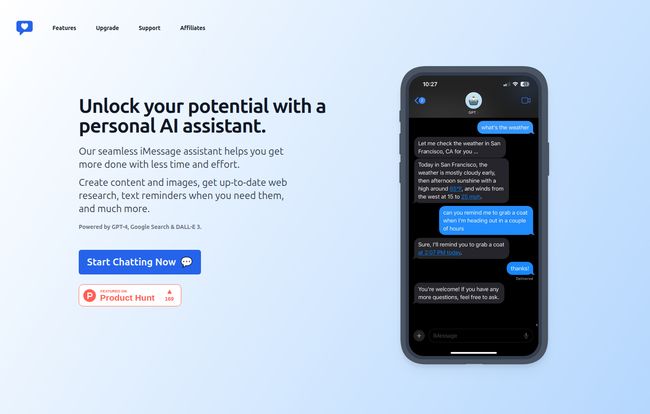
Ever been in the middle of a text debate with a friend about who won the ’98 World Series? Or maybe you’re walking down the street and need a quick summary of a news story without opening a browser and getting sucked into a vortex of clickbait. This is where the web-browsing feature shines. You can just text the AI, “Hey, what’s the weather going to be like in SF tomorrow?” and it’ll pull the info and text you back. The example on their site is spot-on. It’s fast, conversational, and it keeps you in the flow of what you were already doing.
An Artist on Retainer
Okay, this part is just plain fun. With DALL-E 3 integration, you can ask it to create images. Seriously. Text it “Create a photorealistic image of a sloth wearing a tiny top hat and drinking coffee” and a few moments later, you’ve got it. Is this a necessity? Absolutely not. Is it an incredible creative tool for generating blog images, social media posts, or just messing around? 100% yes. It turns a powerful, sometimes complex AI art generator into something as easy as sending a text.
A Reminder System That Doesn’t Feel Like a Chore
I have a love-hate relationship with reminder apps. They’re either too simple or so complicated they require a manual. The beauty here is the natural language. Texting “Remind me to grab a coat at 2:57 PM” feels so much more human than opening an app, hitting the ‘+’ button, typing the task, setting the time, and saving. Because it’s part of a conversation, I feel like I’m more likely to actually use it.
It’s Everywhere You Are (In the Apple World)
This is a big one for anyone invested in the Apple ecosystem. The assistant is available on your iPhone, of course, but also your Apple Watch, MacBook, CarPlay, and even via Siri. The ability to just say, “Hey Siri, text my AI to add milk to the grocery list” is a game-changer. It leverages the ecosystem you’re already in, rather than trying to pull you out of it.
Privacy and Simplicity? Tell Me More.
Here’s the part that really got me. The landing page clearly states: “No signup needed” and “No identifying information.” In an age where every free service is harvesting our data for breakfast, this is a breath of fresh air. You don’t hand over your email, your name, or your life story. You just start chatting. This low-friction, privacy-forward approach is a massive trust signal and, frankly, how more tech should be built. It removes the barrier to entry and the paranoia that often comes with trying new AI tools.
Let’s Talk About the Price Tag
So what’s the catch? Well, there’s always one. The site mentions a free trial and an option to “Upgrade to Pro for unlimited messaging.” They don’t list the specific pricing, which is a bit of a pet peeve of mine, but the model is clear. You can try it out, see if it fits your workflow, and if you become a power user, there’s a subscription. Honestly, that’s fair. The processing power for GPT-4 and DALL-E 3 isn’t free, so a freemium model makes perfect sense. I’d rather pay a few bucks a month for something this integrated and useful than have my data sold.
My Honest Take as a Jaded Tech Blogger
Look, I’m impressed. The concept isn’t just clever; it’s practical. It solves the ‘too many apps’ problem by piggybacking on the most stable and frequently used app on any iPhone: Messages. It’s the ultimate reduction of friction. Some might argue that it further locks you into Apple’s walled garden, and they wouldn’t be wrong. This is unapologetically for the Apple user.
But in my experience, the best tools are the ones that disappear into your workflow. This iMessage assistant comes closer to that ideal than almost any other AI tool I’ve tested recently. It’s not trying to be a spectacle; it’s trying to be a companion. And it’s a darn good one.
FAQs About the iMessage AI Assistant
- How does it actually work without an app?
- It works through the standard iMessage service. You are essentially given a contact number that connects to the AI service. When you send a text to that contact, their servers process your request using GPT-4 or DALL-E 3 and then text you the response back. It’s all done via the SMS/iMessage protocol.
- Is it secure if it’s just a text message?
- The company states they require no identifying information and no signup, which is a strong point for privacy. While iMessage itself has end-to-end encryption between Apple devices, you are still sending your data to a third-party server for processing. It’s likely as secure as other mainstream AI chatbot services, but it’s always wise to avoid sending highly sensitive personal information like bank details or passwords.
- What devices can I use this on?
- It’s designed for the Apple ecosystem. You can use it on any device that supports iMessage, including iPhone, iPad, Apple Watch, and MacBook. It also integrates with CarPlay and can be triggered via Siri.
- How is this different from just using Siri?
- While Siri is great for basic device commands and simple questions, this assistant is powered by the much more advanced GPT-4 model. This allows for more complex conversations, detailed content creation, sophisticated web search summaries, and AI image generation—all things that are currently beyond Siri’s native capabilities.
- Is there a limit to the free version?
- The website implies a limit on the free trial, with an “Upgrade to Pro for unlimited messaging.” The specific number of free messages isn’t stated, but you can expect a cap before being prompted to subscribe.
- Can it remember our previous conversations?
- Yes, much like other advanced AI chatbots, it has conversational memory. This allows you to ask follow-up questions and have a more natural, flowing dialogue without having to repeat the context in every message.
So, Is It Worth a Shot?
Without a doubt. In a market saturated with standalone AI apps, this iMessage-based approach is a standout. It’s simple, powerful, and feels surprisingly natural to use. It meets you where you are, instead of making you come to it. If you live on your iPhone and want to streamline how you get information, create content, and manage your day, this might just be the most practical AI tool you’ll try all year. Give the free trial a go. What have you got to lose? It’s just a text away.
Reference and Sources
- Information and visuals sourced from the official product landing page.
- Social proof mentioned via their Product Hunt feature.
- For more on the underlying technology, read about OpenAI’s GPT-4.


