
Categories: AI Script Writing, AI Subtitle Generator, AI Thumbnail Maker, AI Title Generator, AI Video Editor, AI Video Generator, AI Voice Over, AI Youtube Video Maker, Text to Video, Youtube Tags Generator
BlitzVideo Review: AI Video Generator for YouTubers?

If you’re a content creator, especially on YouTube, you know the grind. The constant, nagging pressure to be consistent. Gary Vee screams it from the rooftops, every guru guide mentions it, and the algorithm… well, the algorithm demands it. But consistency is a beast. It’s not just about having ideas; it’s about the soul-crushing time suck that is scripting, recording, finding B-roll, editing, subtitles, thumbnails, titles, tags… you get the picture. I’ve spent more late nights than I care to admit staring at a Premiere Pro timeline, wondering if it’s all worth it.
It’s what I call the “content hamster wheel.” You run and run just to stay in the same place. So, when a tool like BlitzVideo.ai pops up on my radar, promising to turn simple text into a “publish-worthy video,” my inner skeptic and my exhausted inner creator both sit up and pay attention. Is this another over-hyped AI toy, or could it genuinely be a key to getting off that hamster wheel? I had to find out.
What Exactly is BlitzVideo? Let’s Break It Down
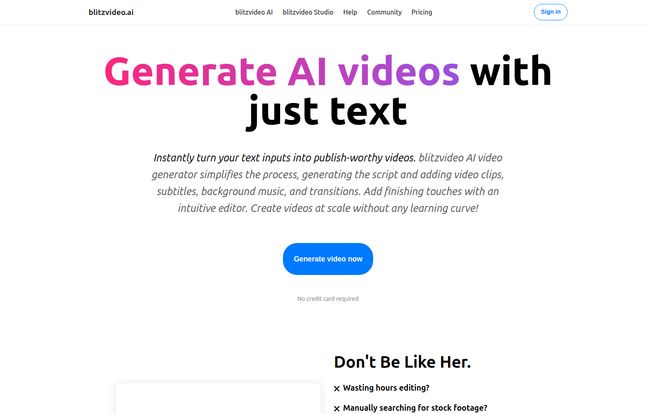
At its core, BlitzVideo is an AI video generator. You feed it text—a full script, a blog post, or just a simple idea—and it takes over. Think of it less as a simple editor and more like having a hyper-caffeinated junior production assistant on your team. This AI assistant reads your text, generates a script if needed, finds relevant stock video clips to match the words, lays down a surprisingly decent AI voiceover, adds background music, and even slaps on subtitles and transitions.
It’s built for one thing above all else: speed. It’s designed to obliterate the technical barriers and time sinks that stop creators from hitting that ‘Upload’ button consistently. We’re talking about automating the most tedious parts of the job, the stuff that makes you want to throw your monitor out the window after the fifth crash of the day.
Visit BlitzVideo
The BlitzVideo Workflow: From Idea to Published in a Few Clicks
The landing page promises a simple three-step process, which, I’ve got to admit, is refreshingly straightforward. There’s no 20-part tutorial to watch or a user interface that looks like an airplane cockpit. It’s clean and to the point.
Step 1: Just Add Words
This is your starting line. You literally just paste your content into a box. Got a blog post you want to repurpose? Paste it in. Have a detailed script for a “Top 10” list? In it goes. Feeling lazy and just have a topic in mind? You can give it a prompt, and its AI will generate a script for you. This first step is all about giving the AI its marching orders.
Step 2: The AI Does the Heavy Lifting
This is where the magic (or at least, the code) happens. Once you hit go, BlitzVideo’s AI gets to work. It analyzes your text, selects visuals, syncs the voiceover, and pieces everything together into a coherent video draft. This is the part that saves you from the endless scroll through stock footage sites or the headache of syncing audio tracks. It’s a huge chunk of work, done in minutes.
Step 3: The Final Polish and Push
No AI is perfect, right? BlitzVideo knows this and gives you an intuitive editor to make final tweaks. Maybe you don’t like a specific clip the AI chose or you want to adjust the timing of a subtitle. You can do that here. Once you’re happy, you can download the video or—and this is a nice touch—publish it directly to your YouTube, TikTok, or Instagram accounts. Streamlining the process right to the very end.
The Features That Actually Matter for Creators
A long list of features is one thing, but which ones actually move the needle? As someone who’s deep in the SEO and content trenches, a few things stood out.
First, the Automated Visuals and B-Roll. My goodness, the hours I’ve lost searching for the perfect clip of someone typing on a laptop. The fact that an AI can do a decent first pass at this is a game-changer. It might not always be perfect, but it gets you 80% of the way there in 1% of the time.
Then there’s the Built-in YouTube SEO. BlitzVideo doesn’t just make the video; it claims to optimize it. It generates titles, descriptions, and tags that are designed to be SEO-friendly. Now, as an SEO pro, I’m naturally skeptical. I’d never fully trust an AI to beat a seasoned expert or even dedicated tools like TubeBuddy. However, for a beginner or someone in a rush, having AI-suggested, optimized metadata is infinitely better than just slapping a random title on and calling it a day. It’s a fantastic starting point that many creators overlook.
The Good, The Bad, and The AI
Alright, no tool is perfect. After playing around with it, here’s my honest take. It’s a classic trade-off scenario.
Why I’m Genuinely Excited
The biggest pro is simply speed. The ability to go from a finished article on my blog to a pretty decent video in under an hour is wild. It makes content repurposing, which we all know we should be doing, a realistic task instead of a dreaded chore. It allows you to feed that hungry YouTube algorithm with the consistency it craves. For faceless channels, news summaries, or tutorial-style content, this is an absolute godsend. It lowers the barrier to entry so you can focus on the quality of your information, not the technicalities of your editing software.
Let’s Be Real About the Downsides
The main drawback is what I call the “AI Ceiling.” You’re trading granular control for convenience. You can’t always get the perfect custom animation, the exact font you want, or that one specific clip that’s in your head. The quality of the final product is entirely dependent on the AI’s capabilities and its library of stock assets. If you’re a filmmaker at heart or your brand has a very distinct, human-centric visual style, you’re going to feel constrained. It’s a fantastic tool, but it’s not a replacement for a unique creative vision… at least not yet.
So, How Much Does BlitzVideo Cost?
This is the part of the review where I’d normally break down the pricing tiers. But here’s a quirky little detail. When I went to find the pricing page to get you the specifics… I was met with a 404 error. Whoops.
I don’t know if this is a temporary glitch, if they’re revamping their plans, or if they’ve moved to a custom quote model. What I do know is that their homepage prominently features a “Generate video now” button with the line “No credit card required.” This suggests there’s a free trial or a freemium model in place, which is great. My advice? Use teh free option to see if the workflow and quality match your needs before you even worry about the price tag.
Who is BlitzVideo Actually For?
This tool isn’t for everyone, and that’s okay. I see it being a perfect fit for a few specific types of people:
- Faceless YouTube Channel Owners: Think channels that do listicles, history explainers, or meditation guides. This tool is practically built for you.
- Bloggers and Marketers: If you want to turn your written content into videos for another traffic source without hiring a video team, this is your easy button.
- Solo Creators on the Brink of Burnout: If you’re struggling to keep up, this can automate a huge part of your process and help you stay in the game.
- Businesses Needing Quick Social Videos: Perfect for creating simple, informative videos for social media feeds without a huge production budget.
On the flip side, if you’re a vlogger whose personality is the brand, a filmmaker who obsesses over color grading, or a team with a highly specific brand guide, you’ll probably find it too restrictive.
In the end, BlitzVideo is a powerful and genuinely useful tool that addresses a major pain point for content creators. It’s not here to replace human creativity; it’s here to handle the grunt work so you have more time to be creative. It takes the most tedious, time-consuming parts of video production and automates them effectively. While you sacrifice some control, you gain an immense amount of speed and consistency. And in the world of online content, that consistency is often the one thing that separates the channels that grow from the ones that fade away.
Frequently Asked Questions about BlitzVideo
- Can I use my own voiceover with BlitzVideo?
- While BlitzVideo excels with its AI voice generation, the ability to upload your own audio track is a standard feature in most advanced video editors. Given the presence of an editor for ‘finishing touches’, it’s highly likely you can mute the AI voice and add your own voiceover file. It’s best to confirm this during a free trial.
- Is the video quality good enough for YouTube monetization?
- Yes, generally. The quality is based on the stock footage library, which is typically HD or 4K. The videos are more than suitable for YouTube’s technical requirements. Monetization, however, also depends on your content’s adherence to YouTube’s policies (like avoiding reused content issues), so originality in your script and presentation is still important.
- How does BlitzVideo’s SEO compare to tools like TubeBuddy or VidIQ?
- Think of BlitzVideo’s SEO feature as a helpful starting point. It generates relevant titles and tags based on your script. Dedicated tools like VidIQ or TubeBuddy offer much deeper analytics, keyword research, and competitive analysis. A smart workflow would be to use BlitzVideo’s suggestions as a base and then refine them using a specialized SEO tool.
- What happens if I don’t like the video clips the AI chooses?
- This is what the built-in editor is for. You should be able to go through the video scene by scene and swap out any clips that don’t fit your vision. You can likely search their library for a better alternative or potentially upload your own clips.
- Is BlitzVideo better than other AI video generators?
- “Better” is subjective and depends on your needs. BlitzVideo seems heavily focused on YouTube consistency and integrates SEO suggestions, which is a strong differentiator. Other tools might offer more animation styles, different AI avatars, or a larger template library. The best approach is to try the free trials of a few top contenders, like Pictory or InVideo, and see which one feels best for your specific workflow.
Reference and Sources
- BlitzVideo Official Website: https://blitzvideo.ai/
- TubeBuddy: https://www.tubebuddy.com/
- VidIQ: https://vidiq.com/


