
Categories: AI Contract Management, AI Contract Review, AI Document Extraction, AI Documents Generator, AI Legal Assistant, AI Report Generator, AI Repurpose, AI Workflow
BRYTER Review: Is This AI the Future of Legal Tech?

For years, the legal world has been drowning in paper. Or, well, the digital equivalent of paper. Mountains of contracts, endless due diligence documents, compliance checks that could make a saint swear. We in the digital marketing and tech space have had our efficiency tools for ages, but legal tech often felt… a decade behind. Then the great AI wave of ’23 hit, and suddenly every other startup was slapping an ‘.ai’ on their name and promising to solve all our problems.
I’ve been skeptical, to say the least. Especially for a field like law where one misplaced comma can change everything. A generic AI that writes poems about cats one minute is NOT something you want reviewing a multi-million dollar M&A agreement the next. The risk is just too high.
But then a platform like BRYTER comes along, and I have to admit, my curiosity is piqued. They aren’t shouting from the rooftops about being a general-purpose miracle. Instead, they’re quietly building something specifically for legal teams. So, is this the real deal? Or just more marketing fluff? I decided to take a closer look.
What Exactly is BRYTER? More Than Just a GPT Wrapper
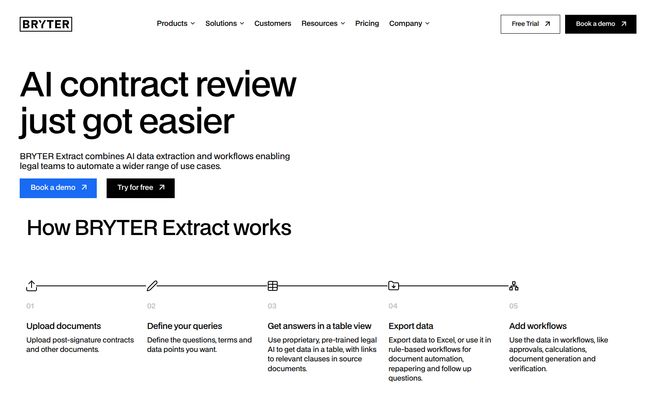
First off, BRYTER isn’t just one thing. It’s a no-code service automation platform. Think of it less as a single tool and more like a high-tech workbench. It’s built on two core ideas: BRYTER Extract, which uses AI to pull specific data from documents, and BRYTER Workflows, which lets you build automated processes using that data. No coding required.
This combination is what makes it interesting. It’s not just about finding information faster; it’s about doing something with it immediately. It’s like having a paralegal who can read 1,000 pages in a minute, perfectly categorize every key date and clause, and then automatically draft summary reports and send reminder emails. All without a coffee break.
Visit BRYTER
The key difference I see here, compared to many other tools, is the focus. It’s not trying to be a chatbot. It’s not trying to write your legal arguments for you. It’s designed for the meticulous, often tedious, work of data extraction and process automation that eats up so many billable hours.
The Features That Make Legal Teams Pay Attention
Okay, so it’s a no-code platform. Cool. But what does it actually do? This is where it gets impressive.
AI That Speaks “Legalese”
BRYTER makes a big deal about its AI being “pre-trained for legal.” This isn’t just marketing speak. It means the models are tuned specifically for the structure, language, and nuance of legal documents. They claim this leads to incredibly high accuracy, which is table stakes in this industry. But the most important promise? No Hallucinations.
An AI “hallucination” is when the model just… makes stuff up. We all saw the headlines about the New York lawyer who used ChatGPT and ended up citing completely fabricated case law. It was embarrassing, and frankly, terrifying for the profession. BRYTER sidesteps this by designing its AI for extraction, not creative generation. It finds and pulls what’s there; it doesn’t invent what isn’t. For any lawyer, that’s a sigh of relief.
Verifiability is Everything
Here’s the feature that really got me. Trust is the biggest barrier to AI adoption in law. How can you be sure the AI got it right? BRYTER’s answer is simple and brilliant: every single piece of data it extracts contains a source reference. It’s a direct link back to the exact spot in the original document where the information was found. You can click and instantly verify. This isn’t a black box; it’s a transparent system that shows its work. That builds an incredible amount of trust.
From Data Extraction to Actionable Workflows
This is where the platform’s two halves meet. You can upload a batch of employment contracts, for example. You then define what you’re looking for—things like start dates, salary, notice periods, non-compete clauses. BRYTER Extract pulls all this into a neat, exportable table. But then, you can build a workflow. Maybe it automatically flags any contract with a non-standard notice period, adds a task for a senior lawyer to review it, and sends a notification. You’re not just finding data; you’re creating an automated compliance machine.
Who is This Really For? Unpacking the Use Cases
This isn’t a tool for a solo practitioner drafting a simple will. This is aimed squarely at in-house legal teams and law firms dealing with high-volume, document-intensive work. Their website lists a bunch of examples that make perfect sense:
- M&A Due Diligence: Imagine cutting down weeks of review into days, or even hours. Their homepage even claims it can “save 90% of time reviewing contracts.” That’s a bold claim.
- Lease Reviews: Pulling key dates, renewal clauses, and financial obligations from hundreds of commercial leases.
- DORA Compliance: They even have a pre-built “DORA Agent” to help financial entities navigate the Digital Operational Resilience Act.
- Commercial Contracts: Standardizing review and ensuring no rogue clauses slip through.
The existence of pre-built agents shows they understand the need for a running start. You don’t have to build everything from scratch, you can use a template designed for a specific, complex task.
Let’s Talk Security, Privacy, and Trust
If you’re a lawyer, your client’s data is sacred. A data breach isn’t just bad PR; it’s a potential ethics violation. BRYTER seems to get this. They prominently feature their security credentials: SOC 2 Type II and ISO27001 certified. For the non-tech-nerds out there, these are serious, difficult-to-achieve certifications that prove you have robust systems in place for managing data securely.
They also specify that they use OpenAI’s models but run them on their own private Azure cloud, hosted in the EU. This is a huge point for any company concerned with GDPR and data sovereignty. Your data isn’t being sent to some random server in who-knows-where; it’s staying within a secure, compliant environment.
The Million-Dollar Question: What Does BRYTER Cost?
Alright, the part you’ve been waiting for. I scrolled all over their site, clicked every link… and you won’t find a neat little pricing table. Both BRYTER Workflows and their other product, BEAMON AI, have a “Get a quote” or “Get pricing” button.
I know, I know. It’s frustrating. But in the world of enterprise B2B software, this is actually pretty standard. The price isn’t a simple per-seat license. It’s based on your firm’s size, your usage, the specific solutions you need. It’s pricing that “scales with your business.” It means you have to talk to a human, which can be a barier for some who just want to kick the tires. But it also means you’re getting a solution tailored to you, not a one-size-fits-all plan that might not fit at all.
My Honest Take: The Good and The Not-So-Good
So, after digging in, what’s my verdict? It’s genuinely promising. The good parts are really good. The focus on accuracy, the brilliant source verification feature, and the promise of no hallucinations directly address the biggest fears lawyers have about AI. The commitment to security is also top-notch. This tool feels like it was designed by people who have actually talked to lawyers and understand their pain points.
On the flip side, the lack of transparent pricing and the requirement to book a demo are hurdles. It signals that this is a premium, enterprise-level solution, and it might put it out of reach for smaller firms or those on a tighter budget. You can’t just swipe a credit card and get started, and in an age of instant gratification, that friction is noticeable.
Frequently Asked Questions about BRYTER
Is BRYTER just another version of ChatGPT for lawyers?
Absolutely not. While it uses large language models, it’s a specialist tool designed for data extraction, not creative writing. Its key features—no hallucinations and source verification—set it apart from general-purpose AI like ChatGPT.
Do I need to be a programmer to use it?
Nope. BRYTER is a no-code platform. It’s built for business experts and lawyers to create their own automated solutions using a visual, drag-and-drop style interface.
Is my data safe with BRYTER?
They take this very seriously. With SOC 2 Type II and ISO27001 certifications, plus hosting on a private EU-based Azure cloud, they have put enterprise-grade security measures in place.
What kind of documents can it handle?
It’s designed for a wide range of legal and business documents, including commercial contracts, employment agreements, lease agreements, M&A paperwork, and compliance documents.
How does the pricing work?
BRYTER uses a custom pricing model. You need to contact their sales team for a quote based on your organization’s needs, size, and intended use cases.
The Final Verdict on BRYTER
BRYTER is not a magic wand that will replace legal expertise. Thank goodness. What it is, is a powerful force multiplier. It’s a precision scalpel in an industry that has been using blunt instruments for far too long. It automates the repetitive, time-consuming tasks, freeing up lawyers to focus on the high-value strategic work that requires human judgment.
If you’re part of a legal team that feels buried under a mountain of documents, BRYTER is definitely worth the demo. It represents a mature, thoughtful application of AI in a field that demands nothing less than precision and trust. This is the kind of legal tech that could actually change the way law is practiced.


