
Categories: AI Background Remover, AI Photo Editor, Open Source AI Models
ByeBackground Review: Free, Private Background Removal?

Okay, let’s talk. As someone who lives and breathes SEO and content, I feel like half my life is spent inside image editors. You know the drill. You need a clean product shot for a client’s e-commerce site, a transparent logo for a blog header, or a cutout of yourself for a new YouTube thumbnail. The next step is usually a sigh, followed by firing up Photoshop, or worse, uploading your image to some random, ad-riddled ‘free’ online tool that probably sells your data to the highest bidder.
I’ve gotten so used to this song and dance. You either pay up for a subscription service like Canva Pro or Remove.bg, or you roll the dice with your privacy. So when I stumbled upon a little tool called ByeBackground, I was skeptical. Another one? But then I looked closer, and let me tell you, this one’s different.
So, What is ByeBackground, Really?
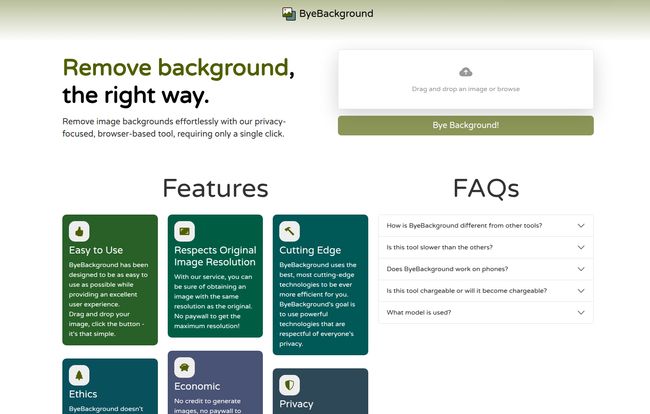
In a nutshell, ByeBackground is a free tool that removes the background from your images. But the magic isn’t what it does, but how it does it. Unlike almost every other tool out there, it processes everything directly in your web browser. Nothing gets uploaded to a server. Nothing. Your image never leaves your computer. It’s like a tiny, self-contained digital darkroom that lives right in a browser tab.
It’s a refreshingly simple concept. You drag your image onto the page, click a button, and a few seconds later, you get a clean PNG with a transparent background. No sign-ups, no credits, no trackers, no ads. Just a tool that does what it promises. It’s an open-source project from a developer in France, which just adds to the charm. You can even check out the source code on GitHub if you’re so inclined.
Visit ByeBackground
My Hands-On Experience: The Good, The Bad, and The Impressive
The interface is minimalist to the extreme. A box to drag your file into and a single button that says “Bye Background!”. That’s it. I love it. I grabbed a recent headshot of myself against a fairly busy office background, dropped it in, and clicked the button.
The result? Pretty darn good. The edges were clean, my shirt was perfectly outlined, and it handled my hair better than I expected. It’s not perfect, mind you. If you have incredibly fine, flyaway hair against a super-cluttered background, you might see some artifacts. But for 90% of the daily tasks a blogger, marketer, or social media manager faces? It’s more than enough.
It’s not instantaneous, there’s a slight pause as your own computer does the heavy lifting. On my fairly modern laptop, it took about 5-7 seconds for a high-res photo. A small price to pay for complete privacy.
The Features That Actually Matter
Let’s break down why this tool has earned a permanent spot in my bookmarks bar. It’s not about a long list of bells and whistles; its about a few core principles executed brilliantly.
The Big One: 100% Privacy
I can’t stress this enough. In an age where every click is tracked, every ‘free’ service is monetizing you, a tool that respects your privacy is a unicorn. Think about it. Are you comfortable uploading an unreleased product photo or a client’s proprietary image to a random third-party server? I’m not. With ByeBackground, that concern is completely gone. The image processing happens locally, using your computer’s resources. It’s a genuine privacy fortress.
Truly Free, No Strings Attached
We’ve all been burned by the “free” tools that let you process an image, only to demand you sign up or pay to download the full-resolution version. It’s infuriating. ByeBackground is different. It’s free. End of story. And it respects the original image resolution. What you put in, you get out—just without the background. Its a great tool for anyone tired of the freemium shenanigans.
An Ethical and Greener Approach
This was a feature that took me by surprise. The website mentions that because it doesn’t rely on huge, power-hungry server farms to process millions of images, it’s a ‘greener’ solution. The computational load is distributed to the user’s device. I’d never really considered the carbon footprint of my background removals before, but it’s a fascinating and compelling point. It’s an ethical choice for your data and a more economical choice for the planet.
But Is It Perfect? Let’s Be Real.
Look, no tool is perfect, especially not a free one. The biggest catch with ByeBackground is that its performance is tied directly to the power of your device. If you’re using a brand new MacBook Pro, it’ll be zippy. If you’re trying to run it on a ten-year-old Chromebook, you might have time to go make a coffee while it works. This is the trade-off for the privacy benefit.
It can also be a bit slow on mobile devices, and for very, very complex images—like a chain-link fence or a fluffy cat sitting in a field of grass—it might not give you the pixel-perfect results a professional photo editor could achieve with an hour of manual work in Photoshop. But for what it is, it’s exceptional.
Who Should Be Using ByeBackground?
I see this tool being a lifesaver for a specific group of people. I’ve broken it down into a simple table:
| Ideal User | Why It Works |
|---|---|
| Bloggers & Content Creators | Quickly create featured images, custom graphics, and thumbnails without leaving the browser. |
| Social Media Managers | Need to make a meme or a quick graphic on the fly? This is your tool. |
| Small E-commerce Sellers | Get clean, consistent product cutouts for your Shopify or Etsy store without paying a monthly fee. |
| Anyone Concerned with Privacy | The absolute best choice for working with sensitive or confidential imagery. |
On the flip side, if you’re a high-end commercial photographer or a graphic designer who needs flawless multi-layered masks for a magazine cover, you’ll probably want to stick to your full-featured desktop software.
The All-Important Question of Price
So, how much does this wonderful little tool cost? What’s the catch?
There isn’t one. ByeBackground is 100% free.
There are no pricing tiers, no credit packs, no subscriptions, and no paywalls. The developer seems to run this as a passion project, funded by the desire to provide a simple, ethical tool to the world. The pricing page on their site literally gives a ‘Not Found’ error, which honestly, is the best pricing page I’ve seen in a long time.
Answering Your Burning Questions
How does ByeBackground compare to paid tools like Canva Pro or Remove.bg?
Paid tools often have more features, like API access, batch processing, and sometimes slightly more accurate AI models for tricky images. However, they come at a cost and require you to upload your images. ByeBackground is the perfect free, private alternative for individual image edits.
Is it really safe to use for confidential images?
Yes. Because the entire process happens within your browser, your image file never gets sent over the internet to a third-party server. From a data privacy standpoint, it’s as safe as editing a photo on your own computer in an offline application.
Will it slow down my computer?
It will use your computer’s processor (CPU) or graphics card (GPU) while it’s working. You might notice a brief spike in resource usage, but it shouldn’t slow down your whole system unless you’re using a very old or underpowered machine. It’s a temporary workload, not a constant drain.
Does it work on all image types?
It works perfectly with common web formats like JPG, PNG, and WEBP. The output is always a PNG file with a transparent background to preserve the cutout.
Will ByeBackground ever become a paid service?
According to the developer’s FAQ on the site, the goal is to keep it free. Since it’s an open-source project that doesn’t rely on expensive servers, the running costs are minimal, making it sustainable as a free tool.
My Final Verdict on ByeBackground
In a world of data-hungry tech and endless subscriptions, ByeBackground is a breath of fresh air. It’s a simple, honest tool that does one thing incredibly well, without asking for your money or your data. It’s a testament to the power of open-source development and a more ethical way of thinking about software.
It might not replace Photoshop for the pros, but it’s not trying to. For the vast majority of us who just need to quickly and safely remove a background, it’s a brilliant solution. It has officially replaced all other online background removers in my workflow. Give it a try; I think you’ll be pleasantly surprised.
References and Sources
- ByeBackground Official Website: byebackground.com
- Project Source Code: ByeBackground on GitHub


