
Categories: AI Caption Generator, AI Hashtag, AI Social Media, AI Social Media Post Generator
Captionary.ai Review: An AI Caption Generator Worth It?

You’ve just taken the perfect shot. The lighting is chef’s kiss, the angle is flattering, the content is pure gold. You’re ready to post it on Instagram, maybe Facebook, and share it with the world. But then… you’re hit with the most dreaded part of the process. The blinking cursor in the caption box. It just sits there. Mocking you. What do you say? How do you sound witty, or profound, or engaging? How do you find those magical hashtags that actually get you seen?
For years, this has been the bane of social media managers, influencers, and even casual posters. It’s a creative bottleneck that can turn a 5-minute post into a 30-minute ordeal. I’ve been in the SEO and traffic generation game for a long time, and I can tell you that while a picture is worth a thousand words, the right words (and hashtags) are what get that picture seen by a thousand people.
So when a tool like Captionary.ai pops up on my radar, claiming to be an “AI-powered creative partner,” my professional curiosity gets the better of me. Is this another overhyped AI gimmick, or is it a genuinely useful tool that can free us from caption-writing purgatory? I decided to take a look.
So What Is Captionary.ai, Really?
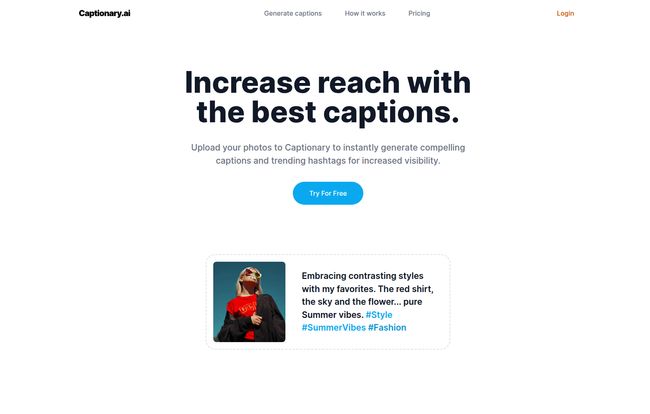
At its core, Captionary.ai is an AI caption generator. But that’s a bit of an oversimplification. It’s not just spitting out random generic phrases. The whole idea is that it analyzes the content of your photo to generate relevant and (hopefully) compelling captions. Think of it less like a random sentence generator and more like a junior copywriter that you can show a picture to and ask, “Hey, what should I say about this?”
It’s designed for anyone who feels the social media content grind: influencers trying to maintain a constant stream of high-quality posts, small brands building an online presence, or even just regular folks who want to spend less time staring at their phone and more time, you know, living.
How Does This AI Magic Actually Work?
One thing I immediately appreciated was the simplicity. There’s no complex dashboard or steep learning curve. The process is boiled down to three straightforward steps, which is a huge plus for anyone who feels overwhelmed by complicated software.
It goes something like this:
- Upload Your Image: You start by feeding the machine. You give it the photo you want to post. The AI then gets to work, looking at the key elements in your visual. Is it a beach scene? A plate of food? A person in a stylish outfit?
- Generate Captions: This is the main event. Based on its analysis, Captionary.ai spits out a few caption options. It also suggests a list of trending hashtags that are supposed to be relevant to your image and audience.
- Copy and Paste: Find a caption you like, maybe tweak it a little to add your own personal flair, and then copy it and the hashtags straight into your social media app. Done.
The whole process is designed to be frictionless. No fuss, no muss. Just a quick solution to a common problem.
Visit Captionary
The Good, The Bad, and The AI-Generated
Alright, no tool is perfect. As an SEO professional, I’m naturally skeptical. I’ve seen countless tools promise the world and deliver a small, slightly misshapen continent. So let’s break down what I genuinely like and what gives me pause about Captionary.ai.
What I Genuinely Like (The Pros)
The most obvious advantage is the sheer time-saving aspect. The creative energy it takes to write a good caption is real, and offloading that, even just for a first draft, is a massive win. It’s a great way to overcome that initial writer’s block.
But for me, the real potential lies in the trending hashtag suggestions. Hashtag strategy is a dark art. Using the right mix of popular, niche, and location-based tags can make or break your post’s visibility. If the AI can consistently serve up relevant, high-performing hashtags, that alone could be worth the price of admission. It takes the guesswork out of a critical part of the social media growth equation.
The process is also incredibly easy. In a world of over-complicated SaaS platforms, the simple ‘upload-and-copy’ workflow is a breath of fresh air. It knows what it is and doesn’t try to be a million other things.
A Few Words of Caution (The Cons)
Okay, now for the reality check. The biggest red flag for me is the little asterisk () you see sprinkled all over the Pro and Enterprise plans. Features like `Emojis`, `Save drafts`, `SEO optimized`, and `Multiple photos (Carousel)` are all marked as coming soon. This is a classic move in the startup world, selling the future vision of the product. While I appreciate the ambition, you’re paying now for features you might not get for a while. That’s a gamble. The “SEO optimized” feature in particular is something I’d want to see in action before getting too excited.
Then there are the credit and image size limits. The Basic plan gets you 20 credits a month. If you post daily, you’ll burn through that in three weeks. It forces you to be selective about which posts get the AI treatment. The Pro plan’s 100 credits are much more generous, but it’s still a limitation to be aware of. You’re not getting unlimited generations here.
Let’s Talk Money: A Look at Captionary’s Pricing
So, what does this AI-powered convenience cost? The pricing structure is pretty standard for a SaaS tool, broken into three tiers. I’ve put together a quick table to make it easier to compare.
| Plan | Price per Month | Key Features |
|---|---|---|
| Basic | $17.99 | 20 Credits, 2MB Max Image Size, Hashtags, Voice Tone |
| Pro | $19.99 | 100 Credits, 3MB Max Image Size, Faster Speed + All ‘Coming Soon’ Features |
| Enterprise | $89.99 | 1000 Credits, 3MB Max Image Size, Fastest Speed + All ‘Coming Soon’ Features |
Honestly, the jump from Basic to Pro is the most interesting part. For just $2 more, you get five times the credits (20 vs 100) and a higher image size limit, not to mention access to all the future features when they do roll out. For any serious user, the Pro plan seems like teh obvious choice. The Basic plan feels more like an extended trial, for people who post maybe once or twice a week. The Enterprise plan is clearly aimed at agencies or large brands managing multiple accounts.
Who Is Captionary.ai Actually For?
I see a few key groups getting real value out of this.
- The Budding Influencer: Someone who needs to post consistently but doesn’t have a team. This tool can be a brainstorming partner to keep their content pipeline flowing.
- The Small Business Owner: You’re already juggling marketing, sales, accounting… everything. Spending 30 minutes on an Instagram caption feels like a luxury you can’t afford. This gets the job done fast.
- The Socially-Exhausted Millennial: You just want to post your vacation photos without having to think too hard. You want it to sound good, but the creative energy just isn’t there after a long day of work. This is for you.
It’s a tool for people who value their time and mental energy. It’s not going to replace a top-tier human copywriter, but it’s not trying to. It’s trying to replace the blank, empty void of the caption box.
The Bigger Picture on AI and Creativity
There’s a lot of debate right now about AI’s role in creative fields. Some people see tools like this as a threat to human creativity. I see it differently. I’ve always felt that the best tools don’t replace us, they augment us. A calculator doesn’t make you worse at math; it just lets you solve complex problems faster. I view Captionary.ai in a similar light.
It’s a starting block. A way to get from 0 to 1. The best results will always come from taking the AI’s suggestion and infusing it with your own unique voice, your own personality. It’s not about letting the machine do all the work; it’s about letting it handle the grunt work so you can focus on the final, human touch.
Frequently Asked Questions
- How does Captionary.ai actually come up with the captions?
- It uses artificial intelligence, specifically computer vision, to analyze the objects, setting, and context of your photo. It then uses a language model to generate text that describes or relates to what it ‘sees’ in the image.
- Are the hashtags really effective for increasing reach?
- In theory, yes. The tool aims to provide trending and relevant hashtags. The effectiveness of any hashtag strategy depends on many factors, including your niche and audience. The best approach is to use the suggestions as a starting point and mix in your own proven, niche-specific tags.
- Is the Pro plan worth the extra $2 over the Basic plan?
- In my opinion, absolutely. You get 5 times more credits (100 vs 20) for a very small price increase. If you plan on using the tool for more than 4-5 posts a week, the Pro plan is a much better value.
- What does ‘credits’ mean in the pricing plans?
- One credit is typically used each time you generate a set of captions and hashtags for a single image. So, the Basic plan lets you do this 20 times per month, while the Pro plan allows for 100.
- Can I use Captionary for platforms other than Instagram?
- Right now, the core functionality works for any platform since you just copy and paste the text. However, a dedicated ‘Platform’ feature, which would likely tailor the caption style for Facebook, LinkedIn, etc., is listed as ‘coming soon’ on the Pro and Enterprise plans.
- Does Captionary.ai have a free trial?
- Yes, the website has a prominent ‘Try For Free’ call to action, allowing you to test out the service and see if it works for you before committing to a paid plan.
My Final Verdict on Captionary.ai
So, is Captionary.ai the silver bullet for all your social media woes? No, of course not. But it is a very promising tool that addresses a very real pain point. It’s a fantastic starting point for anyone who struggles with the creative side of caption writing.
The biggest caveat remains the ‘coming soon’ features. The tool’s full potential is still on the horizon. However, what it offers right now—quick, image-aware caption ideas and hashtag suggestions—is genuinely useful. It saves time, reduces friction, and can help you stay consistent with your posting schedule.
If you’re a creator or business owner on the fence, I’d say give the free trial a spin. See how the suggestions fit your brand voice. For the price of a couple of fancy coffees a month, it might just be the creative assistant you’ve been looking for. It’s not perfect, but it’s a definite step in an interesting direction.


