
Categories: AI Charting, AI Diagram Generator, Graph AI
ChartAI Review: Is This AI Chart Generator Worth It?

If you’ve ever had to make a flowchart for a client, a system diagram for a development team, or even just a simple org chart, you know the pain. You fire up PowerPoint or Visio, and what should take ten minutes ends up being a two-hour battle against alignment guides, stubborn connector lines, and text boxes that just refuse to behave. It’s like trying to herd cats with a keyboard. I’ve been there. You’ve been there. We’ve all lost a small piece of our souls to a badly behaved arrow.
For years, this has just been… the way. A necessary evil. But with the AI explosion we’re living through, I’ve been waiting for something to come along and fix this particular headache. We have AIs that can write poetry and generate photorealistic images of astronauts riding horses, so surely one can draw a few boxes and connect them, right?
Well, a new tool called ChartAI just landed on my radar, claiming to be the “ChatGPT for charts and diagrams.” Big words. It promises professional-looking diagrams in two seconds flat. Two seconds! That’s less time than it takes me to find the dang rectangle shape tool. So, naturally, I had to see if it was just another over-hyped tool or the workflow revolution I’ve been dreaming of.
What Exactly Is ChartAI? A First Look
At its core, ChartAI is a web-based application that creates diagrams from text prompts. You don’t drag and drop. You don’t fiddle with settings. You simply tell it what you want, and the AI is supposed to spit out a clean, coherent diagram. The concept is beautifully simple, and frankly, it’s about time.
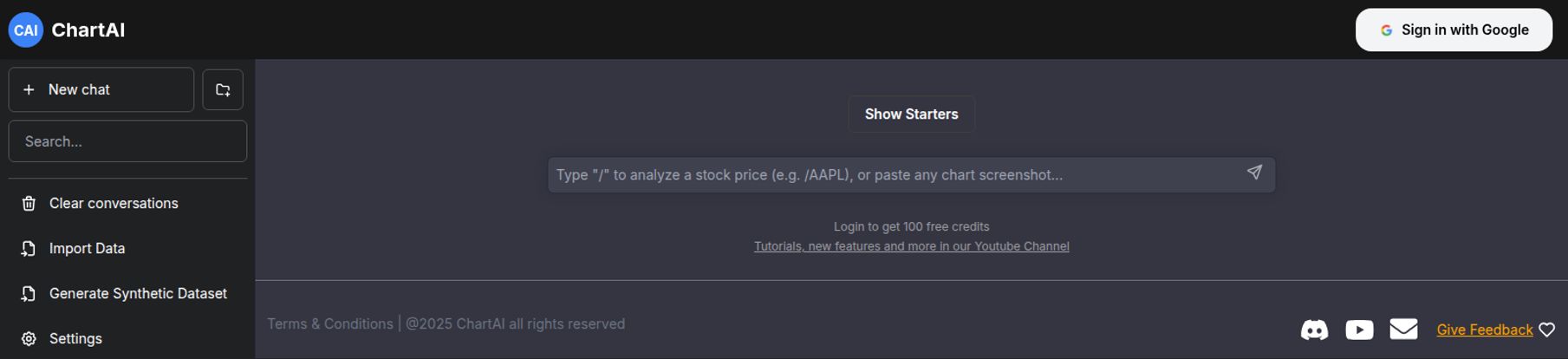
The screenshot of their interface tells a big part of the story. It’s a clean, dark-mode layout that feels immediately familiar to anyone who has used a modern AI chatbot. No clutter. No overwhelming toolbars. Just a prompt box, waiting for your command. The whole thing feels designed to remove friction, which as a busy professional, I deeply appreciate.
Visit ChartAI
Getting Started with ChartAI: My First 5 Minutes
Onboarding is a breeze—just a standard ‘Sign in with Google’ button. I like that. I don’t need another password to forget. Once you’re in, you’re greeted by that simple prompt box. The placeholder text gives a clue to its power: `Type “/” to analyze a stock price (e.g., /AAPL), or paste any chart screenshot…`. So it’s not just about creating from scratch; it seems it can interpret existing visuals too. Interesting.
But what really caught my eye was the sidebar. Sure, you have the basics like ‘New chat’ and ‘Clear conversations’. But then you see ‘Import Data’ and, get this, ‘Generate Synthetic Dataset’. Whoa. Okay, so this is potentially more than just a drawing tool. The ability to import your own data and have it visualized automatically is a huge deal. And generating synthetic data? That’s a pretty niche, high-level feature that tells me they might be targeting a more technical audience of developers and data scientists, not just marketers and PMs. I’m intrigued.
The Core Features That Actually Matter
A tool can have a million features, but only a few really define it. Here’s what seems to make ChartAI tick.
The “ChatGPT for Charts” Experience
This is the main hook. The idea of using natural language to build visuals is a paradigm shift. Instead of thinking like a designer—”I need a square here, a diamond there, an arrow connecting them”—you can think in terms of process. “Create a flowchart for a customer checkout process starting with ‘Add to Cart’ and ending with ‘Order Confirmation’.” The potential time savings are just… immense. It shifts the work from tedious execution to high-level instruction.
Speed Demon: The 2-Second Promise
I’m still a bit of a cynic about the “2 seconds” claim. Maybe for a three-box flowchart, sure. But for a complex AWS architecture diagram? I have my doubts. That said, even if it’s 10 or 20 seconds, that’s still an order of magnitude faster than doing it manually. The goal isn’t just speed for speed’s sake; it’s about maintaining flow. You can stay in your creative or analytical zone without getting bogged down in the mechanics of diagramming. That’s the real win.
Professional Output Without the Designer Price Tag
Let’s be honest, most of us aren’t graphic designers. Our homemade diagrams often look… homemade. ChartAI promises professional-looking results out of the box. If it delivers on this, it’s a massive value proposition for small teams, startups, and solo consultants who need to produce high-quality reports and presentations without a design budget.
So, How Does It Actually Perform? The Good and The… Murky
No tool is perfect, especially a new one. After poking around, here are my initial thoughts, the good and the not-so-good.
On one hand, the upsides are pretty clear. The ease of use is off the charts (pun intended, sorry not sorry). The learning curve is practically nonexistent if you can write a sentence. This makes it incredibly accessible. The speed, as I mentioned, is a potential game-changer for rapid prototyping and brainstorming. You could literally create three different versions of a process flow in under a minute to see which one feels right.
However, there are some big question marks. The biggest one for me is the reliance on AI accuracy. We’ve all seen AI get the small details hilariously wrong. What happens when it misinterprets a key step in your prompt? How easy is it to edit the output? If I spend 2 seconds generating a chart and 20 minutes correcting it, have I really saved any time? The effectiveness of the entire platform hinges on how well the AI translates intent into reality. It’s the difference between magic and a frustrating mess.
There’s also a general lack of deep information available right now. It feels very new, which is exciting but also means we don’t have a lot of user case studies or advanced tutorials yet. What are its true limitations? We just dont know yet.
Who is ChartAI Really For?
I can see a few groups of people getting really excited about this. Project Managers and Business Analysts could use it to map out user stories and business processes in real-time during meetings. Developers and Engineers could quickly scaffold system architecture or database schemas without breaking their coding flow. And of course, Marketers and Content Creators like myself could generate visuals for presentations and blog posts in a fraction of the usual time. It’s a tool with broad appeal, assuming the execution is solid.
A Quick Word on Pricing
Ah, the all-important question. As of my review, there isn’t a public pricing page. What we do know from the interface is that you get 100 free credits when you sign in. This is a smart freemium model that lets you properly kick the tires before committing. What happens after those 100 credits are gone is anyone’s guess. It’ll likely be a monthly subscription model, maybe with different tiers, or perhaps they’ll sell credit packs. For now, 100 free tries is more than enough to see if it fits your workflow.
Frequently Asked Questions about ChartAI
Is ChartAI free to use?
It has a free trial model. You get 100 free credits upon signing up to generate diagrams. The pricing for continued use after that hasn’t been announced yet.
What kinds of diagrams can ChartAI create?
While not explicitly listed, the interface and concept suggest it’s built for things like flowcharts, sequence diagrams, mind maps, organizational charts, and even basic data charts like stock analyses. Its full range is still being explored.
Is ChartAI better than Visio or Lucidchart?
It’s a different beast. Tools like Visio and Lucidchart offer deep manual control and a vast library of templates. ChartAI bets on AI-powered speed and simplicity. It’s better if you want a good-looking chart now with minimal effort; it’s probably not better if you need pixel-perfect, highly customized technical schematics.
Can I import my own data into ChartAI?
Yes, the user interface clearly shows an “Import Data” feature. This suggests you can upload datasets (like CSV or Excel files) and have the AI create visualizations from them.
How accurate is the AI?
This is the million-dollar question. Its accuracy will depend heavily on the quality of your prompt and the complexity of the diagram. Expect to experiment and refine your requests to get the best results. It’s a collaboration with the AI, not a magic wand.
My Final Verdict: Is ChartAI the Future?
So, is ChartAI the real deal? My gut says… maybe. The potential is enormous. The core concept of prompt-based diagramming is, without a doubt, the future of this kind of work. It aligns perfectly with the broader trend of AI integration into our daily software.
The platform is fast, ridiculously easy to start with, and the free credit model makes it a no-brainer to try. The big unknowns—the nuance of the AI’s interpretive power and the eventual cost—will ultimately determine its long-term success. But for now? I’m genuinely excited. It’s one of the most practical applications of generative AI I’ve seen for everyday business tasks.
Go sign up, use your free credits, and see if you can make a diagram of your morning coffee routine. It might just be the most productive (and fun) five minutes of your day.
Reference and Sources
- ChartAI Official Website: Information and access to the tool are based on the product’s live interface. A direct public URL was not available, but you can search for “ChartAI diagram tool.”
- Lucidchart: For comparison on traditional diagramming tools. https://www.lucidchart.com/
- TechCrunch Article on AI Productivity: For context on the broader trend of AI in the workplace, see articles like ‘The emerging era of generative AI in the enterprise’.


