
Categories: AI Design Generator, AI Developer Tools, AI Diagram Generator, Open Source AI Models
ChartDB Review: An AI Database Diagram Tool That’s Legit?

If you’ve ever had to design, document, or just understand a complex database, you’ve felt the pain. You’ve been there, wrestling with some ancient, clunky ERD tool that feels like it was designed in 1998 and never updated. It’s like trying to sketch a blueprint on a wet napkin. You spend more time fighting the software than actually thinking about your data relationships. It’s a chore. A genuine, soul-sucking chore.
So, when I kept hearing whispers about ChartDB, my curiosity was piqued. The buzzwords were flying: “free,” “open-source,” “AI-powered.” Normally, that’s enough to make my inner skeptic raise an eyebrow. But I decided to give it a proper go, and well, I have some thoughts. And for once, they’re mostly good ones.
So, What Even Is ChartDB?
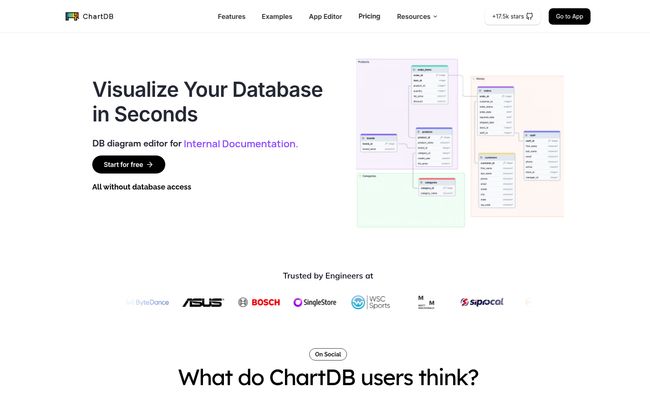
At its heart, ChartDB is a database diagram editor. Simple enough. It helps you draw those boxes-and-lines diagrams that show how all your tables connect. But that’s where the comparison to older tools stops. Calling ChartDB just a diagram editor is like calling a smartphone just a phone. It misses the point entirely.
This thing is built for the way we work now. It’s a modern, web-based tool that lets you visualize your database schema, often from a single query. You can import an existing structure, tweak it visually, and then—here’s the fun part—use its AI to generate the DDL (Data Definition Language) scripts to build that schema in a completely different SQL dialect. It’s less of a manual drawing board and more of an intelligent database Swiss Army knife.
The Good Stuff: Why I’m Actually Impressed
I went in ready to be underwhelmed, but a few features genuinely made me sit up and say, “Okay, that’s clever.”
The “Single Query” Import is Genuinely Magical
This is the headline feature for a reason. Instead of manually creating every single table, column, and foreign key for an existing database, you can often just import it. The site claims it takes about 15 seconds, and that’s not far off. For anyone who’s ever inherited a poorly documented database, this feature alone is a lifesaver. It takes the grunt work out of discovery, turning hours of reverse-engineering into a coffee break.
AI-Powered DDL Generation That Doesn’t Suck
I’m so tired of the “AI” label being slapped on everything. But here, it feels earned. Let’s say you have a schema designed for PostgreSQL, but a new project requires MySQL. In the old days, that meant a painful, manual translation process, carefully checking data types and syntax differences. With ChartDB, you can just… export it for MySQL. The AI handles the translation. I’ve seen it work, and while you should always double-check AI-generated code, it gets you 95% of the way there. That’s a massive win.
Visit ChartDB
Open-Source and Self-Hosted? Yes, Please.
This is a big one for me, and for any company that’s serious about data security. While ChartDB offers a convenient cloud version, the fact that you can download it and host it on your own infrastructure is huge. It means your database schemas, which are the blueprints to your most valuable asset, never have to leave your control. It shows a deep understanding of what professional dev teams actually need: options. You get the ease-of-use of the cloud for team collaberation or the iron-clad privacy of self-hosting.
It Just… Looks Good
Maybe it’s a small thing, but I don’t think so. The diagrams are clean, modern, and visually appealing. In a world where we have to share technical docs with less-technical stakeholders, having something that doesn’t look like a computer science textbook from the 90s really helps. The ability to share a beautiful, interactive diagram with a simple link is just the cherry on top.
Let’s Be Real: The Not-So-Perfect Parts
No tool is perfect, and it’s important to be honest about that. ChartDB is still young, and it shows in a couple of places.
First, the Advanced Query Editor is listed as a work-in-progress (WIP). This is a bit of a bummer for power users who want to write complex queries directly within the tool to fetch schemas. It’s not a dealbreaker, since you can import DDL files, but it’s a feature I’m eagerly waiting for. They’re transparent about it, which I respect, but it’s a limitation for now.
Also, a minor gripe: the homepage is a little vague on pricing specifics. You see the features and the plans, but for the nitty-gritty details of what each tier includes, you have to click over to the dedicated pricing page. Not a huge deal, but it’s an extra click to get the full picture.
Breaking Down the ChartDB Pricing (Is It Worth It?)
Speaking of pricing, let’s get into it. They have a pretty standard tiered model, but it’s surprisingly generous, especially at the bottom end.
The Free plan is fantastic. You get 2 diagrams and up to 10 tables. For a student, a solo developer working on a personal project, or just someone wanting to properly test the tool, this is more than enough. You don’t get the fancy AI stuff or migrations, but you get the core diagramming tool for free. No complaints here.
Then there’s the Pro plan, which sits at a very reasonable $2.50 per month per person. This, in my opinion, is the sweet spot. It unlocks unlimited everything—diagrams, tables—and brings in the powerful features like the DBML editor and the AI Assistant for DDL generation. If you’re a freelancer or a professional who deals with databases regularly, the cost is trivial compared to the time it saves.
Finally, the Team plan comes in at $39 per month for a team of up to five people. This is built for collaboration. You get everything from Pro, plus real-time sync, public diagrams for sharing, and priority support. If you have multiple developers working on the same database, this plan makes perfect sense to keep everyone on the same page and avoid costly mistakes.
Who Is ChartDB Actually For?
After playing around with it, I have a clear idea of who gets the most value here.
- Backend & Full-Stack Developers: To quickly visualize schemas, plan migrations, and collaborate with their team. This is a no-brainer.
- Database Administrators (DBAs): For documenting existing systems and designing new ones. The import/export functionality is a massive time-saver.
- Students & Educators: The free plan is an incredible teaching aid for learning about database design and SQL.
- Data Analysts & Scientists: When you’re dropped into a new project, being able to quickly generate a visual map of the database you’re working with is invaluable.
Who might want to wait? Probably someone who absolutely needs a mature, all-in-one query editor and can’t use an external tool for that part of their workflow. But for most of us, that’s not a major hurdle.
The Final Verdict
Look, I’m a cynical guy when it comes to new dev tools. Most are just hype. But ChartDB is different. It feels like a tool built by developers who have actually experienced the frustrations of database management. It’s smart, fast, flexible, and solves a real problem without unnecessary complexity.
It successfully bridges the gap between powerful functionality (AI migrations, self-hosting) and user-friendly design. While it’s not perfect yet, its trajectory is incredibly promising. If you’re still wrestling with old-school ERD software, do yourself a favor. Give ChartDB’s free plan a spin. You have nothing to lose but the headache.
Frequently Asked Questions about ChartDB
- Is ChartDB really free to use?
- Yes, it has a generous Free forever plan that includes 2 diagrams and up to 10 tables per diagram. It’s perfect for small projects or for trying out the core features before committing.
- Can I host ChartDB on my own servers?
- Absolutely. ChartDB offers a self-hosted option, which is a major advantage for organizations with strict data privacy and compliance requirements. You get full control over your data.
- What databases does ChartDB support?
- It supports a wide range of popular databases, including PostgreSQL, MySQL, SQL Server, SQLite, CockroachDB, and Oracle, among others. Its AI export feature can also generate DDL for many SQL dialects.
- How does the AI in ChartDB actually work?
- The primary AI feature is the DDL script generation. You can design or import a schema and then ask the AI to write the SQL code needed to create that schema in a specific database system, like converting from PostgreSQL to SQL Server syntax.
- What is the main difference between the Pro and Team plans?
- The Pro plan is designed for individual users and unlocks unlimited diagrams and advanced features like AI. The Team plan includes all Pro features but adds critical tools for collaboration, such as real-time diagram syncing, team management, and public diagram sharing.
- Is there a student discount available?
- The pricing page FAQ section has a question about a student discount, which suggests they have a policy for it. It’s best to check their website or contact their support directly for the most current information on student offerings.


