
Categories: AI Art Generator, AI Assistant, AI Chatbot, AI Image Generator, AI Models, AI Summarizer, AI Tools Directory, AI Translate, AI Writing Assistants, Text to Image
ChatAI Review: The All-In-One AI Tool I Didn’t Know I Needed

If you’re in marketing, content creation, or frankly, just breathing in 2024, your browser tabs probably look like a digital centipede. You’ve got one for ChatGPT to draft emails, another for an AI image generator to whip up some blog graphics, and maybe a third for a fancy AI writer to help bust through writer’s block. It’s a lot. I’ve been living in that tab-hell for years, juggling subscriptions and trying to remember which AI is good for what.
So when I stumbled upon ChatAI, my initial reaction was, naturally, skepticism. Another AI tool? Great. But the tagline, “Your Do Everything AI Companion,” was just cocky enough to get my attention. An all-in-one platform? Sure, I’ll bite.
And you know what? I’m glad I did. This isn’t just another fish in an ocean teeming with AI sharks. It’s more like a Swiss Army knife. And I’m here to give you the no-fluff rundown of what it is, who it’s for, and whether it can finally let you close some of those tabs.
So What is ChatAI, Really?
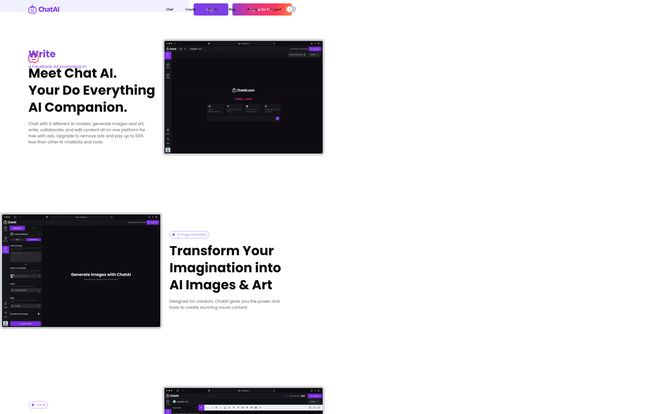
Think of ChatAI not as a single AI, but as a clever container for a bunch of the best ones. It’s a unified platform that gives you access to a whole roster of powerful AI models without needing a dozen different accounts. We’re talking about having heavy-hitters like ChatGPT 4o and ChatGPT 3.5, alongside other interesting players like Cohere, AI21 Labs, and even the image-magic of Stable Diffusion, all under one roof.
It’s like having a universal remote for the AI world. Instead of switching channels (or tabs), you just click a dropdown menu to see how a different AI engine would answer your prompt. For an SEO and content nerd like me, that’s just… incredibly useful. You can A/B test AI responses in real-time. It’s brilliant.
Visit ChatAI
My Favorite Features After Kicking the Tires
Okay, so it aggregates AIs. Cool. But what does that feel like to use? Here’s what stood out to me after spending a good amount of time with the platform.
The All-You-Can-Eat AI Buffet
This is the main event. The ability to switch between AI models on the fly is a bigger deal than it sounds. Last week, I was working on a campaign slogan. I fed my prompt to ChatGPT-4o and got some solid, safe options. With one click, I switched to Cohere, which is known for its slightly more creative, sometimes quirky, outputs. It gave me a few weird ones, but one was an absolute gem that I would’ve never gotten from GPT alone. No copying, no pasting, no opening a new window. That simple workflow improvement is a massive time-saver.
From Imagination to Image in a Few Clicks
I’m not a graphic designer. My artistic skills peak at stick figures. So, AI image generation has been a godsend for blog headers and social media posts. ChatAI integrates image generation powered by Stable Diffusion, and it’s surprisingly robust. It has about 10 different models to choose from, along with filters and templates. While a dedicated artist might still live in Midjourney’s Discord server, for a marketer who just needs a high-quality, thematic image of “a sad robot eating a taco in the rain, photorealistic style,” this gets the job done without the steep learning curve. It’s accessible, and that’s a huge win.
DocAI is the Unsung Hero for Content Creators
Okay, this feature is genuinely clever. We’ve all done it: had a long, rambling brainstorming session with an AI, and then faced the nightmare of trying to copy, paste, and format that mess into a usable document. DocAI solves this. It’s a built-in content editor that lets you convert your chats directly into editable documents. You can write, summarize, translate, and collaborate right there. It turns the chaotic creative process into a structured output. I’ve used it to turn a messy Q&A with the AI into a clean FAQ section for a client’s website. Seriously, it’s the kind of feature you don’t know you need until you use it, and then you can’t go back.
Let’s Talk Money: The ChatAI Pricing Structure
Alright, the all-important question: what’s this going to cost me? This is where ChatAI gets really interesting. They have a pricing model that’s incredibly accessible, which I respect.
| Plan | Price | Key Features |
|---|---|---|
| Free Plan | $0 / year | Unlimited prompts, all AI models, image generation, DocAI. The catch? You’ll see ads. |
| Plus Plan | $9 / month | Everything in Free, but with no ads. |
| Pro Plan | $90 / year | Everything in Plus, with a yearly discount and first access to new features and models. |
The Free Plan is… shockingly generous. Unlimited prompts and full functionality is almost unheard of. The ads are there, sure, but they’re a small price to pay for getting access to GPT-4o and everything else without dropping a dime. It’s the perfect way to try it out with zero commitment.
The Plus and Pro plans are for when you’ve decided you like the platform and the ads are starting to get on your nerves. At $9 a month, it’s cheaper than a Netflix subscription and way more productive. The Pro plan at $90/year is the best deal if you’re a committed user, effectively giving you two months free and putting you at the front of the line for new toys. Smart.
The Good, The Bad, and The Ad-Supported
No tool is perfect, right? I’m a big fan, but let’s be balanced. The biggest advantage is obviously the consolidation. Having all these tools in one spot saves time and mental energy. The incredibly generous free plan is a close second—it lowers the barrier to entry for everyone. And for me personally, the DocAI feature is a standout that directly addresses a major pain point in my workflow.
On the flip side, the ads on the free plan are a reality. They have to pay the bills somehow. If you’re easily distracted, you might find yourself upgrading sooner rather than later. Also, priority support and first dibs on new features are reserved for paid users, which is pretty standard practice but something to be aware of.
Is ChatAI the Right Tool For You?
So, the final verdict. Who should jump on the ChatAI train?
In my opinion, ChatAI is a fantastic fit for marketers, students, small business owners, and content creators who use a variety of AI tools but are tired of the juggle. It’s for the generalist who needs a powerful, versatile assistant. If you’re new to AI, its user-friendly interface is a much gentler introduction than some of the more specialized platforms.
Some might argue that a jack-of-all-trades is a master of none. And they might have a point. If you’re an elite AI artist who needs every single advanced parameter in Midjourney, or a developer who needs deep API access to a specific model, a dedicated tool might still be your go-to. But for the 90% of us who need to write great copy, generate cool images, and brainstorm ideas efficiently? ChatAI is a powerful and practical solution.
It’s managed to earn a permanent spot in my bookmarks bar, and that’s the highest praise I can give. It simplifies my stack, and in the world of SEO and content, simplicity is priceless.
Frequently Asked Questions about ChatAI
- 1. What is ChatAI in simple terms?
- Think of it as an all-in-one app for AI. It lets you use different AI chatbots like ChatGPT and image creators like Stable Diffusion all in one place, so you don’t have to switch between websites.
- 2. Is ChatAI really free to use?
- Yes, it has a completely free plan that gives you unlimited access to all its core features, including multiple AI models and image generation. The catch is that the free plan is supported by ads.
- 3. What AI models can I use on ChatAI?
- ChatAI provides access to several top models, including ChatGPT 4o, ChatGPT 3.5, Cohere, AI21 Labs, and image generation models based on Stable Diffusion.
- 4. Is ChatAI the same thing as ChatGPT?
- No, they’re different. ChatGPT is a specific AI model created by OpenAI. ChatAI is a platform that gives you access to ChatGPT and other AI models from different companies. It’s a host, not the AI itself.
- 5. Who is ChatAI best for?
- It’s ideal for anyone who uses multiple AI tools for writing, brainstorming, and image creation. This includes marketers, content creators, students, and small business owners who want a simple, powerful, and consolidated tool.
- 6. Can I create art and images with ChatAI?
- Absolutely. ChatAI has a built-in AI image generator that uses Stable Diffusion technology. You can create images from text prompts and even use different art styles and filters.


