
Categories: AI Assistant, AI Chatbot, AI Copilot
Chatbox AI Review: Your AI Copilot on Every Device?

My browser tabs are a warzone. I’ve got a tab for ChatGPT, another for Claude, maybe one for Perplexity to check some facts, and a fourth for some obscure AI image generator. It’s chaos. It’s inefficient. And if you’re in the SEO or digital marketing game like I am, you know that efficiency is everything. We’re constantly juggling tasks, and context-switching between a dozen different AI tools is a massive productivity drain.
So, when I stumbled upon Chatbox AI, my first thought was, “Okay, here we go again. Another ‘all-in-one’ solution.” My cynicism is well-earned, you see. I’ve seen countless tools promise to be the Swiss Army knife of AI and end up being more like a plastic spork. But I have to say… Chatbox AI feels different. It feels like someone who actually uses AI on a daily basis finally got fed up and built the app they always wanted. And I’m here for it.
Visit Chatbox AI
So What Exactly Is Chatbox AI?
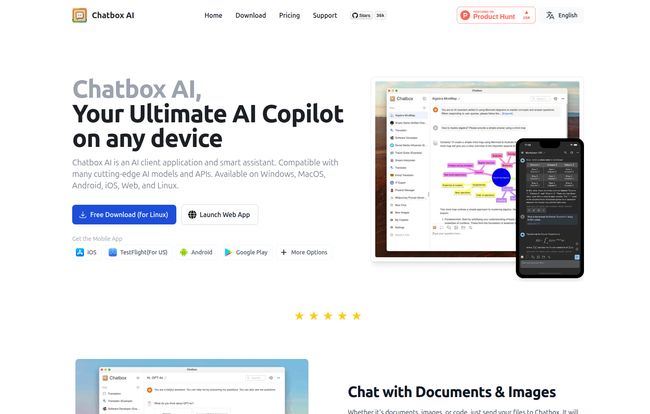
Think of it less as another AI model and more as a universal remote for all the best AI models. Chatbox AI is a client application—a clean, centralized dashboard that runs on basically everything you own: Windows, Mac, Linux, your iPhone, your Android, even right in your web browser. This isn’t just another web wrapper; it’s a native application that connects to various cutting-edge AI models and APIs.
You can plug in your own API keys from OpenAI (for GPT-4, etc.), Anthropic (Claude), Google (Gemini), and others. Or, you can subscribe to one of their plans and just get going without messing with API credits. It’s designed to be your single command center for chatting with AI, analyzing documents, writing code, generating images, and more. A single pane of glass, as the IT folks would say.
Why You Should Actually Care About This AI Client
Okay, so it pulls everything together. Neat. But why is that a game-changer? For me, it boils down to a few key things that directly impact my workflow.
The Cross-Platform Dream Is Real
This is huge. I can start brainstorming a blog post outline on my main Mac at my desk, then grab my phone to tweak a prompt while I’m waiting for my coffee. All my conversations and history are right there. The fact that it works natively on Linux is also a massive win for the developer community. It’s a seamless experience that respects the fact that we don’t live our lives chained to a single machine.
Privacy Isn’t Just a Buzzword Here
This is the big one for me. Chatbox stores all your data locally on your device. Let that sink in. I work with sensitive client data, traffic analytics, and proprietary strategies. The idea of pasting that into a public web interface where I’m not 100% sure who’s training on my data gives me the heebie-jeebies. With Chatbox, my conversations, my documents, my everything stays on my hardware. It’s privacy by design, not as an afterthought.
Bring Your Own AI (or Use Theirs)
Flexibility is the name of the game. If you’re a power user who already has API accounts with various providers, the free version of Chatbox is incredible. You just plug in your keys and use the fantastic interface without paying them a dime. But if you’re like most people and just want things to work without managing multiple bills and API dashboards, their subscription plans bundle everything together with “compute points.” It’s a smart model that caters to both the tinkerers and the professionals who just need to get work done.
A Look at the Features That Matter
A pretty interface is nice, but it’s the tools in the toolbox that count. Chatbox is packed, but here’s what’s stood out in my daily use.
- Chatting with Documents and Images: This is probably my most-used feature. I can drag a 50-page PDF report or even a scanned document into Chatbox and start asking it questions. “Summarize the key findings from this traffic analysis report.” “What are the main counter-arguments presented in this research paper?” It’s like having a research assistant who never sleeps. It handles PDFs, Word docs, PowerPoints, and more.
- Code Generation and Preview: As someone who dabbles in Python for data scripts and HTML for site tweaks, this is a godsend. You can ask it to generate code, and it provides a live preview with syntax highlighting. It’s great for generating snippets, debugging, or just learning a new language.
- Real-Time Web Search: A massive weakness of many standard AI models is their knowledge cut-off date. Chatbox integrates real-time web search, so you can ask about current events, the latest Google algorithm update, or trending topics and get up-to-date answers with sources. For an SEO, this is non-negotiable.
- AI-Powered Image and Chart Creation: This is just plain cool. You can be in the middle of a chat and ask it to “create an image of a friendly robot writing a blog post” or “generate a bar chart showing this traffic data,” and it does it right in the chat window. It simplifies the process of creating visuals for articles or presentations immensely.
Let’s Talk Money: The Pricing Breakdown
So, what’s this going to cost you? Chatbox has a refreshingly clear pricing structure. I’ve laid it out in a simple table so you can see what you get at each level.
| Plan | Price | Who It’s For | Key Features |
|---|---|---|---|
| Chatbox Apps (Free) | $0 | The DIY power user or tinkerer. | Full app functionality on all platforms. Requires you to bring your own API key. |
| Chatbox AI Lite | $3.5 / Month | Students, writers, and casual office use. | Points for standard models (GPT-4o mini, Claude 3.5 Haiku), web search, 25 AI drawings, image chat. |
| Chatbox AI Pro | $16.7 / Month | Professionals, marketers, developers. | Points for Advanced Models (GPT-4, Claude 3 Sonnet), 100 AI drawings, and chat with documents. |
| Chatbox AI Pro+ | $33.3 / Month | High-intensity power users. | More points for Advanced Models, 200 AI drawings, all Pro features. |
Personally, I think the Pro tier is the sweet spot. Access to the advanced models and the document chat feature is what transforms this from a cool toy into a serious work tool.
The Good, The Bad, and The… Typo?
No tool is perfect. While I’m pretty high on Chatbox, it’s only fair to point out the full picture. The best part is the cross-platform availability and the local-first privacy approach. The flexibility of using multiple AI models in one place is the core strength.
On the flip side, the best features, like document chat and access to top-tier models like GPT-4, are locked behind a paid subscription. That’s fair, as those API calls cost money, but it’s something to be aware of. The biggest quirk, and one I found hilarious in the user reviews, is the lack of an automatic spell checker in the input box. One user, Richard M, noted, “The only complain is there is no auto spelling check and correction when I input the text.” It’s a small thing, but it’s such a human, relatable frustration! I’ve made a few typos myself and wished it would just fix it for me. A minor annoyance, but an annoyance nonetheless.
Frequently Asked Questions About Chatbox AI
Is my data really private with Chatbox AI?
Yes. The application is designed to store all your chat history, settings, and other data locally on your own device. This is a core feature for users concerned about sending sensitive information to third-party cloud services.
What does “Bring Your Own API Key” mean?
This means you can use the Chatbox application for free, but you need to have your own account with an AI provider like OpenAI. You get an API key from them, paste it into Chatbox, and then you are billed directly by that provider for your usage. It’s for users who want granular control over their AI spending.
What’s the difference between Standard and Advanced models?
Generally, Standard models (like GPT-4o mini or Claude Haiku) are faster and cheaper, making them great for everyday tasks. Advanced models (like the full GPT-4 or Claude Sonnet) are more powerful and capable of handling more complex reasoning, analysis, and creative tasks, but they use up more compute points.
Can I use it on multiple devices with one subscription?
Yes, all the paid plans (Lite, Pro, and Pro+) support use on up to 5 devices simultaneously. Your data and conversations will be synced across them.
My Final Verdict on Chatbox AI
So, is Chatbox AI the one tool to rule them all? For me, it comes pretty darn close. It’s not perfect—I’m still waiting for that spell check, guys!—but it solves the biggest headaches of the modern AI workflow: platform chaos and privacy concerns. It successfully wrangles the wild herd of AI tools into a single, powerful, and private command center.
If you’re a professional who relies on AI for coding, writing, or research, the Pro version is a worthwhile investment. If you’re just curious or a power user with your own APIs, the free version is one of the slickest AI clients out there. It’s earned a permanent spot in my dock, and my browser tab count has never been lower. A true win.


