
Categories: AI Assistant, AI Chatbot, AI Copywriting, AI Grammar Checker, AI Spell Check, AI Summarizer, AI Text Generator, AI Translate, AI Writing Assistants
ChatGPT2Help: An AI Writing Assistant Worth Installing?

The Chrome Web Store is a jungle. It’s a sprawling, chaotic digital marketplace filled with gems, junk, and a thousand different tools that all claim to be the one thing that will revolutionize your workflow. As someone who lives and breathes SEO and content, I’ve downloaded more extensions than I can count. Most get uninstalled within a week. They’re either too clunky, too expensive, or just… don’t work.
So when another AI writing assistant pops up on my radar, my first reaction is usually a healthy dose of skepticism. We’ve all seen the explosion of AI tools since ChatGPT went mainstream. So. Many. Tools. But every now and then, something catches my eye. This time, it was a little extension called ChatGPT2Help. The name isn’t exactly poetic, but its promise was simple and direct: a seamless ChatGPT experience on any website.
I decided to take it for a spin. You know, for science. And for you, dear reader. What I found was, frankly, pretty surprising.
What Exactly is ChatGPT2Help Anyway?
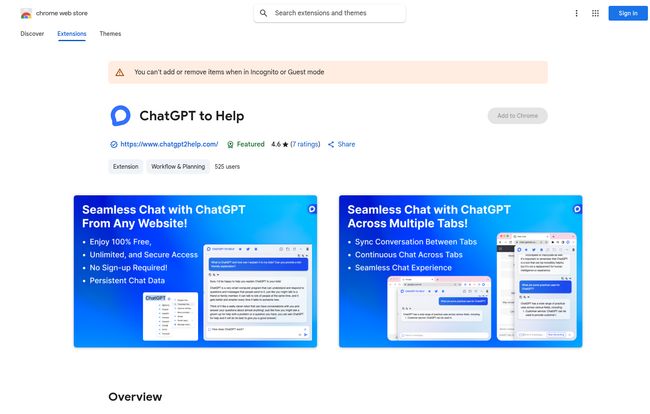
In a nutshell, ChatGPT2Help is a Chrome extension that bolts an AI assistant directly into your browser. Think of it less like a separate program you have to open and more like a clever little writing partner perched on your shoulder, ready to jump in whenever you need it. Whether you’re staring at a blank email draft in Gmail, trying to come up with a witty social media post, or deep in a Google Docs rabbit hole, the tool is right there.
It was developed by a company called HENSUN INNOVATION LLC and, according to its store page, it aims to make your writing more efficient and accurate. No more toggling between ten different tabs to copy and paste prompts and responses. It integrates the AI conversation directly into your browsing experience. A simple concept, but the execution is what matters.
Visit ChatGPT2Help
The Features That Actually Matter
Okay, let’s get into the nitty-gritty. A tool can have a million features, but only a few usually make a real difference in your day-to-day grind. Here’s what stood out to me after putting ChatGPT2Help through its paces.
A Chatbot That Follows You Around (In a Good Way)
The biggest win for me is the “seamless chat” feature. You can open the assistant on one tab, maybe to brainstorm some blog titles, then switch to another tab to start writing, and your conversation is still there. It’s a persistent chat history that syncs across your browser. This might sound minor, but it’s a huge quality-of-life improvement. I can’t tell you how many times I’ve lost a brilliant AI-generated idea because I accidentally closed the wrong tab. With this, that frustration is gone. You can even share a specific conversation with a colleague via a URL, which is a neat touch for collaboration.
Real-Time Writing and Editing on the Fly
This is the core of the tool. As you type, you can call on the AI for real-time suggestions. It’s pretty slick for blasting through emails or generating quick bits of copy. It also handles the basic-but-crucial stuff like copy editing—checking your spelling and grammar. It even has a translation feature, which the store page says works with 13 languages. I tested it with some Spanish phrases, and it was surprisingly accurate for a quick, on-the-fly translation. It’s not going to replace a professional translator for important documents, but for understanding the gist of a foreign-language email or website? It’s perfect.
Your Own Personal Prompt Library
Here’s a feature for the power users. ChatGPT2Help lets you create, save, and reorder your own custom prompts. If you’re a social media manager who constantly needs to write posts in a specific brand voice, or an SEO who regularly performs the same kind of keyword analysis, this is a game-changer. You can build a library of your go-to prompts and fire them off with a click. It saves time and ensures consistency across your work. This is one of those subtle features that separates a decent tool from a great one, in my opinion.
My Honest Take: The Good, The Bad, and The AI
No tool is perfect. After a few days of using ChatGPT2Help almost constantly, I’ve got some pretty clear thoughts on where it excels and where it falls a little short.
Where It Shines: The Upsides of ChatGPT2Help
First off, the efficiency boost is real. I genuinely cut the time I spent on my email inbox by at least a third. For drafting quick responses and summarizing long threads, it’s fantastic. The fact that it works everywhere—on LinkedIn, in WordPress, on Twitter—without any fuss is its main selling point. And then there’s the price. Did I mention it’s 100% free? Not “free trial” free. Not “freemium” free. Just free. In an age of endless subscriptions, that’s a breath of fresh air.
I also have to give them a nod for their privacy statement. The developer claims they don’t collect or use your data. In today’s world, where every click is seemingly tracked, that’s a massive plus and a major trust signal for me.
Some Potential Hiccups to Consider
Of course, it’s not all sunshine and roses. The most obvious drawback is that it’s a Chrome-only extension. If you’re a die-hard Firefox, Safari, or Edge user, you’re out of luck. That’s a significant chunk of the internet population, but for the millions of us in the Google ecosystem, it’s a non-issue.
Then there’s the bigger, more philosophical question: the AI dependency trap. Some folks in the content world worry that over-reliance on these tools could atrophy our own writing skills. I get it. If an AI is always there to fix your sentences, do you ever get better at forming them yourself? It’s a valid concern. My take is that these are tools, not replacements. You still need a good human brain to guide the AI, fact-check its output, and add that spark of genuine personality. The tool’s output is only as good as the underlying AI model and the prompts you give it. It’s a powerful assistant, not a magic content button.
Who Should Install This Extension Today?
So, who is this for? I can see a few groups getting a ton of value out of this immediately.
- Busy Professionals: If your job involves a lot of communication, this is a no-brainer. Drafting emails, reports, and messages becomes so much faster.
- Social Media Managers: Churning out fresh, engaging copy for multiple platforms is a grind. Use this to brainstorm ideas, write variations, and check your work on the fly.
- Students: From summarizing research articles to getting help structuring essays, this could be an invaluable study partner. Just, you know, don’t let it write the whole paper for you. Academic integrity and all that.
- Bloggers and Content Creators: For folks like me, it’s great for overcoming writer’s block, outlining articles, and speeding up the research process. It’s now part of my standard toolkit.
Lets Talk About The Price
I mentioned it before, but it bears repeating because it’s so rare. The ChatGPT2Help extension is completely free. The Chrome Web Store page proudly states “Enjoy 100% Free, Unlimited & Secure Access.” There’s no sign-up required, no credit card, no sneaky trial period that auto-renews. You just click ‘Add to Chrome,’ and you’re good to go. This level of accessibility is its secret weapon.
Frequently Asked Questions about ChatGPT2Help
Is ChatGPT2Help really free?
Yes, it is. Based on all the information on its official Chrome Web Store page, the tool is 100% free with no hidden costs or subscription models mentioned.
Do I need a ChatGPT or OpenAI account to use it?
Nope. The extension prides itself on having “No Sign-up Required.” It works right out of the box, which removes a significant barrier to entry compared to other tools.
How is this different from just using the ChatGPT website?
The main difference is integration. Instead of having a separate tab open for ChatGPT, this tool brings that functionality to any webpage or text field you’re working in. The persistent chat history across tabs is also a key feature you don’t get from the standard website experience.
Is my data safe when using this extension?
According to the developer’s privacy disclosure on the Chrome Web Store, the extension “will not collect or use your data.” This is a strong commitment to user privacy, though as with any extension, it’s always wise to be mindful.
Will this work inside Google Docs or my email?
Absolutely. It’s designed to work across all websites. It’s particularly useful in web-based applications like Google Docs, Gmail, WordPress, LinkedIn, and more.
Can it help with languages other than English?
Yes. The extension page notes support for 13 languages and includes translation as a feature, making it useful for multilingual communication and research.
The Final Verdict on ChatGPT2Help
So, after all is said and done, has ChatGPT2Help earned its place on my browser’s precious toolbar? The answer is a resounding yes.
It’s not the most revolutionary AI tool ever created, but it does exactly what it promises with a simple, effective, and—most importantly—unobtrusive design. It streamlines the process of using AI in your daily work without getting in the way. It’s a well-designed utility that solves a real problem: the constant, tedious tab-switching that comes with using web-based AI assistants.
For a free tool, it punches way above its weight. If you’re a Chrome user looking for a straightforward, powerful, and privacy-respecting AI writing assistant, you have nothing to what so ever to loose by giving this one a try. It might just be the productivity boost you didn’t know you needed.


