
Categories: AI Chatbot, AI Documents Generator, AI PDF
ChatGPT2Pdf Review: One-Click ChatGPT to PDF Conversion?

You know the feeling. It’s that tiny spike of panic. You’ve just spent the last hour in a deep, productive session with ChatGPT. You’ve coaxed out the perfect block of code, a killer marketing slogan, or a detailed outline for a presentation. It’s digital gold. You feel like a genius. Then you close the tab, come back later, and… where did it go? Drowned in a sea of identically named “New Chat” threads. It’s like trying to find a specific needle in a haystack made of other, slightly different needles.
I’ve been there more times than I care to admit. The copy-paste-into-a-doc method is clunky, loses all the formatting, and feels like a chore. For a while, I just accepted this as the messy reality of working with AI. But then I stumbled across a ridiculously simple tool that fixed the entire problem. It’s called ChatGPT2Pdf, and it does exactly what the name suggests, with zero fuss.
So, What is ChatGPT2Pdf, Exactly?
In the simplest terms, ChatGPT2Pdf is a lightweight Chrome extension that adds a ‘save to PDF’ button directly into your ChatGPT interface. It’s built on a simple premise: your conversations are valuable, and you should be able to save and share them easily. No more awkward screenshots, no more chaotic copy-pasting into Google Docs. Just a clean, formatted PDF of your entire conversation, ready for offline access, archiving, or sharing with your team.
It’s one of those ‘why didn’t I think of that?’ tools. A simple solution to a surprisingly common headache for anyone who uses ChatGPT regularly for work, study, or creative projects.
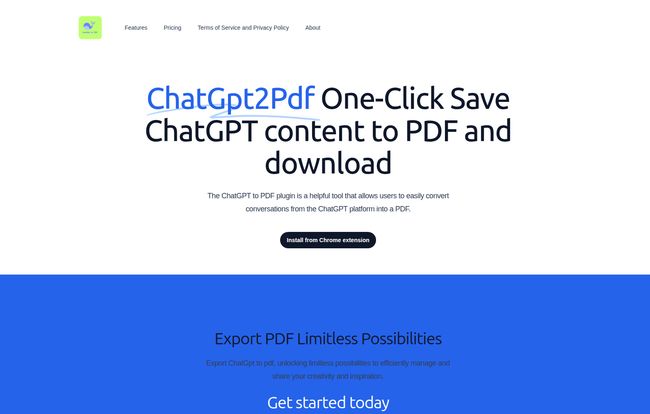
Visit ChatGpt2Pdf
The Core Features (Or, The Beauty of Doing One Thing Well)
Let’s not overcomplicate this, because the tool certainly doesn’t. Its beauty is its simplicity. After a quick install from the Chrome Web Store, a new button just… appears in ChatGPT. That’s the entire learning curve. Seriously. You finish your chat, hit the button, and a neatly formatted PDF document magically appears in your downloads folder. It preserves the back-and-forth of the conversation, which is awesome for reviewing the logic or the creative process later on. It’s one-click convenience in its purest form.
My Honest Take: The Good and The Not-So-Good
No tool is perfect, right? As an SEO and a heavy user of all sorts of platforms, I’m always a bit skeptical. So I put ChatGPT2Pdf through its paces. Here’s the real scoop from my experience.
Why I’m Genuinely Impressed (The Pros)
First off, the sheer ease of use is a massive win. In an industry filled with tools that have a learning curve steeper than a cliff face, this is a breath of fresh air. The ability to have an offline archive of my best prompts and AI outputs is a game-changer. I’ve started building a personal library of brainstorming sessions and content outlines. It’s also fantastic for sharing. Instead of sending a messy wall of text to a colleague, I can send a professional-looking PDF document. It just looks better and is easier to read.
A Few Things to Keep in Mind (The Cons)
Now, for the reality check. This is not a Swiss Army knife. Its functionality is laser-focused on one thing: converting ChatGPT conversations. It doesn’t work with other AI chatbots like Claude or Gemini. It’s also a Chrome extension, so if you’re a die-hard Firefox or Safari user, you’re out of luck for now. And of course, there’s a cost involved, which we’ll get to in a moment. But given what it does, these aren’t deal-breakers for me; they’re just the boundaries of what the tool is designed to do.
Let’s Talk About That Insane Pricing
Okay, this is the part that made me do a double-take. When I see a tool this useful, I usually brace myself for a hefty subscription price. But the pricing for ChatGPT2Pdf is, frankly, wild. They’re running an ‘early bird’ special right now, and the deals are almost too good to be true.
Here’s a quick breakdown of what they’re offering:
| Plan | Early Bird Price | Original Price | Discount |
|---|---|---|---|
| 1 Month | $1.19 | $19.98 | 90% |
| 1 Year | $9.99 | $59.98 | 85% |
| Permanent Use (Lifetime) | $19.99 | $79.98 | 75% |
Note: These prices are based on the ‘early bird’ discount shown on their website at the time of writing. You can check the current pricing here.
Honestly, the $19.99 lifetime deal is a no-brainer. That’s less than a couple of fancy coffees for a tool I’ll probably use every single day. The ‘early bird’ tag suggests these prices won’t last forever, so if you’re on the fence, now is probably the time to jump.
Who Is This Tool Actually For?
While anyone could find this useful, I see it being particularly valuable for a few groups:
- Content Creators and SEOs: For archiving keyword research sessions, content briefs, brainstorming, and draft articles. It’s perfect for documentation and repurposing content.
- Developers and Programmers: Saving code snippets, debugging sessions, and technical explanations. A clean PDF is way better than scrolling through a messy chat history.
- Students and Researchers: Keeping records of research queries, summarized texts, and study notes. A great way to organize your work for a paper or exam.
- Business Professionals: Sharing meeting prep notes, report drafts, or email templates generated by AI with team members who might not even have a ChatGPT account.
Basically, if you see your ChatGPT conversations as assets rather than just disposable chats, this tool is for you.
Frequently Asked Questions about ChatGPT2Pdf
- 1. Is it safe to use a Chrome extension with my ChatGPT account?
- It’s always smart to be cautious with browser extensions. ChatGPT2Pdf is available on the official Chrome Web Store, which has its own vetting process. Based on its function, it simply interacts with the front-end of the site to generate a PDF, it doesnt seem to be scraping your data for other purposes. As always, review the permissions before installing.
- 2. Does it work with the free and paid versions of ChatGPT?
- Yes, in my testing, it works perfectly with both the free version (GPT-3.5) and the Plus subscription (GPT-4).
- 3. What does the PDF look like?
- It’s quite clean! It formats the conversation with clear distinctions between your prompts and the AI’s responses, much like how it appears on the screen. The formatting is simple and professional.
- 4. Why not just use the ‘Share’ feature in ChatGPT?
- The built-in share feature creates a public web link to the conversation. That’s great for quick sharing, but its not ideal for permanent, offline archiving. A PDF is a self-contained, unchangeable document you own and can store anywhere. Plus, sometimes you dont want a public link floating around.
- 5. What happens when the ‘early bird’ pricing ends?
- The site implies prices will go up to their original amounts. The $19.99 lifetime deal in particular feels like a limited-time offer to attract initial users. I’d expect it to increase significantly or be removed entirely later on.
The Final Verdict
Look, in the world of SEO and digital marketing, we’re drowning in complex, expensive tools that promise to revolutionize our workflow. Sometimes, the best tools are the ones that are simple, cheap, and just solve one annoying problem perfectly. That’s ChatGPT2Pdf.
It’s not going to change the world. It won’t write your content for you. But it will give you peace of mind and save you from the frustration of losing your valuable AI conversations. For less than the price of lunch, the lifetime deal provides a permanent solution to a real problem. For me, that’s an easy win.
References and Sources
-
ChatGPT2Pdf Official Website: https://www.chatgpt2pdf.com/
-
ChatGPT2Pdf Pricing Page: https://www.chatgpt2pdf.com/#pricing


