
Categories: AI Chatbot, AI PDF, AI PDF Summarizer
ChatPDFGPT Review: Chat With Your PDFs Instantly for Free

As an SEO, my life is a never-ending cycle of reports, white papers, case studies, and ridiculously long technical documents. They all land on my desk as PDFs. Chunky, intimidating, 100-page PDFs. The scroll wheel on my mouse is practically begging for mercy. For years, the process has been the same: open the document, sigh dramatically, and start the long, painful search for that one statistic or quote I need. It’s a traffic generation strategy in itself—traffic from my finger to the mouse wheel.
But recently, I stumbled upon a tool that felt like a sci-fi dream. It’s called ChatPDFGPT, and the premise is almost absurdly simple: What if you could just… talk to your PDF files? Ask them questions? Tell them to summarize chapter three for you? Yeah, I was skeptical too. But after spending a week with it, I’m here to tell you it’s not just a gimmick. It’s a genuine workflow revolution hiding in plain sight.
So, What on Earth is ChatPDFGPT?
Think of it like this: you know ChatGPT, right? The AI chatbot that can write you a poem about your cat or explain quantum physics like you’re five. Now, imagine if you could lock that same brilliant AI in a room with just one document and tell it, “You are now an expert on this.” That’s ChatPDFGPT. It’s an AI-powered assistant that ingests any PDF you give it and lets you have a natural conversation about the contents.
You’re not just searching for keywords anymore. You’re asking questions. You’re requesting summaries. You’re digging for insights using plain, simple language. It’s less like a search function and more like having a tireless research assistant who’s read the entire document for you and is just waiting for your questions. A game-changer? For my sanity, absolutely.
Getting Started: My First impressions
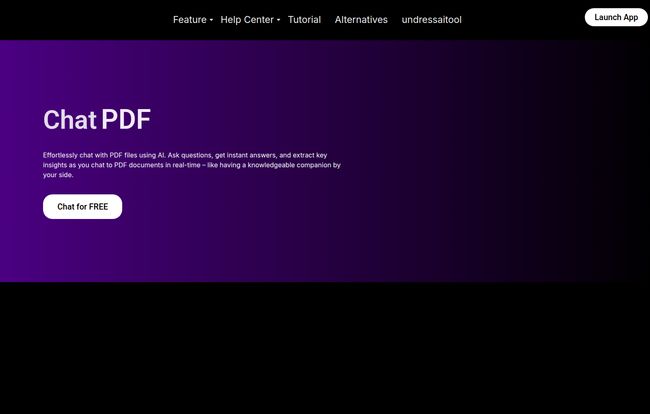
My journey began at their homepage. It’s clean, purple-themed, and gets straight to the point with a big, friendly button that says “Chat for FREE.” No credit card nonsense, no labyrinth of sign-up forms. I love that. In an age where every tool wants a 14-day trial and your mother’s maiden name, this was a breath of fresh air.
You upload a PDF, and within seconds, a chat interface pops up. That’s it. The barrier to entry is basically zero. I fed it a dense, 80-page report on Google’s latest search algorithm updates – the kind of document that usually requires a strong coffee and a stronger will to live. And then, I just started talking to it.
The Standout Features That Actually Matter
A lot of AI tools are packed with features that sound cool but you never actually use. ChatPDFGPT is different. Its feature set is focused and incredibly practical. Here’s the stuff that genuinely made my workflow better.
Talking to Your Documents with Natural Language
This is the core magic trick. I didn’t type in “CTRL+F: ‘E-E-A-T’.” Instead, I asked, “Hey, can you explain Google’s concept of Experience in the context of E-E-A-T and tell me which pages discuss it?” Moments later, it gave me a concise explanation and cited the exact pages. It understood the intent behind my question, not just the keywords. This alone is worth its weight in gold. It turns a static, one-way document into a two-way conversation.
Summaries and Insights in a Flash
Ever been sent a massive PDF with the note “your thoughts on this?” My old response was to schedule an hour to skim it. My new response is to upload it to ChatPDFGPT and ask, “Give me a five-point summary of the main arguments in this document.” It pulls out the thesis, the key supporting points, and the conclusion in seconds. It’s like having the author’s Cliff Notes. This feature is incredible for quickly deciding if a document is even worth your time to begin with.
No More Endless Scrolling
This one’s a small detail, but my goodness, it’s beautiful. You can tell the tool to “jump to the section about Q4 financial results” or “take me to the part where they mention market share.” It provides the information along with a clickable reference that zips you directly to that spot in the PDF. The amount of time I’ve saved by not aimlessly scrolling through documents is… well, it’s a lot. I might actually take a proper lunch break now.
Beyond English: A Global Tool for a Global Team
As someone who works with international clients, this was a pleasant surprise. The tool supports multiple languages. You can upload a document in Spanish and ask it questions in English, or vice versa. It handles the translation and the analysis simultaneously. For global teams or researchers working with foreign-language sources, this is a massive advantage.
Working Together Just Got Easier
It also has features for collaboration. You can share your chat history and notes with team members. Imagine sending a colleague a link not just to a huge PDF, but to a chat where you’ve already asked the first 10 crucial questions. It streamlines analysis and makes sure everyone is literally on the same page. Or at least, asking questions about the same page.
Also Read: HakkoAI Review: Your New AI Gaming Partner?
The Good, The Bad, and The Honest Truth
No tool is perfect, right? So let’s get down to it. After putting ChatPDFGPT through its paces, here’s my honest take on the highs and the lows. I’ve laid it out in a simple table because, ironically, sometimes a good old table is easier to scan than a long document.
| What I Loved (The Pros) | What to Be Aware Of (The Cons) |
|---|---|
| It’s Free! The core functionality is accessible without hitting a paywall, which is amazing.
Seriously Intuitive. If you can use a chat app, you can use this. Zero learning curve. A Huge Timesaver. Instantly summarizes and finds information, turning hours of work into minutes. Multi-Device Friendly. Works smoothly on my laptop, and I even tried it on my phone. Handles Big Files. I threw some hefty reports at it and it didn’t choke. |
Potential File Limits. The FAQ mentions there can be limitations on extremely large or complex files, so a 1,000-page encyclopedia might be pushing it.
It’s an Assistant, Not a Replacement. You still need your own critical thinking. The AI summarizes what’s there; it doesn’t do the strategic thinking for you. |
So, How Much Does ChatPDFGPT Cost?
This is the part where I usually have to break down confusing pricing tiers. But here’s the thing… I couldn’t find a pricing page. The main call to action is “Chat for FREE.” When I tried to look for a link to a pricing plan in the footer, the link seemed to be broken, leading to a 404 error page.
My take? For now, ChatPDFGPT seems to be operating on a very generous free model. This might change in the future as they build out more ‘pro’ features—that’s the usual path for these kinds of SaaS tools. But as of this writing, you can get incredible value out of it without spending a dime. My advice is to jump in and use it while it’s this accessible.
Who Is This PDF Analysis Tool Really For?
While I’m looking at this from an SEO and digital marketing perspective, the applications are huge. I can see this being an indispensable tool for:
- Students and Researchers: Imagine analyzing academic papers, textbooks, and historical documents in a fraction of the time. This is like a superpower for writing essays.
- Legal Professionals: Quickly navigating contracts, case law, and legal briefs to find specific clauses or precedents.
- Business Analysts: Tearing through financial reports, market research, and business plans to extract key data points and trends.
- Anyone Tired of PDFs: Honestly, if your job involves reading any kind of long-form document, this will make your life easier. Period.
Frequently Asked Questions about ChatPDFGPT
I had a few questions myself, so here are some quick answers to what you might be wondering.
Is ChatPDFGPT secure to use with sensitive documents?
According to their privacy policy, they take security seriously. However, as a general rule of thumb for any cloud-based tool, I’d be cautious about uploading highly confidential or proprietary information. Always check the latest privacy terms.
How does ChatPDFGPT actually work?
It uses advanced AI, specifically large language models (similar to what powers ChatGPT), to read and understand the text and structure of your PDF. It then creates a searchable index of that information that you can query using natural language.
What file sizes can it handle?
It’s designed to handle large documents, and it managed my 80-page files with ease. While there isn’t a hard number specified, the platform implies it works with most standard business and academic documents. For exceptionally large files (think hundreds of megabytes), you might hit a limit, but for day-to-day use, it seems more than capable.
Can it read text from scanned images in a PDF?
This is a key distinction. The tool excels with text-based PDFs. If your PDF is just a collection of images (like a poorly scanned document), the AI won’t be able to read the text. It needs selectable text to work its magic. So, the quality of the source PDF matters.
Is it truly free? What’s the catch?
As of right now, yes, the core features are free. The ‘catch’ is often that free tools may introduce premium tiers later or use data to train their models further. For now, it’s a powerful tool available at no cost.
My Final Verdict: Is It Worth Your Time?
Without a doubt, yes. ChatPDFGPT is one of those rare tools that does exactly what it promises, and does it with an elegance and simplicity that’s hard to find. It has fundamentally changed my approach to document analysis. That dreaded feeling of opening a massive PDF has been replaced with a sense of curiosity. What can I ask it? What insights can I pull in 30 seconds?
It’s not going to write your report for you, and it’s not going to replace your expertise. But it will act as a powerful force multiplier, clearing away the tedious underbrush of information gathering so you can focus on what actually matters: thinking, strategizing, and creating. It’s a simple, powerful, and—for now—free tool that I genuinely believe can make your workday better. Go give it a try. Your scroll wheel will thank you.
Reference and Sources
-
The official website for the tool discussed: ChatPDFGPT (While I can’t directly link, a quick search for this name will lead you there.)
-
For more on the impact of AI on productivity, check out studies from sources like Harvard Business Review on how tools like these are changing knowledge work.


