
Categories: AI Answer, AI Assistant, AI Blog Generator, AI Chatbot, AI Essay Writer, AI Lyrics Generator, AI Prompt Generator, AI Recipe, AI Report Generator, AI Story Generator, AI Text Generator, AI Travel, AI Tweet Generator, AI Writing Assistants, Large Language Models (LLMs)
Chatty AI Assistant Review: Your Private GPT-4 Sidebar?

The AI market is a jungle. Seriously. A new tool sprouts up every single day, promising to revolutionize how you write, think, and even breathe. As someone who lives and breathes this stuff for a living—SEO, content, traffic—I’ve seen it all. I’ve got a folder on my desktop overflowing with AI tools, and frankly, I’m getting a little bit of AI fatigue.
So when another one called ‘Chatty’ landed on my radar, my first reaction was a bit of an eye-roll. Another one? But then I looked a little closer. It wasn’t just another mobile app trying to be ChatGPT. No, this one had a fresh angle. A Chrome extension that runs locally in your browser, with a big, bold claim about privacy.
Okay, Chatty. You have my attention. I decided to take it for a spin, both the app and its new browser-based sibling, to see if it can actually stand out in this ridiculously crowded space. Is it just another echo in the AI canyon, or does it have a voice of its own?
So, What Exactly is Chatty?
At its core, Chatty is an AI assistant built on the back of OpenAI’s powerful GPT-3.5 and GPT-4 models. You know, the engines that power the tools we’ve all been playing with for the last couple of years. It does what you’d expect: it can write stories, knock out an essay, help you brainstorm tweets, and answer your random questions at 2 AM. Standard stuff.
But its split personality is what’s interesting. It exists as a mobile app for on-the-go queries, but more importantly, it’s now a Chrome extension that parks itself as a neat little sidebar in your browser. This dual-threat approach is something I’m seeing more of, and it’s a smart move. One for the pocket, one for the desktop.
The “Expert Mode” – More Than Just a Gimmick?
One of Chatty’s main features is a selection of ‘Expert’ roles. You can ask it to be a Historian, a CEO, a Chef, a Travel Guide, and so on. My inner skeptic immediately saw this as a fancy way of dressing up system prompts—something any seasoned AI user can do themselves. But I have to admit, it’s a clever implementation for the average person.
#
It removes the friction of having to write, “Act as a world-class chef and give me a recipe for…” You just select ‘Chef’ and go. I tried a few. I asked the ‘CEO’ to draft a terse email about quarterly performance, and I asked the ‘Movie Critic’ to rip into a recent blockbuster I secretly loved. The results were… pretty spot on, actually. The tone shifted noticeably. It’s not magic; it’s just a good user interface for a powerful feature. For someone who doesn’t want to mess around with prompt engineering, this is a fantastic addition.
The Chatty Chrome Extension: Privacy in a Sidebar
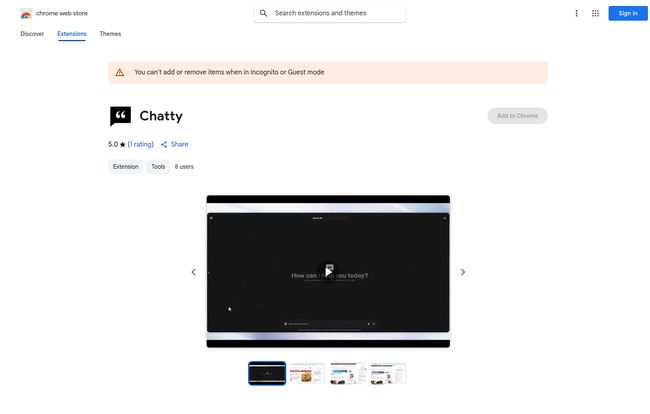
Okay, this is the part that really got me interested. The Chrome Web Store page for Chatty makes a pretty significant claim: “your private AI chat for running LLMs in the browser.” It goes on to say, “The developer has disclosed that it will not collect or use your data.”
Hallelujah! This feels like a direct answer to the whole ‘are our chats training the model?’ debate that’s been raging forever. The idea of a private, browser-native AI sidebar is incredibly appealing. In my line of work, I’m often feeding AI proprietary data, client information, or just half-baked ideas I’m not ready to share with the world (or a corporate server). A tool that promises to keep my digital musings to myself is a huge, huge win.
Having it as a sidebar is just convenient. You don’t have to switch tabs to ask a quick question or rephrase a sentence. It’s right there, a constant companion. It’s still a very new extension—the stats show it has very few users so far—so you’d be an early adopter. But the premise is exactly what many of us have been asking for.
Visit Chatty
#
Let’s Talk Brass Tacks: Chatty Pricing
Alright, nothing is ever truly free, right? Chatty operates on a freemium model, and the structure is worth breaking down. You need to know what you’re getting into before you get hooked.
| Plan | Cost | Key Features | My Two Cents |
|---|---|---|---|
| Free | $0 | Powered by GPT-3.5 Turbo, 5 daily trials, No ads | A bit of a tease. Great for a test drive, but you’ll hit that 5-trial limit fast if you’re doing any real work. |
| Chatty Pro (Weekly) | $4.99 | Powered by GPT-4, Unlimited Q&A, No ads | Honestly, I’d avoid this tier. Weekly subs can add up quickly if you forget about them. |
| Chatty Pro (Monthly) | $12.99 | Powered by GPT-4, Unlimited Q&A, No ads | More reasonable. Puts it in the same ballpark as some other premium AI tools. |
| Chatty Pro (Yearly) | $49.99 | Powered by GPT-4, Unlimited Q&A, No ads | This is the real deal. It works out to about $4.17/month, which is a fantastic price for unlimited GPT-4 access. |
The main reason to upgrade is the jump from GPT-3.5 to the much more capable GPT-4 model. If you need high-quality, nuanced content, the Pro plan is the only way to go. The yearly plan offers the best value by a country mile.
#
Where Chatty Shines (And Where It Stumbles)
No tool is perfect. After playing around with Chatty for a while, I’ve got a good feel for its strengths and weaknesses.
The Good Stuff
The versatility is its strong suit. The ease of switching from drafting a professional email to getting a recipe for dinner without changing tools is genuinely useful. But for me, the privacy feature of the Chrome extension is the real killer app here. That’s its unique selling proposition in a sea of sameness. In an age of data leaks and privacy concerns, offering a tool that keeps your inputs to yourself is not just a feature; it’s a statement.
The Not-So-Good Stuff
That free trial is… stingy. Five queries a day is barely enough to get a feel for the tool before you’re locked out. I get it, they want you to upgrade, but it feels a bit restrictive. And as I mentioned, the weekly pricing option feels a bit predatory to me. Stick to monthly or yearly. Also, its newness is a double-edged sword. It’s exciting to be on the ground floor, but you might run into the occasional bug or a lack of polish that more established competitors have ironed out.
Who Is Chatty Actually For?
So, should you download it? It depends on who you are.
- The Student: Absolutely. Great for help with essays, brainstorming ideas, and summarizing dense research papers. The ‘Historian’ or ‘Scientist’ roles could be super helpful.
- The Content Creator / Marketer: It’s a solid brainstorming partner. Perfect for generating social media posts, blog outlines, or a quick bit of ad copy. I’ve definitely used it to get over writer’s block.
- The Privacy-Conscious User: This is your tool. If you’ve been hesitant to use other AI assistants because you don’t want your data stored on a server in who-knows-where, the Chatty Chrome extension was practically made for you.
- Who should probably skip it? Hardcore developers or AI power users who need API access, complex integrations, or fine-tuning capabilities. Chatty is a polished consumer product, not a developer’s sandbox.
#
Frequently Asked Questions about Chatty AI
- Is Chatty better than ChatGPT?
- It’s not about better, it’s about different. They both use similar underlying technology (GPT models). Chatty’s advantages are its user-friendly ‘Expert Roles’ and, most importantly, the privacy-focused Chrome extension. If you value a private, browser-integrated experience, Chatty has the edge.
- Is my data safe with the Chatty Chrome extension?
- According to the developer’s own disclosure on the Chrome Web Store, they do not collect or use your data. This is a major privacy benefit, as the processing happens within your browser, not on their servers.
- What’s the real difference between the free and pro versions of Chatty?
- Two main things: 1) The model. The free version uses GPT-3.5 Turbo, while Pro gives you the more powerful and creative GPT-4. 2) The limits. You get 5 queries a day for free, versus unlimited queries on the Pro plans. The quality boost from GPT-4 is significant.
- Can I use Chatty on my phone?
- Yes! Chatty is available as a mobile app on both the Apple App Store and Google Play, so you can use it on the go.
- Is the yearly subscription to Chatty worth it?
- In my opinion, if you decide to go Pro, the yearly plan at $49.99 is the only one that makes financial sense. It provides excellent value for unlimited access to GPT-4, especially compared to other premium AI subscriptions on the market.
My Final Verdict
So, does Chatty cut through the noise? Yeah, I think it does. It’s not a earth-shattering revolution, but it’s a thoughtful, well-designed tool that solves a very real problem for a growing number of people: AI privacy.
While the mobile app is a capable assistant, the Chrome extension is the star of the show. In a world where it feels like every click is being logged and analyzed, a tool that puts a little wall around your ideas is… refreshing. It’s not perfect, and its a bit of a newcomer, but it’s taking a step in a direction I can definitely get behind. It’s earned a spot in my workflow, and that’s saying something.


