
Categories: AI Lesson Plan Generator, AI Quiz Generator, AI Teachers, AI Text Generator
Classroom Plans Review: AI Tool for Overworked Teachers?

Okay, let’s have a real chat. As someone who lives and breathes content creation, my day is a frantic ballet of planning, drafting, and hitting deadlines. Some days, the well of ideas feels bone dry. I imagine for teachers, it’s that feeling, but multiplied by a factor of 30 students, each with their own needs, all while the curriculum bell tolls relentlessly in the background. It sounds… exhausting.
So whenever a new AI tool pops up promising to lighten the load, my ears perk up. We’ve all seen the explosion of AI assistants for writers, marketers, and developers. But what about for the people shaping the next generation? Enter Classroom Plans, a platform that claims to be the AI sidekick for educators. I decided to take a look and see if it lives up to the hype, or if it’s just another piece of tech that promises more than it delivers.
So, What Exactly Is Classroom Plans?
At its heart, Classroom Plans is an AI-powered generator for educational materials. Think of it less as a self-driving car and more as a really, really good cruise control system for your administrative tasks. The entire point is to slash the time you spend on the repetitive, brain-draining parts of the job—like formatting worksheets or outlining a basic lesson—so you can pour that energy back into the classroom, where it actually matters.
Instead of staring at a blank document, you give the AI a prompt, and it spits out a first draft of a lesson plan, a quiz, a study guide, or an activity worksheet. It’s designed to be your brainstorming partner and first-draft monkey, all rolled into one neat package.
A Look Under the Hood at the Features
The platform isn’t trying to be a jack-of-all-trades, which I appreciate. It focuses on four main AI-powered templates, and for a teacher, these are the bread and butter of daily prep work.
The Core Four Templates for Your Classroom
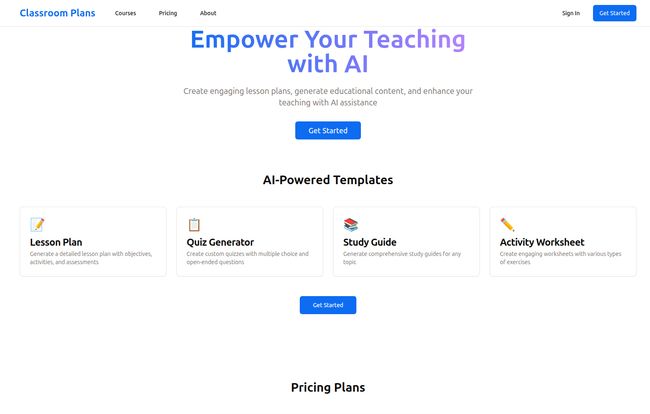
The main dashboard presents you with four clear options: Lesson Plan, Quiz Generator, Study Guide, and Activity Worksheet. This straightforward approach is a breath of fresh air. No confusing menus or hidden features. You need a quiz? You click the quiz button. Simple.
The Lesson Plan generator helps you create a structured plan with objectives and activities. The Quiz Generator is a godsend, creating multiple-choice and open-ended questions with an answer key. The time saved on just that one feature is probably worth the price of admission for many. Then you have your Study Guides to help students prep for those quizzes, and Activity Worksheets to create engaging exercises. It’s a cohesive little ecosystem.
Visit Classroom Plans
Beyond a One-Trick Pony
Two other things stood out to me. First, it supports multiple subjects. You’re not just stuck with a tool that only understands 10th-grade history. You can theoretically use it for biology, literature, even math concepts. Second, it lets you save and reuse the content you generate. This is huge. If you create a fantastic worksheet on photosynthesis, you don’t have to reinvent the wheel next semester. You can just pull it up, tweak it, and you’re good to go. It builds a personal library of resources over time.
The All-Important Question: What’s the Price Tag?
This is where things get a little… interesting. The homepage clearly advertises a single “Pro” plan for $9.99 per month. For that price, you get access to everything: all the generators, the content saving, the multi-subject support, the whole shebang. Honestly, ten bucks a month to reclaim potentially hours of your week seems like a pretty fantastic deal. It’s less than two fancy coffees.
Now, for the bit of real-world wonkiness. When I tried to click on their dedicated pricing page for more details, I was met with a classic “404 Page Not Found” error. Whoops. While that’s not ideal, I’m chalking it up to a new platform still ironing out the kinks. The main page is clear about the price, so it’s not a dealbreaker, just a small bump in the road and something to be aware of.
The Good, The Bad, and The AI-Generated
No tool is perfect, right? Especially in the world of AI. Here’s my honest breakdown of where Classroom Plans shines and where you need to be a little cautious.
The Good Stuff (Why I’m Optimistic)
The number one advantage is time. The sheer amount of time this tool can save is staggering. It takes the grunt work out of lesson prep. It’s like having a teaching assistant who is always on, never complains, and is ready to draft something for you at 11 PM on a Sunday. This frees up so much mental and emotional bandwidth. The simplicity is another major win. It’s focused, it does a few things, and it seems to do them well without overcomplicating the process.
A Few Words of Caution (The Reality Check)
Now for the other side of the coin. An AI is only as good as its programming. There’s a risk that the generated content could feel a bit generic or impersonal if you’re not careful. This isn’t a “copy, paste, print” solution. It’s a “generate, review, refine” solution. The teacher’s professional judgment is still the most important ingredient. You have to be the one to inject personality, connect the material to your specific students’ interests, and ensure the content is 100% accurate.
Think of the AI as a talented but inexperienced student teacher. It provides a solid foundation, but you, the veteran educator, need to provide the final polish and contextual nuance.
My Final Verdict: Is Classroom Plans Worth a Shot?
After looking at everything, I’d say yes, absolutely. For $9.99 a month, Classroom Plans presents a low-risk, high-reward proposition for any educator feeling the squeeze. It’s not about replacing teachers; it’s about empowering them. It’s a tool that respects a teacher’s most valuable asset: their time.
If you go in with the right mindset—seeing it as a powerful assistant rather than an autopilot button—I think Classroom Plans could genuinely make a teacher’s life easier. It handles the tedious stuff, so you can focus on the human stuff. And in education, the human stuff is everything.
Frequently Asked Questions about Classroom Plans
What can I create with Classroom Plans?
You can use its AI-powered templates to generate detailed lesson plans, quizzes (complete with answer keys), comprehensive study guides for students, and various activity worksheets for classroom exercises.
How much does the Pro plan cost?
According to their homepage, the Pro plan costs $9.99 per month. This gives you access to all the features, including unlimited generation and the ability to save your work.
Can I use it for different subjects like Math and History?
Yes! The platform is designed to support multiple subjects. You can prompt it to create content for a wide range of topics, from literary analysis to scientific concepts.
Is the content from the AI ready to use immediately?
It’s best to think of the generated content as a strong first draft. While often very good, you should always review and refine it to add your personal touch, ensure it perfectly matches your students’ needs, and double-check for any inaccuracies. The teacher’s oversight is key.
Do I need to be a tech expert to use it?
Not at all. The interface is very straightforward and user-friendly. If you can write an email or use a search engine, you’ll have no problem navigating Classroom Plans.
Where can I sign up or learn more?
You can head directly to their website at ClassroomPlans.com to get started and explore the tool for yourself.


