
Categories: AI Instagram, AI Podcast Clip Generator, AI Repurpose, AI Short Video Generator, AI Social Media, AI Subtitle Generator, AI Tiktok, Long Video To Short Video AI
ClipGen Review: The AI Podcast Tool I Wish I Had Sooner

If you’re a podcaster or content creator, you know the grind. You spend hours, maybe even days, planning, recording, and editing your masterpiece episode. You finally hit publish, feel that rush of accomplishment, and then… the silence. The next thought hits you like a ton of bricks: “Now I have to promote it.”
And what does promotion mean in 2024? Video. Short-form video, to be exact. TikToks, Reels, YouTube Shorts. The content treadmill never, ever stops. For years, my process was a clunky, soul-crushing nightmare. I’d download my own hour-long episode, scrub through it trying to find those ‘golden nuggets’, clumsily chop them up in a video editor, manually type out subtitles… I’m getting tired just writing about it.
So when I stumbled upon a tool called ClipGen, my professional skepticism was high, but my inner, overworked creator was desperate. It claims to automatically repurpose your podcast into engaging short-form clips in one click. Yeah, right. I’ve heard that before. But I gave it a shot, and folks, I need to talk about it.
So, What is ClipGen, Anyway?
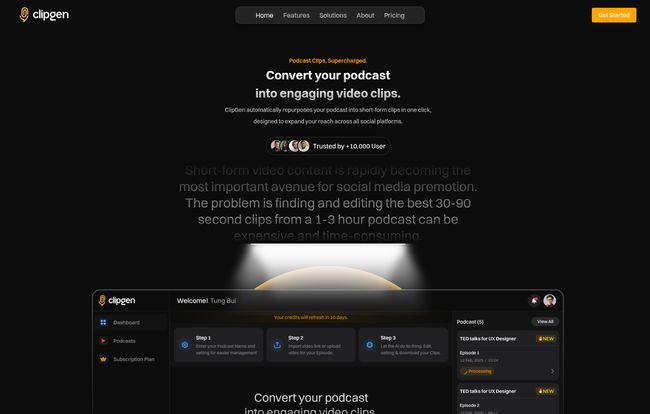
At its core, ClipGen is an AI-powered platform designed to be your personal podcast-to-social-media assistant. You feed it your long-form content—either a video podcast from YouTube or just a plain old audio file—and its AI gets to work. It doesn’t just randomly chop your episode into 60-second chunks. It actually analyses your content, looking for the most interesting, engaging, and potentially viral moments.
Think of it like having a junior video editor on staff who works 24/7. This editor listens to your entire show, flags the best parts, adds eye-catching subtitles, slaps your logo on it, and presents you with a folder of ready-to-post clips. It’s designed to solve the biggest bottleneck in content repurposing: time.
Visit ClipGen
How Does This AI Magic Actually Work?
I’m always wary of tools that promise “one-click” solutions, but ClipGen’s process is surprisingly straightforward. It’s not quite one click, but it’s damn close, and it’s way better than the 100-click alternative.
Here’s the basic flow:
- Submit Your Podcast: You start by giving ClipGen a link. This can be a YouTube URL or you can upload an audio/video file directly. Easy enough.
- The AI Analysis: This is where the cool stuff happens. The platform’s algorithm gets to work, listening to the entire conversation. It’s looking for compelling questions, impactful statements, and conversational hooks. From what I can tell, it scores different segments to identify what’s most likely to grab attention on social media. In a few minutes, it has a list of suggested clips.
- Render and Refine: ClipGen then automatically generates the video clips, complete with subtitles. For video podcasts, it uses some clever speaker detection to reframe the shot, keeping the active speaker in focus. This is huge for making horizontal video look good vertically.
- Review and Export: You get a dashboard with all your new clips. You can watch them, make minor tweaks to the text or timing if needed, and then download the ones you like. Ready for Instagram, TikTok, or wherever else you’re fighting for eyeballs.
The whole thing feels less like hard work and more like curating. The AI does the heavy lifting, and you provide the final human touch of approval.
The Standout Features I Actually Care About
A lot of SaaS tools come with a laundry list of features that sound impressive but you never use. I found ClipGen’s feature set to be refreshingly practical. Here are the ones that made a real difference in my workflow.
Automatic Clip Curation is the Real MVP
Let’s be honest, this is why you’d use a tool like this. The thought of not having to manually listen back to a 90-minute interview to find 3-4 good moments is… liberating. Is the AI perfect? Not always. Sometimes it picks a clip that lacks context. But I’d say it gets it right about 80-90% of the time. And even a slightly ‘off’ suggestion is a better starting point than a blank timeline. It turns a creative chore into a simple review process.
Subtitles Without the Swear Jar
We all know a huge percentage of social video is watched with the sound off. If you don’t have subtitles, you’re losing a massive audience. Manually transcribing and timing captions is one of the most tedious jobs in content creation. ClipGen’s automatic subtitle generation is a lifesaver. It supports over 30 languages, which is a fantastic touch for creators with an international audience. The ability to just have this done for you is worth the price of admission alone.
Branding That Doesn’t Look Generic
Another pain point of creating clips is maintaining brand consistency. You need your logo, your brand colors, your fonts. ClipGen lets you set up a brand kit with your assets, and it automatically applies them to every clip it generates. This is a small thing that makes a big difference, helping your content look professional and instantly recognizable as it flies by in a user’s feed.
Let’s Talk Money: ClipGen’s Pricing Breakdown
Okay, the big question. What’s this going to cost? I was pleasantly surprised by the flexibility here. They have a range of options, from free to enterprise-level stuff.
| Plan | Price | Key Features |
|---|---|---|
| Free | £0 /month | 5 clips per month (720p), 60 upload minutes. |
| Creator | Starts at £7.50 /month | 10 clips per month (720p), 60 upload minutes, customizable plan. |
| Pro | Starts at £15.00 /month | 15 clips per month (1080p), 60 upload minutes, customizable plan. |
| Enterprise | Contact for Pricing | Advanced needs, priority support, etc. |
The Free plan is genuinely useful. Getting 5 clips a month at 720p is more than enough to test the waters and see if the workflow fits your style. For a hobbyist podcaster, it might even be all you need. The Creator and Pro plans are where it gets serious. The jump to 1080p on the Pro plan is a big deal for anyone who cares about quality, and I love that you can use a slider to customize the number of clips you need. That kind of flexible pricing is a breath of fresh air.
The Honest Downsides (Because Nothing’s Perfect)
Look, I’m a fan, but no tool is a silver bullet. It’s only fair to point out the areas where ClipGen has room to grow.
First, the 720p resolution cap on the free and Creator plans is a bit of a bummer in a 4K world. It’s fine for most mobile viewing, but pixel peepers will want to spring for the Pro plan to get that crisp 1080p output. Second, while the subtitle generation is great, more advanced customization like custom fonts is listed as ‘coming soon’ for higher tiers. It’s not a deal-breaker, but something to be aware of.
Finally, you have to remember that AI is a tool, not a replacement for human judgment. You’ll still want to give every clip a final watch to make sure the AI didn’t cut off a sentence weirdly or miss the emotional nuance of a moment. It saves you 95% of the work, not 100%.
So, is ClipGen Actually Worth It? My Final Verdict
After a few weeks of kicking the tires, I can confidently say: yes, for the right person, ClipGen is absolutely worth it. The amount of time and mental energy it saves is phenomenal. It takes the most dreaded part of my content process and turns it into a quick, almost enjoyable task.
If you’re a solo creator, a podcaster, or a social media manager trying to squeeze more life out of your long-form content, this tool could be a game-changer. It lowers the barrier to entry for creating consistent, high-quality social video. It’s not about being lazy; it’s about being efficient. It frees you up to spend less time in a video editor and more time doing what you actually love—creating your next great episode.
Frequently Asked Questions (FAQ)
- How does ClipGen find the ‘best’ clips?
- It uses an AI model that analyzes the transcript and audio for keywords, questions, emotional peaks, and phrases that indicate a strong, self-contained thought. It’s essentially looking for the same things a human editor would.
- Can I use this for my audio-only podcast?
- Yep! If you upload an audio file, ClipGen creates a video by adding dynamic elements like waveforms and your custom branding, along with the all-important subtitles. Your audio becomes a proper video clip.
- Is the free plan really free?
- Yes, from my experience, it’s a true free tier. You can sign up and start creating clips without needing to enter a credit card. The limitations are on the number of clips and resolution.
- Can I edit the clips that ClipGen suggests?
- You can. While it doesn’t offer a full-blown video editor, you can adjust the start and end points of the clips it suggests and edit the subtitle text to correct any transcription errors before you export.
- What social media platforms are these clips best for?
- They are primarily optimized for vertical video platforms. Think Instagram Reels, TikTok, YouTube Shorts, and even LinkedIn posts. The square and vertical formats are perfect for mobile feeds.


