
Categories: AI Blog Generator, AI Repurpose, AI SEO Tools, AI Social Media Post Generator, AI Transcription
ClipWrite Review: AI Video to Blog Content on Autopilot?

The Content Treadmill is Real, and I’m Tired of Running
Let’s have a real talk. You and me. As a fellow creator and marketer, you know the feeling. That ever-present hum in the back of your mind that you need to be creating more. More blog posts, more social updates, more newsletters. It’s a relentless treadmill, and some days, it feels like the speed just keeps ticking up.
For years, the smart advice has been to “work smarter, not harder.” The golden goose of that strategy? Content repurposing. You spend hours, maybe days, creating that perfect YouTube video or recording an insightful podcast episode. The gold is there. But mining that gold—turning it into a well-written blog post, a snappy Twitter thread, and a thoughtful LinkedIn article—is a whole other job. It’s time-consuming. It’s tedious. And frankly, it’s often the task that gets pushed to the bottom of the to-do list.
So when a tool like ClipWrite pops onto my radar, promising to be the automated mining machine for my content gold, my ears perk up. But as an SEO pro who has seen a lot of AI tools come and go, I’m also skeptical. Can it really turn a video into a genuinely good, SEO-friendly article? Or is it just another glorified transcription service? I decided to take a look.
So, What Exactly is ClipWrite?
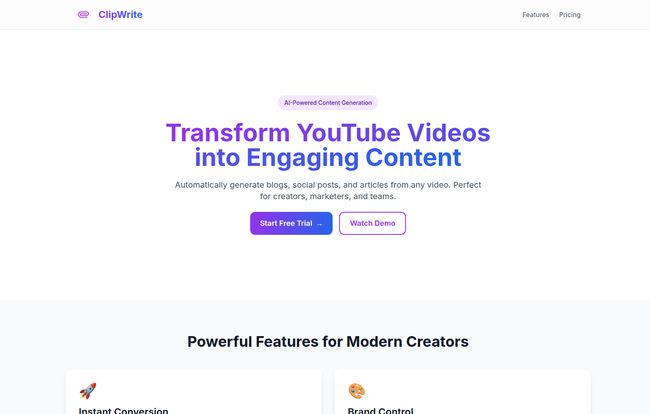
Think of ClipWrite as a translator. But instead of translating from Spanish to English, it translates from video or audio… to written content. You feed it a link—from YouTube, Spotify, and on their higher-tier plan, even TikTok and Instagram—and it uses AI to churn out a blog post, social media updates, or a professional article. All, they claim, in under 30 seconds.
This isn’t just about pulling the spoken words into a text file. That’s transcription, and we’ve had that for ages. The idea here is that the AI understands context, structure, and intent, transforming a conversational video into a piece of writing that’s structured for reading, not just listening. It’s for the YouTuber who wants to build a blog to complement their channel, the podcaster who needs better show notes and social promo, or the marketing manager who wants to get more mileage out of every webinar. It’s a pretty compelling pitch.
The ClipWrite Features That Actually Matter
A shiny feature list is one thing, but what actually moves the needle in your day-to-day workflow? I’ve dug through their offerings, and here’s what stands out from a practical, boots-on-the-ground perspective.
More Than Just a Transcript
The core promise is the “Instant Conversion.” The speed is impressive, no doubt. But the real test is the quality. The tool doesn’t just create a wall of text. It attempts to structure it with headings, paragraphs, and a logical flow. This is the first, and most important, hurdle. A simple transcript still leaves you with the job of editing and formatting, which is half the battle. ClipWrite aims to get you 70-80% of the way there right out of the gate.
Staying On-Brand in the AI Era
One of my biggest gripes with early AI writers was the generic, robotic voice. Everything sounded like it was written by a slightly-too-helpful textbook. ClipWrite’s Brand Control feature is their answer to this. You can supposedly customize the tone and style settings to keep your content sounding like… well, you. For any brand or creator with a distinct voice, this is non-negotiable. Consistency is king in building an audience, and this feature is a nod to that important fact.
Visit ClipWrite
SEO Features Built Right In? Let’s See.
Okay, now for my turf. The “SEO Ready” feature. ClipWrite says it optimizes content with strategic keyword placement and meta descriptions. I’ll take that with a grain of salt, as any seasoned SEO would. Real SEO is about more than just stuffing keywords. It’s about search intent, topical authority, and user experience.
“An AI can give you a starting block for SEO, but it can’t run the race for you. It can identify primary topics and generate a meta description, which is a fantastic time-saver. But you, the human expert, still need to refine it, check the keyword relevance, and ensure it truly answers the user’s query.”
So, see it as a powerful assistant. It does the initial grunt work, but you need to do the final strategic polish.
A Tool That Plays Well with Others
The “Team Workflows” feature might get overlooked by solo creators, but for agencies or in-house marketing teams, it’s huge. Shared workspaces, real-time editing, and approval workflows mean you can have a junior marketer run a video through ClipWrite, then a senior editor can come in to polish and approve it, all in one place. It stops the chaos of emailing different versions of a Google Doc back and forth. I’ve lived that nightmare, and it ain’t pretty.
My Honest Take on Using ClipWrite
After playing around with it, I’ve landed on a favorite analogy. ClipWrite is like a brilliant content sous-chef. It’s not the head chef. You are. It does all the chopping, the dicing, the tedious prep work that consumes so much time. It hands you a perfectly prepped set of ingredients (a structured draft, headings, key points). But it’s still up to you, the head chef, to combine them with your own unique flavor, add that secret sauce (your personal insights and anecdotes), and plate it beautifully for your audience.
The speed is the undeniable win. The ability to look at a backlog of 50 videos and not feel immediate dread is, frankly, liberating. You can create a month’s worth of blog drafts in an afternoon. That’s a game-changer.
But let’s be real. Don’t fire your editor just yet. The AI is good, but it’s not a mind reader. It might miss some nuance, a sarcastic comment, or an inside joke from your video. It needs a human touch to check for accuracy, to inject genuine personality, and to ensure the final piece truly connects with a reader. The reliance on AI means you must proofread and edit. It’s a collaborator, not a replacement.
Let’s Talk Money: ClipWrite Pricing Breakdown
Alright, the all-important question: what’s it going to cost? ClipWrite has a pretty straightforward, three-tiered pricing structure, which I appreciate. No confusing credit systems here.
| Plan | Price | Key Features |
|---|---|---|
| Starter | Free | 15 content generations/month, multi-language support, AI Editor. |
| Pro | $12 /month | Unlimited generations, up to 4-hour videos, multi-language support. |
| Enterprise | $39 /month | Everything in Pro, plus up to 10-hour videos, automated publishing, and support for all sources (YT, Spotify, Insta, etc.). |
My take? The Free plan is perfect for testing teh waters. 15 generations are more than enough to see if the tool’s output works for your style. The Pro plan at $12/month is the sweet spot for most serious creators and small businesses. Unlimited generations for that price is very competitive. The Enterprise plan is clearly for power users and agencies who need to process long-form content like webinars and want the convenience of automated publishing and pulling from all the major platforms.
Frequently Asked Questions about ClipWrite
- 1. Can ClipWrite handle languages other than English?
- Yes, it does. All plans, including the free one, come with multi-language support, which is a huge plus for creators with an international audience.
- 2. Is the generated content truly 100% ready for SEO?
- I’d say it’s about 80% ready. It gives you a great, structured foundation with a meta description and some keyword ideas. However, you’ll always want a human to do a final pass for strategic keyword placement, search intent alignment, and adding internal/external links.
- 3. How fast is the content generation really?
- Their claim of “under 30 seconds” seems to hold up for most standard-length videos. It’s impressively fast, turning a major task into a minor one.
- 4. What platforms can I import from?
- The core platform is YouTube. The Enterprise plan expands this to include Spotify, Instagram, TikTok, and more, making it a much more versatile tool for multi-platform creators.
- 5. Does ClipWrite just give me a transcription of my video?
- No, and this is the important part. It goes beyond simple transcription. It uses AI to reformat the spoken words into a structured article, with headings and paragraphs, designed for reading.
- 6. Is there a free trial to test it out?
- Even better. They have a “Free forever” Starter plan that gives you 15 content generations per month. It’s the perfect way to try it out without any commitment.
Final Thoughts: Is ClipWrite Worth It?
After digging in, my initial skepticism has softened into cautious optimism. ClipWrite isn’t a magic button that creates perfect content while you sleep. Such a thing doesn’t exist. But it is an incredibly powerful efficiency tool.
It slashes the activation energy required to start writing. It takes the most tedious part of content repurposing and automates it. For any creator or marketer who is rich in video/audio ideas but poor on time, ClipWrite could be the key to finally getting off that content treadmill and building a robust, multi-format content engine. It’s not about replacing the writer; it’s about empowering them. And in my book, that’s a tool worth paying attention to.


