
Categories: AI Code Assistant, AI Code Generator, AI Teachers
CodeWhizz Review: Your AI Python Coding Friend?

Another day, another AI tool promising to revolutionize our workflow. You’ve seen them, I’ve seen them. They pop up in your feed, sponsored by some influencer, and they all claim to be the ‘next big thing’. Honestly, I’m getting a little jaded. We’ve all been burned by tools that promise the moon but deliver… well, a blurry picture of the moon taken on a 2005 flip phone.
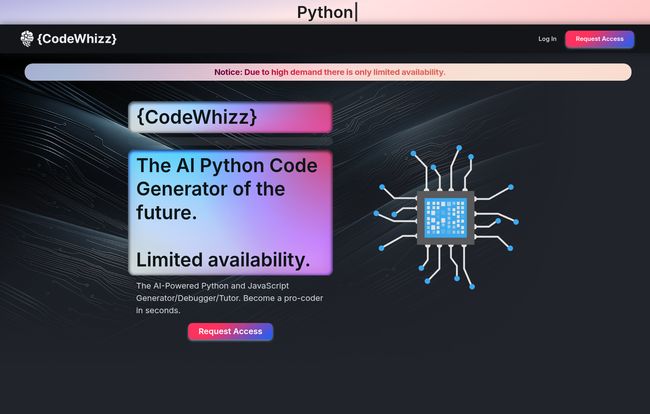
So when I first saw the landing page for a new platform called CodeWhizz, I was skeptical. It had that slick, dark-mode aesthetic and the bold claim of being “The AI Python Code Friend of the Future.” Okay, marketing team, I see you. But then I saw something that piqued my interest: “Limited Availability.”
Ah, the classic scarcity play. But it also suggested this wasn’t just another open-beta free-for-all. Maybe, just maybe, there was something more substantial behind the curtain. So I put on my SEO blogger hat, requested access, and did a deep dive. Is this thing legit, or just another drop in the AI ocean? Let’s get into it.
So What Exactly is CodeWhizz?
At its core, CodeWhizz isn’t trying to just be one thing. And that’s its main selling point. It’s not just a code generator like the early days of ChatGPT prompts. It’s not just a debugger. And it’s not just an online course. It’s trying to be all three, wrapped up in its own little ecosystem. The official line is that it’s an AI-powered Python code generator, debugger, and tutor with a built-in IDE.
That’s a mouthful. Let’s break that down. Imagine you have a coding problem. Instead of opening a browser to search Stack Overflow, a separate VS Code window to write the code, and a third tool to debug it, CodeWhizz wants you to do it all in one place. Think of it less like a vending machine for code snippets and more like having a senior developer on call, 24/7, who runs on coffee and credits instead of patience.
Visit CodeWhizz
A Closer Look at the Features
A tool is only as good as its features, right? Here’s where CodeWhizz seems to be putting its money where its mouth is.
The AI Code Generator and Built-in IDE
This is the bread and butter. You give it a prompt, and it spits out Python code. We’ve seen this before. But the integration with a built-in IDE (they call it a CodeEngine) is a nice touch. No more awkward copy-pasting that messes up your indentation (Python developers, you know the pain). You generate, test, and tweak, all in the same window. They also have a ‘ScriptRepo’ feature, which is basically a fancy name for being able to save your prompts and the scripts they generate. As someone who constantly loses good prompts in a sea of chat histories, I actually appreciate this simple, practical addition.
More Than Just Code: The AI Debugger and Tutor
This, for me, is the most interesting part. The generator is for productivity; the debugger and tutor are for growth. The AI can supposedly look at your buggy code and not just fix it, but explain why it was broken. It becomes a learning moment. This could be huge for people just starting their Python journey. Instead of getting a cryptic TypeError and wanting to throw your laptop out the window, you get a patient explanation. It’s a fascinating concept that could seriously lower the barrier to entry for programming.
I’ve always believed the best way to learn is by doing and fixing. This tool bakes that philosophy right in. It’s not just giving you the fish; it’s teaching you how to fish, while also having a robot that can just catch the fish for you if you’re in a hurry. A pretty compelling combo.
Okay, What’s the Catch?
Nothing’s perfect, and I’d be doing you a disservice if I painted this as a flawless masterpiece. There are a few things that give me pause.
First, that “Limited Availability” gate. As a marketer, I get it. Create hype, build a waitlist, make people feel special. But as a user, it can be frustrating. You’re ready to try something now, not in six weeks. It’s a double-edged sword that might turn some impatient devs away.
Second, and this is a big one I found in their own documentation, the “AI contextual awareness feature is coming soon.” This tells me that right now, it might not fully grasp the context of your entire project when generating or debugging code. This is a common challenge for all AI coding tools—they’re great at small, isolated tasks but can struggle with the big picture. The fact they’re openly working on it is good, but it’s a crucial limitation to be aware of right now.
Let’s Talk Money: The CodeWhizz Pricing Structure
Alright, the part everyone’s waiting for. Is it affordable? Well… it depends on who you are. The pricing is a tiered, credit-based system, which is becoming pretty standard for AI services. Here’s how it breaks down:
| Plan | Monthly Price | Annual Price (per month) | Credits | Best For |
|---|---|---|---|---|
| Standard | $49.99 | $37.50 | 1000 / month | Beginners or hobbyists (1-10 hrs/week) |
| Pro | $89.99 | $59.99 | 2000 / month | Professionals & heavy users (10-20 hrs/week) |
| Enterprise | $189.99 | $114.99 | 5000 / month | Companies & daily coders |
Note: These prices are based on the information available at the time of writing. Always check the official CodeWhizz pricing page for the most current details.
The big question is, what is a “credit”? The site doesn’t explicitly define it, but based on similar models, you can assume one credit is used per generation or per complex query. This means a heavy user could burn through the Standard plan’s credits pretty quickly. At nearly $50 a month for the base plan, it’s not an impulse buy. You have to be committed to using it. The annual plans offer a decent discount, which is a smart move to lock in users.
My Honest Take: Who Should Use CodeWhizz?
After digging through the features and staring at the pricing page for a while, here’s my verdict. CodeWhizz isn’t for everyone, and that’s okay.
For a Python newbie, the combination of a tutor and debugger is incredibly powerful. If you have the budget, it could dramatically speed up your learning curve and save you hours of frustration. It’s like having a private tutor on retainer. For a seasoned professional, the value is more in productivity. Can it write boilerplate code, generate unit tests, or refactor a function faster than you can? Probably. The real question is whether that speed boost is worth the monthly fee and the potential friction of switching from your beloved, highly-customized local setup.
For teams and companies, the Enterprise plan makes a lot of sense. It provides a standardized, powerful tool for the whole team, ensuring everyone has access to the same AI assistance. I could see it being a real asset for onboarding junior developers or for teams that need to prototype ideas very, very quickly.
Ultimately, it comes down to a simple calculation: will the time and frustration it saves you be worth more than the monthly cost? For many, I suspect the answer will be yes.
Also Read: PearAI Review: The Ultimate AI Code Editor?
Frequently Asked Questions about CodeWhizz
- 1. What is CodeWhizz in simple terms?
- It’s an all-in-one website for Python programming that uses AI to help you write code, fix your mistakes, and explain programming concepts. It includes a code editor, so you can do everything in one place.
- 2. How is CodeWhizz different from GitHub Copilot?
- While both use AI to help with code, Copilot primarily integrates into your existing editor (like VS Code) to suggest code as you type. CodeWhizz is a complete, self-contained platform that also adds dedicated debugging and personal tutoring features, making it more of an integrated learning and development environment.
- 3. Is CodeWhizz a good tool for absolute beginners?
- It seems so. The AI tutor feature is specifically designed to help people learn. While the price might be a bit steep for some beginners, it could be a valuable investment to overcome the initial, often difficult, learning hurdles of Python.
- 4. Why is there a waitlist or “limited availability”?
- This is likely a strategy to manage high demand and server costs, which can be significant for powerful AI tools. It also creates a sense of exclusivity and hype, which is a common marketing tactic for new tech products.
- 5. Is there a free trial for CodeWhizz?
- The website focuses on a “Request Access” model rather than advertising a free trial. This suggests access is controlled, and you may need to be approved to sign up for a paid plan. There does’nt appear to be a traditional, open free trial at this time.
Final Thoughts
So, is CodeWhizz the future? It’s certainly a glimpse of what the future could be. The idea of a single, integrated platform where you write, debug, and learn is incredibly appealing. It’s smart, ambitious, and addresses some real pain points for developers at all levels.
However, it’s a premium product with a premium price tag and some key features still on the horizon. It’s not going to replace every developer’s custom setup overnight. But for those willing to invest in their education or productivity, CodeWhizz is a seriously compelling new player in the AI coding space. It’s one I’ll definitely be keeping my eye on.


