
Categories: AI API, AI Chatbot, AI Document Extraction, AI Models, No-Code&Low-Code
Cogniflow Review: Build AI Without Code (The Easy Way)

Let’s have a real chat. For the last couple of years, the air has been thick with AI talk. It’s everywhere. “AI will change everything!” they say. And while I believe it, for most of us—the marketers, the solopreneurs, the small business owners—it’s often felt like a party we weren’t invited to. It’s this big, complicated, expensive-sounding thing that requires a PhD in computer science and a team of people in lab coats.
We see the potential, but the bridge from ‘cool idea’ to ‘working tool’ has been a chasm. That’s why my ears perk up whenever I hear the phrase “no-code AI.” It’s a promise. A promise that maybe, just maybe, the rest of us can finally play with these powerful new toys. Which brings me to Cogniflow. It landed on my radar with that exact promise, and I had to see if it was just more marketing fluff or the real deal. So, I rolled up my sleeves and spent some time with it. Here’s what I found.
What Exactly is Cogniflow Anyway?
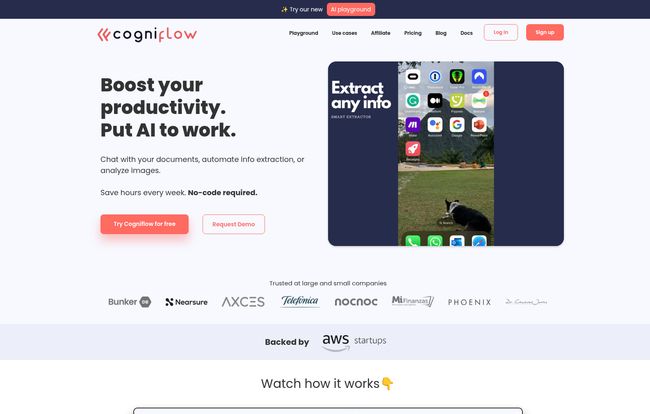
Think of it like this: If WordPress lets you build a website without being a developer, Cogniflow aims to let you build an AI model without being a data scientist. It’s a platform where you can bring your own data—be it text from customer reviews, images of your products, or audio files from sales calls—and teach an AI to understand and automate tasks with it. All through a pretty clean, point-and-click interface.
It’s not trying to be some all-powerful, sentient brain. It’s a workbench. A set of incredibly sharp tools that you, the user, get to direct. You’re not coding an algorithm; you’re training a model. It’s a subtle but massive difference in approach, and it’s the key to the whole no-code movement.
Visit Cogniflow
My First Impressions and Getting Started
Signing up was painless, and I was poking around the dashboard within a couple of minutes. My first thought? ‘Okay, this isn’t terrifying.’ So many so-called ‘user-friendly’ platforms still feel like you’re looking at the flight deck of a 747. Cogniflow feels more like… Canva. It’s clean, the options are clear, and it nudges you toward its “Use Cases” right away.
These pre-built templates are the perfect training wheels. Things like “Receipt or invoice scanner” and “Chat with your docs.” It gives you an immediate ‘Aha!’ moment. You can see the end product right from the start, which is a huge motivator. You’re not starting with a blank, intimidating screen; you’re starting with a solvable problem.
The Core Features That Actually Matter
A platform can have a million features, but only a few usually make a real difference in your day-to-day. After playing around, a few of Cogniflow’s capabilities really stood out to me as genuine problem-solvers.
Taming Your Document Dragons
Every business has them. The digital beasts made of invoices, receipts, contracts, and forms. Manually pulling data from these is a soul-crushing task. Cogniflow’s information extraction is designed for this exact pain point. You can train it to look at a specific type of document and pull out the bits you need—the date, the total amount, the client’s name, whatever. It learns what an invoice looks like to you and gets the data. This alone could be a massive time-saver for operations or finance folks.
Building Your Own Personal Chatbot
The “Chat with your docs” feature is another gem. Imagine uploading all your internal help documents, company policies, or product specs and getting an AI chatbot that can answer questions about them instantly. No more digging through a messy shared drive for that one specific policy. You can build a little expert system for your team or even for customer-facing FAQs. It’s a practical application of LLMs that almost any business could use yesterday.
Connecting the Dots with Integrations
This is where things get really interesting for me, as an SEO and process nerd. An AI model is cool, but an AI model that talks to your other tools is a game-changer. Cogniflow connects to Zapier, Make, Bubble, Google Sheets, and other platforms. This means you can build workflows. For example: A new email comes in -> Cogniflow analyzes its sentiment -> If it’s negative, it automatically creates a high-priority ticket in your support system via Zapier. That’s not just automation; it’s intelligent automation.
Who is Cogniflow Actually For?
After using it, I have a pretty clear picture of the ideal Cogniflow user. It’s for the doers. The busy entrepreneur who wears ten hats and needs to automate customer support queries. It’s for the marketing team that wants to sift through thousands of survey responses for sentiment without building a spreadsheet pivot table from hell. It’s for the no-code creator building an app on Bubble who wants to add a slick, AI-powered feature without learning Python.
Now, who is it not for? Probably the hardcore data scientist at a Fortune 500 company who wants to fine-tune neural network architectures and debate the merits of different tokenization strategies. This is a trade-off. Cogniflow gives you simplicity and speed by abstracting away the deep complexity. For 95% of us, that’s a fantastic bargain. For the other 5%, it might feel a bit like a walled garden.
Let’s Talk Money: The Cogniflow Pricing Tiers
Alright, the all-important question: what’s this going to cost? The pricing structure is tiered, which I appreciate. You can get your feet wet without dropping a credit card. Here’s a quick breakdown:
| Plan | Price (Monthly) | Key Features |
|---|---|---|
| Free | $0 | 100 credits/mo, 5 training hours, Non-commercial use. Great for testing. |
| Starter | $19 | 5,000 credits/mo, 10 training hours, Commercial use, Premium models. The sweet spot. |
| Team | $49 | 15,000 credits/mo, 20 training hours, Up to 3 users, Option for GPT-4. |
| Business | $199 | 100,000 credits/mo, 50 training hours, Unlimited users, Priority support. |
(Note: Prices are lower if you opt for annual billing.)
The “credit” system is the currency of the platform. Every action, like analyzing a document or answering a chat query, uses a certain number of credits. The Free plan’s 100 credits will disappear fast, it’s really just for a quick test drive. The Starter plan at $19/mo feels like the real entry point for anyone serious about using this for their business. It unlocks commercial use and gives you a much more reasonable 5,000 credits to play with.
The Good, The Bad, and The AI
No tool is perfect, so let’s get down to it. I’m a big fan of the sheer accessibility here. The fact that you can go from zero to a working AI model in an afternoon is honestly amazing. It’s a huge win. The integrations are powerful and the UI doesn’t make you want to tear your hair out. That’s a solid foundation.
On the flip side, the credit-based system is something to watch. If you plan on processing tens of thousands of documents a month, the costs could climb. It’s a consumption-based model, which is fair, but requires you to monitor your usage. Also, as mentioned, this is not the tool for deep customisation. You’re using their frameworks. But again, for most people, that’s a feature, not a bug.
A Final Thought Before You Jump In
So, is Cogniflow worth your time? In my opinion, absolutely. It successfully lowers the ridiculously high barrier to entry for building practical AI tools. It transforms AI from an abstract concept into a tangible asset you can build this afternoon to solve a real business problem.
It’s not about creating Skynet. It’s about saving yourself five hours a week on mind-numbing data entry. It’s about giving your customers instant answers. It’s about making smarter decisions because you can finally analyze the data you’ve been collecting. And Cogniflow puts the hammer and nails for that squarely in your hands.
Frequently Asked Questions about Cogniflow
- Do I need to be a coder to use Cogniflow?
- Nope. Not at all. That’s the whole point. If you can drag and drop, you can use Cogniflow. The platform handles all the complex code behind the scenes.
- What can I actually build with it?
- You can build a variety of custom tools. Some popular examples include chatbots trained on your own documents, tools that extract specific info from invoices or IDs, models that classify images (e.g., product types), and systems that analyze text for sentiment.
- How does the credit system work?
- Think of credits as tokens. Each time you ask the AI to do something—like analyze a piece of text or process a page of a document—it costs a certain number of credits. More complex tasks use more credits. Each pricing plan comes with a monthly allowance of credits.
- Can I use this for my actual business?
- Yes, but you’ll need one of the paid plans. The Free plan is explicitly for non-commercial use and learning the ropes. The Starter plan is the first tier that allows for commercial use cases.
- What happens if I go over my credit limit?
- According to their FAQ, if you exceed your monthly credit limit, you’ll need to upgrade to a higher plan to continue using the services for that month. It’s a good idea to pick a plan that gives you a comfortable buffer.
Conclusion
Cogniflow is a seriously impressive and, more importantly, a truly useful player in the no-code space. It delivers on its promise of making AI accessible. It’s not magic, it’s just a really well-thought-out tool that empowers people to build amazing things. If you’ve ever had an idea for a process you wish you could automate with a bit of intelligence, I’d strongly suggest giving the free plan a spin. You’ve got nothing to lose and, potentially, hours of your life to gain back.


