
Categories: AI Color Palette Generator, AI Design Generator, AI Developer Tools, AI Graphic Design, AI SVG Generator, AI UX Design, AI Website Builder, No-Code&Low-Code
Components AI Review: A No-Code Tool for Designers?

If you’ve been in the web design or development game for more than a few years, you know the drill. The designer slaves away, creating a pixel-perfect mockup in Figma or Sketch. It’s beautiful. It’s approved. Everyone is happy. Then comes the handoff. And that’s when the ‘fun’ begins.
Suddenly, that beautiful static image needs to become a living, breathing thing on the web. The developer has to translate every shadow, every spacing, every responsive breakpoint into code. It’s a process that’s… let’s just say, prone to interpretation. It’s the source of countless Slack threads, follow-up meetings, and that age-old question: “Can you just check my build against the design? It looks a bit off.”
I’ve been on both sides of that fence, and frankly, I’m tired of it. So when a tool like Components AI pops up on my radar, claiming to be an open-source tool for building custom design tools without code, my curiosity is definitely piqued. But so is my skepticism. We’ve seen a lot of promises in this space. Does this one deliver?
So, What Is This Thing, Exactly?
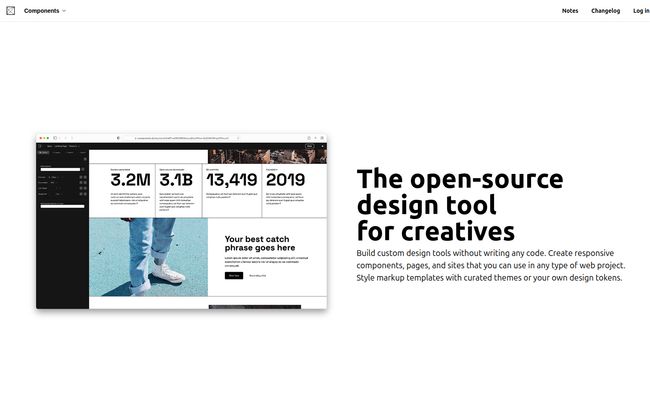
Calling Components AI just another “design tool” feels a bit like calling a Leatherman just a “knife.” It’s missing the point. This isn’t really a tool for drawing static mockups. It’s a tool for building the systems that create your designs. Think of it as a meta-tool. You’re not just designing a button; you’re designing the machine that generates all your future buttons.
At its heart, it’s a platform for creating responsive components, pages, and even entire sites using a no-code visual interface. But the magic is how it connects the dots. You can style things with curated themes, or—and this is big—import your own existing design tokens or CSS. It’s designed to fit into your world, not force you into a new one.
Visit Components AI
The Features That Actually Caught My Eye
I get pitches for new tools all the time, and my eyes glaze over at the feature lists. But a few things here stood out from the usual marketing fluff. I’m not going to list them all, just talk about the ones that matter.
The Studio and That Generative Magic
The main workspace is called the Studio. It’s clean, it’s modern, it feels familiar if you’ve used other web-based design apps. But the real power is in its generative capabilities. This isn’t just about picking a hex code. It’s about setting up rules, constraints, and relationships. You can define a color scale, a typographic hierarchy, or a spacing system, and then let the tool generate variations for you. It feels less like painting and more like gardening—you plant the seeds and guide the growth. It’s a creative partner, not a dumb utensil.
Finally, a Real Bridge Over the Design-Dev Chasm
Okay, this is the showstopper for me. The multi-format export. You can take a component you’ve built and export it as clean, ready-to-use code for React, plain JavaScript, JSON, HTML/CSS, and even Sass. This isn’t some janky, unreadable mess of code either. It’s meant to be used. This feature alone has the potential to shave hours, if not days, off of development cycles. It’s the Rosetta Stone for the designer-developer conversation.
Combine that with the theme import, and you’ve got something special. Got an existing brand with a fat CSS file? You can pull it in and Components AI will work with it. You’re not starting from scratch. You’re enhancing your existing workflow.
Little Things That Are Actually Big Things
Two other things are worth a mention. First, the automated accessibility documentation. Building accessible sites is non-negotiable, but documenting it can be a chore. Having this automated is a huge win. Second, the built-in Markdown publisher. For anyone creating docs, blogs, or knowledge bases, this is a surprisingly powerful addition. It shows they’re thinking about the full lifecycle of content, not just the pretty pictures.
Who Should Be Using Components AI?
I don’t think this tool is for everyone. If you’re a small business owner who just needs a quick landing page, something like Carrd or Mailchimp’s builder is probably faster for you. This is a bit more… professional. In my opinion, this is for:
- Design System Architects: If you’re the person on your team responsible for creating and maintaining a design system, this is built for you.
- Frontend-Focused Designers: You know your way around CSS principles, even if you don’t write it daily. You think in terms of components, not just static pages.
- Small, Agile Teams: Perfect for startups or small agencies where the lines between design and development are blurry.
- Experimental Creatives: The generative aspect is a playground. If you love seeing where a system can take you, you’ll have a blast.
Let’s Talk Money: The Pricing Breakdown
Pricing is always the elephant in the room, right? Here’s how Components AI lays it out. It’s a pretty standard freemium model, but the free tier is quite generous.
| Plan | Price | Best For |
|---|---|---|
| Creator | $0 / month | Trying it out, hobbyists, or one-off projects. You get unlimited publishing but can’t save designs. |
| Pro | $24 / month (or $288/yr) | Serious individuals and freelancers. This unlocks everything you actually need, like saving designs, private projects, and support. |
| Enterprise | Custom | Larger teams needing custom onboarding, workflows, and dedicated support. |
Pro-tip: The pricing page mentions an early bird special with the code PARAMETRIC for 50% off the first year of the Pro plan. That’s a pretty sweet deal if you’re thinking of jumping in.
The Good, The Bad, and The Open-Source Reality
No tool is perfect. Let’s get into the nitty-gritty. The biggest pro is its entire philosophy: it’s an open-source, system-first tool that generates real code. It’s a genuine attempt to solve a real-world problem.
Now, for the potential downsides. Some might say that the reliance on presets and generative tools could limit creativity. I personally disagree. I see it as a scaffold, not a cage. The ability to import your own themes and tokens means the only limit is your own system’s quality. A more valid point is the learning curve. To get the most out of its advanced, generative features, you’re going to need to spend some time with it. This isn’t a 5-minute tool. But what powerful tool is?
The biggest trade-off is probably community size. It’s an emerging platform, so you won’t find the same universe of YouTube tutorials, plugins, and community files that you would for a giant like Figma. That’s the reality of backing a challenger, but it’s also how you get in on teh ground floor of something new and exciting.
Final Verdict: Is Components AI Worth Your Time?
After playing around with it, I’m genuinely optimistic. Components AI isn’t trying to be another Figma-killer. Thank goodness. It’s aiming at a different, and arguably more complex, target: the messy, frustrating, and costly gap between design and production.
It’s a tool for people who think systematically. It’s for designers who want their work to be more than just a pretty picture and for developers who want to start with clean, structured components instead of a flat JPG. It feels like a step in the right direction, embracing a future where design tools don’t just help us draw things, but help us build them, too. It’s one to watch, for sure.
Frequently Asked Questions
Is Components AI free to use?
Yes, it has a ‘Creator’ plan that is free forever. It lets you use the tools and publish unlimitedly, but you can’t save your designs or files, which is the main incentive to upgrade to the Pro plan.
Can I use Components AI with my existing website project?
Absolutely. That’s one of its main strengths. You can import your existing CSS or design tokens to style components, and then export those components in various code formats (like React, HTML/CSS) to integrate directly into your project.
Is Components AI a good replacement for Figma?
It’s not a direct replacement. Figma is king for collaborative design, brainstorming, and detailed UI prototyping. Components AI is more of a design system and component factory that bridges the gap to development. Many teams could use both for different stages of their workflow.
What does ‘generative design’ mean in Components AI?
It means using algorithms and user-defined rules to create design options. For example, instead of picking one color, you define a color scale and let the tool generate a harmonious, accessible theme based on your rules. It’s about co-creating with the machine.
Do I need to know how to code to use Components AI?
No, the core interface is a no-code, visual tool. You don’t need to write any code to design components. However, a basic understanding of web concepts like CSS, components, and design systems will help you get the absolute most out of the platform.


