
Categories: AI Copywriting, AI Social Media Post Generator, AI Writing Assistants
ContentIn Review: The AI LinkedIn Tool I’m Actually Using

Creating content for LinkedIn can feel like a full-time job on top of your actual full-time job. You know the drill. You spend an hour crafting what you think is a killer post, a real gem of an insight. You hit ‘post’, and then… crickets. Tumbleweeds. Maybe a pity-like from your mom.
I’ve been in the SEO and traffic generation game for years, and even I get hit with what I call “LinkedIn fatigue.” The pressure to be consistently visible, insightful, and engaging is immense. The algorithm is a fickle beast, and the fear of the blank white box is very, very real. So, when another AI content tool pops up on my radar, my first reaction is usually a skeptical eye-roll. Another robot that promises the world but spits out generic, soulless drivel? No thanks.
But then I stumbled upon ContentIn. And I’ve gotta admit, something felt different. The promise wasn’t just about speed; it was about creating memorable content, in my voice. So I did what any self-respecting digital marketer would do: I dove in headfirst to see if it could actually live up to the hype. And well, here we are.
What Exactly is ContentIn? (And Why Should You Care?)
So what is this thing? ContentIn bills itself as an AI-powered LinkedIn content assistant. But that’s a bit of a dry, corporate way of putting it. I’d call it a co-pilot for your LinkedIn strategy. It’s not just a writer. It’s an idea generator, a scheduler, an analytics wiz, and a template library all rolled into one clean interface. The whole point is to help you build your personal brand and establish yourself as a thought leader without pulling your hair out.
The core promise, the thing that made me raise an eyebrow in interest, is its ability to be trained on your unique style. We’ve all seen those cringey, obviously-AI posts. You know, the ones that start with “In the dynamic landscape of today’s business world…” Yikes. ContentIn claims to learn from your past content to sound less like a robot and more like… well, you.
Let’s Talk Features: The Nuts and Bolts of ContentIn
A tool is only as good as its features, right? So let’s pop the hood and see what’s powering this thing. It’s more than just a single-trick pony.
The AI Ghostwriter: More Than Just a GPT Wrapper?
This is the main event. The Personal AI Ghostwriter. The big question for me was, is this just a fancy front for ChatGPT? The answer seems to be no. The magic happens when you let it train on your expertise and existing content. It analyzes your tone, your phrasing, your favorite weird analogies (we all have them). The difference is noticeable. The image on their site comparing a generic ChatGPT post to a ContentIn post about a morning routine is pretty spot-on. One is generic motivational fluff; the other has personality. It’s the difference between saying “Seize the day!” and “Mornings are sacred to me. (And I protect them ferociously.)” See what I mean? It has a voice.
The Endless Idea Generator and Viral Templates
My biggest personal struggle? Coming up with ideas. Day after day. ContentIn has an idea generator that is, frankly, a lifesaver. You can pop in a topic or even a URL from a blog post, and it spits out a bunch of angles to work with. It’s like having a brainstorming partner who never needs a coffee break. On top of that, it has a library of over 100 “viral templates.” Now, I’m always a bit skeptical of the word ‘viral’, but these templates are solid. They’re based on structures that are proven to perform well on LinkedIn. It’s not about copying, it’s about having a framework to build on. It’s like a cheat sheet for getting the algorithm’s attention.
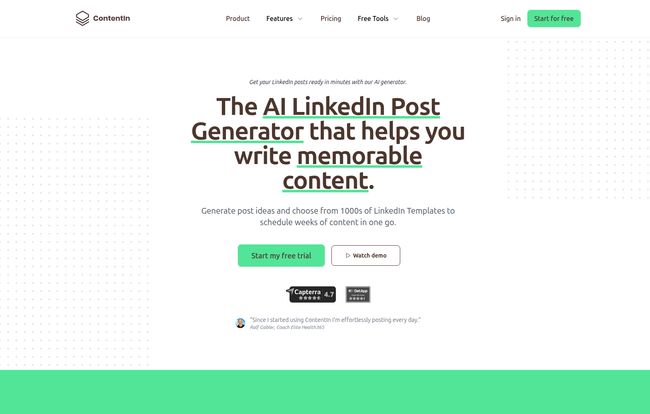
Visit ContentIn
Scheduling and Analytics: The Strategy Side of Things
Creating content is only half the battle. You need to post it consistently, and you need to know what’s working. The built-in Post Scheduler is a godsend for batching your work. You can plan out a whole week or two of content in one sitting. No more daily scramble. Then comes the Post Analytics. It shows you what’s getting traction, what’s flopping, and helps you double down on what your audience loves. It stops you from just throwing content spaghetti at the wall and hoping it sticks.
Other Cool Tricks Up Its Sleeve
Beyond the big three, there are some other nifty tools. The AI Comments feature helps you engage with other people’s posts faster, which is huge for visibility. There’s an AI Image Creator for making quick visuals. And there’s even a feature called FeedZen, which is a sortable feed designed to make commenting and engagement less chaotic. These aren’t just bells and whistles; they create a more complete ecosystem for managing your LinkedIn presence.
The All-Important Question: ContentIn Pricing
Okay, let’s talk money. No tool is worth it if the price is out of whack. ContentIn has a pretty straightforward pricing structure, with a discount for paying annually.
| Plan | Price (Monthly) | Who It’s For |
|---|---|---|
| Starter | $32.50 /m | Great for solopreneurs or anyone just getting serious about LinkedIn. Gives you the core writing and idea tools. |
| Growth | $49.16 /m | This is the sweet spot. If you’re a consultant, founder, or creator, the personalized AI voice, analytics, and company page features are probably worth the upgrade. |
| Ghostwriter / Agency | Custom | For the power users—agencies or individuals managing multiple LinkedIn profiles. |
In my opinion, the Growth plan offers the most bang for your buck. The personalized AI voice is the killer feature, and that alone justifies the price difference if you’re serious about building an authentic brand.
ContentIn vs. The World: How Does It Stack Up?
The space for LinkedIn tools is getting crowded. I’ve used others, and some of the user testimonials for ContentIn even mention trying out tools like Taplio and AuthoredUp. So how is this one different? For me, it comes down to two things: the focus on voice and the all-in-one workflow. While some tools are great at scheduling and others are great at analytics, ContentIn does a remarkable job of bringing the entire process—from raw idea to published post to performance analysis—under one roof. The AI doesn’t just feel tacked on; it feels woven into every step of the process.
Of course, there’s a catch. The effectiveness of the AI is only as good as the input you give it. If you have a thin content history or give it vague prompts, the output might be a little shaky at first. You still need to be the human in the loop, the editor-in-chief of your own brand. This isn’t a set-it-and-forget-it magic wand.
The Verdict: Is ContentIn Worth the Investment?
After spending some quality time with it, my verdict is in. Yes, for the right person, ContentIn is absolutely worth it. It’s a powerful force multiplier.
It’s for you if you’re a consultant, small business owner, creator, or coach who understands the power of LinkedIn but doesn’t have 10 hours a week to dedicate solely to content creation. It’s for you if you’re tired of that blank-page anxiety and want a smart assistant to help you get your ideas out into the world.
Who is it not for? If you only post once a blue moon, it’s probably overkill. And if you’re looking for a 100% automated tool that requires zero thought or effort, this aint it. You still need to bring your expertise and your final editorial eye. It’s a collaboration between you and the machine, and that’s where its real power lies.
It doesn’t eliminate the work, but it makes the work smarter, faster, and, dare I say, more fun. It brought back some of my own joy in creating for the platform, which I didn’t expect.
Frequently Asked Questions about ContentIn
Does the AI-generated content really sound human?
Surprisingly, yes—with a caveat. The “Growth” plan’s feature that trains the AI on your specific writing style is the key. Out of the box, it’s good. After it learns from you, it’s great. You still need to review and tweak, but it’s a far cry from generic robot-speak.
Will the LinkedIn algorithm penalize me for using AI?
This is a hot topic. The consensus right now, which I agree with, is that LinkedIn penalizes bad, low-value content, not AI content specifically. As long as you’re using ContentIn to enhance your own ideas and create genuinely helpful posts, you should be fine. The goal is to create great content, and this is just a tool to help you do that more efficiently.
How long does it take for the AI to learn my style?
It’s pretty quick. The platform guides you through the process of feeding it your past posts or expertise. The more quality examples you provide, the faster and more accurately it learns. You can start seeing personalized results within your first few sessions.
Can’t I just use ChatGPT for free?
You could, but it’s a different ballgame. ChatGPT is a generalist. ContentIn is a specialist. With ContentIn, you’re getting LinkedIn-specific templates, scheduling, analytics, and an AI that’s fine-tuned for the platform and your voice. It’s about the entire workflow, not just text generation.
Can I use this for my LinkedIn Company Page too?
Yes! The Growth plan includes support for unlimited LinkedIn Company pages, so you can manage both your personal brand and your business presence from the same place.


