
Categories: AI Assistant, AI Copilot, AI Email Assistant, AI Image Generator, AI Note Taker, AI Productivity Tools, AI Summarizer, AI Text Generator, AI Workflow, AI Writing Assistants
COPILOT Review: The AI Shortcut Your iPhone Needs?

We all do it. The great ‘app shuffle.’ You open your calendar to see what’s on. Then you jump to your reminders app to check your to-do list. Then you open your email. Then back to your notes to find that one piece of information you jotted down last week. It’s a digital dance of a thousand taps, a constant, tedious copy-paste-a-thon. My thumb gets a better workout than I do most days.
AI was supposed to fix all this, right? It was pitched as this magical helper that would streamline our lives. But for the most part, AI has lived inside its own box. You open the ChatGPT app, you ask it a question, you copy the answer, and you paste it somewhere else. Useful? Sure. Revolutionary for my daily workflow? Not quite.
But every now and then, a tool comes along that feels… different. A tool that doesn’t just give you an AI chatbot, but actually weaves AI into the very fabric of your device. I’ve been playing around with one such tool called COPILOT, and I’ve got some thoughts. It claims to be the AI companion for Apple devices, and honestly, it might just live up to the hype.
So, What Exactly is This COPILOT Thing?
In the simplest terms, COPILOT is a super-intelligent assistant, powered by the brain of ChatGPT, that lives inside your iPhone, iPad, or Mac via Apple’s own Shortcuts app. Think of it less as an app you open and more like a set of skills you give to Siri and your operating system. It’s the AI plumbing that connects all your native Apple apps together.
This isn’t some mega-corp creation either. It was built by an iOS developer named Daniel, who, like me, was tired of the endless app-switching. He basically built the tool he wished Apple had created. There’s a certain charm to that, isn’t there? A tool born from genuine frustration, not a boardroom meeting.
It’s designed to stop the manual drudgery. No more copy-pasting. No more juggling five apps to plan your day. You just… ask.
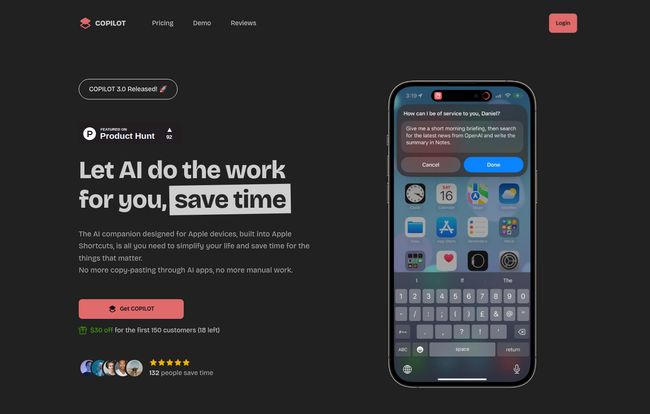
Visit COPILOT
The Magic is in the Shortcuts: How COPILOT Actually Works
Okay, let’s get a bit nerdy for a second. The secret sauce here is Apple Shortcuts. If you’ve never used Shortcuts, it’s Apple’s own automation tool that lets you create little workflows to perform tasks. It’s incredibly powerful but, I’ll admit, a bit intimidating for the average person. Most people never touch it.
COPILOT takes the power of Shortcuts and makes it both accessible and supercharged with AI. Instead of you having to figure out how to build a complex, multi-step automation, COPILOT provides pre-built, intelligent actions.
Take the “Morning Briefing” example from their site. You can just say, “Hey Siri, activate COPILOT” and ask for your morning brief. It will then:
- Scan your Apple Calendar for today’s appointments.
- Check your Apple Reminders for your tasks.
- Use ChatGPT to synthesize all that info into a neat, prioritized summary of your day.
That one command replaces at least three apps and five minutes of mental gymnastics. And that’s just one example. You can use it to summarize webpages you’re browsing in Safari, create notes on the fly, process text, and even generate images with DALL-E, all without leaving the app you’re in.
My Favorite Features (And a Few Quirks)
After using it for a while, a few things really stand out. It’s not perfect, but the good stuff is really good.
The Deep Ecosystem Integration is a Game-Changer
This is the killer feature. Hands down. Most AI tools are islands. They’re great, but isolated. COPILOT feels like its part of the OS. The ability to pull information from my calendar and push a summary to my notes, all with one voice command, is the kind of futuristic stuff I’ve been waiting for. It feels less like I’m using a third-party tool and more like my iPhone just got a major IQ boost.
Context-Awareness That Actually Feels Smart
It’s one thing to have a chatbot, it’s another for it to understand what you’re doing. Because it’s integrated via Shortcuts, COPILOT can often see the context of your screen or current app. This means you can be reading a long article in Safari and just ask it to summarize the text on the page. That’s where the real time-saving kicks in. It’s proactive, not just reactive.
Dynamic Personalities are a Fun Touch
This is a smaller detail, but it shows the thought that went into the user experience. You can change COPILOT’s “personality,” which alters the tone of its responses. Want a super professional assistant? Done. Want a sarcastic, witty sidekick? You can do that too. It’s a bit of a gimmick, sure, but it makes the interaction feel more personal and less robotic.
Let’s Talk About the Catch
Alright, it can’t all be sunshine and automated rainbows. There are a few things you absolutely need to know before you jump in. I believe in full transparency, especially when it comes to spending money on apps.
| The Good Stuff | The Not-So-Good Stuff |
|---|---|
| Genuinely saves time on repetitive tasks. | Only available for Apple devices (sorry Android folks!). |
| Amazing integration with native Apple apps. | Requires a recent OS (iOS 16+, macOS 13+). |
| Automates complex workflows with simple commands. | Relies on a credit system or your own OpenAI key. |
| One-time payment, not another subscription. | Their credits include a 30% fee on top of OpenAI prices. |
Stuck in the Apple Walled Garden
First and foremost, this is an Apple-only product. If you live in the Android or Windows world, this tool isn’t for you. It’s built from the ground up to work with iOS, iPadOS and macOS, which is its greatest strength but also its biggest limitation.
The Cost: Lifetime License and API Keys
COPILOT isn’t a subscription, which I love. It’s a one-time payment of $49 for a lifetime license (I’ve seen it on sale, so keep an eye out). That gets you the tool itself, one year of updates, and $5 in starting credits.
But here’s the crucial part: to actually run the AI, you need to fuel it. You have two options:
- COPILOT Credits: You can buy credits directly through them. It’s the simplest option, but they add a 30% fee on top of OpenAI’s direct pricing. This covers their costs, but it’s not the cheapest way.
- Bring Your Own Key (BYOK): This is the power-user move. You can get your own API key directly from OpenAI and plug it into COPILOT. You’ll pay OpenAI’s standard rates, which are incredibly cheap for most text-based tasks. For anyone planning to use this regularly, this is the way to go. It might sound scary, but it’s a pretty straightforward copy-and-paste job.
The transparency about the 30% fee is respectable, but my advice is clear: if you’re serious about this, get your own API key. You’ll save a ton of money in the long run.
How Does it Stack Up Against Other AI Apps?
This is where some people get confused. Is this better than the ChatGPT app? It’s not really a fair comparison. It’s like asking if a wrench is better than a hammer. They’re different tools for different jobs.
The official ChatGPT app is a fantastic tool for conversation, brainstorming, and content creation in a dedicated window. COPILOT is a workflow tool. Its purpose isn’t to be a destination, but to be a silent, integrated partner that works across all the other apps you use. You don’t go to COPILOT; you call it when you need it, wherever you are.
“The stuff that you built should have been done by Apple 🙂 You’re a genius.”
– Endymion C., a COPILOT user
That user quote really hits the nail on the head. It feels like a feature that’s missing from iOS itself.
So, is COPILOT Worth Your Money?
After all this, we land on the big question. My verdict? For the right person, absolutely.
If you’re an Apple power user, a productivity enthusiast, a small business owner, or just someone who genuinely gets annoyed by repetitive digital chores, the one-time fee for COPILOT is a steal. The amount of time and mental energy it can save you is well worth the price of a few fancy coffees. The ability to stitch together your digital life on your iPhone is its true value.
However, if you’re a very casual user, rarely use apps like Reminders or Calendar, and the idea of an API key gives you a headache, you can probably skip this one. It’s a tool for people looking to actively optimize their workflows.
The Future is Integrated
COPILOT is a fantastic glimpse into what I believe is the real future of AI: not as a standalone gimmick, but as a deeply integrated utility. It’s a tool that does its job so well that it disappears into the background, saving you clicks and time without you even thinking about it. While it has its quirks and a specific audience, it’s one of the most practical and clever applications of AI I’ve seen for personal productivity. It finally makes my iPhone feel a little bit more like the personal assistant it was always meant to be.
Frequently Asked Questions
What do I get with the COPILOT lifetime license?
The $49 lifetime license gives you access to the COPILOT Shortcuts on all your Apple devices (iPhone, iPad, Mac), all its features, $5 in starter credits, 24/7 support, and one year of free updates to new versions.
Do I have to use my own OpenAI API key?
No, it’s optional. You can use the built-in COPILOT Credits system if you prefer simplicity. However, for heavier users, bringing your own OpenAI key (BYOK) is more cost-effective as it avoids the 30% surcharge on credits.
What are the system requirements for COPILOT?
You’ll need an Apple device running on a fairly recent operating system: iOS 16 or newer, iPadOS 16 or newer, or macOS 13 or newer. This is because it relies on features in the modern versions of Apple Shortcuts.
Is this better than just using the free ChatGPT app?
They serve different purposes. The ChatGPT app is for direct interaction with the AI in a chat window. COPILOT is an automation tool that integrates that AI’s power into other apps and your device’s operating system to complete tasks across your digital ecosystem.
How is this different from Microsoft’s Copilot?
This is a great question due to the similar names! They are completely different products. Microsoft Copilot is Microsoft’s own AI assistant, deeply integrated into Windows and the Microsoft 365 suite (Word, Excel, etc.). This COPILOT is an independent product specifically for the Apple ecosystem, built by a third-party developer to work with Apple Shortcuts.
Is it difficult to set up?
The basic setup is quite easy. You purchase, download the Shortcuts, and it walks you through the installation. If you choose to use your own API key, there’s one extra step of copying and pasting the key from the OpenAI website into the Shortcut’s settings, but comprehensive documentation is provided.


