
Categories: AI App Builder, AI Code Generator, AI Developer Tools
Craftable PRO Review: A Laravel Admin Panel Speedrun

If you’re a web developer, you’ve been there. You’ve just landed an exciting new project. You’re hyped about the unique logic, the complex database interactions, the cool front-end stuff. But then it hits you. That sinking feeling. You still have to build the admin panel. Ugh.
Admin panels are the broccoli of web development. We know they’re necessary, good for the project’s health, and will make the client’s life easier… but nobody really wants to spend their time on them. It’s often repetitive, tedious work. Setting up the same CRUD (Create, Read, Update, Delete) operations for the umpteenth time can suck the soul right out of you.
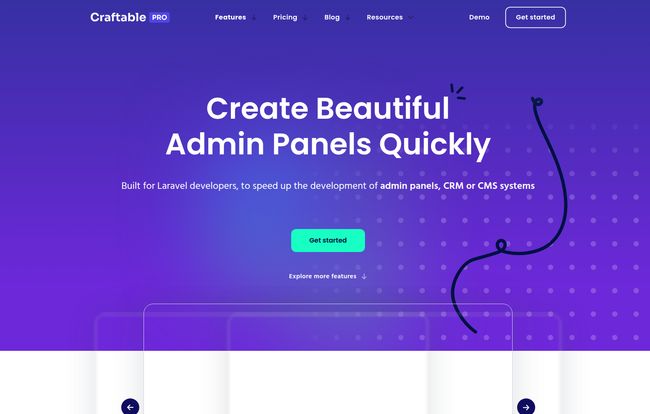
For years, the Laravel community has relied on a patchwork of solutions. Some are open-source, some are clunky, many look like they were designed in 2010. I’ve tried a bunch of them. So when I stumbled across Craftable PRO, my professional curiosity was piqued. It promises to “Create Beautiful Admin Panels Quickly.” A bold claim. But could it actually deliver and save us from the admin panel doldrums? I had to find out.
What Exactly is Craftable PRO?
In a nutshell, Craftable PRO is a high-octane scaffolding tool specifically for Laravel developers. Think of it less as a restrictive, all-in-one CMS and more like a powerful assistant that builds the boring parts for you, so you can focus on the fun stuff. It generates a complete admin interface, complete with CRUD functionalities, user management, and more, pretty much without you having to write a line of code for the interface itself.
It’s built on a modern stack that many of us in the Laravel world already appreciate: InertiaJS, Vue.js (specifically Vue3), and TailwindCSS. This isn’t some black box system; it’s built with tools that developers can actually understand and, if needed, extend. That, for me, is a huge plus.
The Features That Actually Matter
A tool can have a million features, but only a few ever really make a difference in your day-to-day workflow. After playing around with it, here are the parts of Craftable PRO that genuinely caught my eye.
A UI That Doesn’t Look Like Bootstrap from 2012
First impressions count, especially when you hand a project over to a client. The UI here is clean, minimalistic, and modern. It feels like an application built for today, not a relic of the past. The use of TailwindCSS means everything is snappy and responsive. This isn’t just about aesthetics; a clean, intuitive interface makes managing the application easier for the end-user, which means fewer support calls for you. A win-win.
Generating CRUD Without the Cruddy Work
This is the main event. The Modules Generator is the heart of Craftable PRO. You can define your database model, and with a few clicks, it will generate the entire CRUD scaffold. We’re talking the controller, the validation rules, the views, the routes—the whole shebang. The time saving here is immense. What could take a full day of repetitive coding can be done in minutes. Seriously. It’s like having a junior dev who only does the boring stuff, never complains, and drinks way less coffee.
Visit Craftable PRO
Granular Control with Roles and Permissions
I can’t count the number of projects where access control started simple (“Admins” and “Users”) and then ballooned into a complex web of permissions. Craftable PRO comes with a robust Roles & Permissions system baked right in. You can create detailed roles and assign specific permissions for every part of your application. This is one of those things that’s a massive pain to retrofit, so having it from the start is a godsend.
Managing Media Without Pulling Your Hair Out
The built-in Media Library is another feature that feels like a massive quality-of-life improvement. It’s not just a simple file upload field. It’s an advanced manager where you can upload, edit, and organize media. For any content-heavy site, like a blog, news portal, or e-commerce platform, this is a non-negotiable feature that just works out of the box.
Going Global with Localization
If you’ve ever built a multi-language site, you know the headache of managing translation strings. Craftable PRO includes a Localization Manager to handle translatable content and strings. This makes building applications for an international audience significantly more straightforward.
Let’s Talk Brass Tacks: The Pricing
Alright, so it’s not free. Let’s get that out of the way. But as the landing page says, “Your time costs more.” I’ve always been a firm believer in paying for tools that give me back my most valuable asset: time. The cost of this tool is a rounding error compared to the billable hours it saves.
Here’s a breakdown of their pricing model:
| Plan | Price | Usage |
|---|---|---|
| Single | €149 / year | Use in a single project |
| Unlimited (Popular) | €399 / year | Use in unlimited projects |
| Forever | €990 (one-time) | Use in unlimited projects, forever |
For a freelancer or a small agency, the Unlimited plan at €399/year seems like a no-brainer. If you build more than two Laravel projects a year, it pays for itself almost immediately. The Forever plan is tempting for anyone who is fully committed to the Laravel ecosystem and plans to be for years to come.
The Good, The Bad, and The Laravel-Specific
No tool is perfect, and honest reviews need to cover both sides. One of the customer testimonials even says, “Craftable is not yet perfect but I’m very grateful of what you guys have done.” I love that honesty.
The Good Stuff is obvious: lightning-fast development, a beautiful and usable UI out of the box, and powerful features like access control and a media library that save a ton of time. It streamlines the most predictable part of app development, freeing up mental energy for the unique business logic that actually provides value.
The Not-So-Good Stuff (or things to know) is also important. First, it requires a paid license after the trial. If you’re looking for a completely free, open-source solution, this ain’t it. Second, it’s obviously tied to the Laravel framework. That’s a pro if you love Laravel, but a non-starter if you don’t. Lastly, while you can get a lot done with no code, for really deep customization, you’ll want to be comfortable with the underlying stack: InertiaJS, Vue, and TailwindCSS. That’s not a con in my book, but it’s a prerequisite to be aware of.
Who Is This Tool Really For?
So, who should be clicking that ‘buy package’ button? In my opinion, Craftable PRO is a perfect fit for a few groups:
- Freelance Laravel Developers: You can churn out high-quality projects faster, increasing your profitability and impressing clients.
- Small to Medium Agencies: Standardize your backend development process and deliver projects more consistently and on tighter deadlines.
- Developers Building Internal Tools: Need a quick, functional, and good-looking interface for an internal dashboard or CRM? This is probably the fastest way to get there.
Who might not need it? Massive enterprise companies with their own dedicated platform teams and bespoke design systems might find it too restrictive. But for the vast majority of projects, it hits a real sweet spot.
My Final Take
I went in skeptical and came out impressed. Craftable PRO isn’t just another admin generator. It’s a well-thought-out development accelerator that understands the pain points of modern web development. It tackles the age-old “build vs. buy” debate by offering a compelling “buy” option that still gives you the flexibility of the underlying “build” framework.
It won’t write your application’s killer feature for you, but it will build the solid, professional foundation for that feature to live on—and it’ll do it in record time. For me, that’s more than worth the price of admission.
Frequently Asked Questions
- Is Craftable PRO a full CMS like WordPress?
- Not exactly. It’s better to think of it as a tool to build a custom CMS, CRM, or any other application that needs an admin panel. It provides the foundation and tools, but you control the final structure and logic.
- Do I need to be a Vue.js expert to use it?
- For basic CRUD generation and using the pre-built features, you don’t need much Vue knowledge at all. However, if you want to heavily customize the front-end components of the admin panel, then having some familiarity with Vue.js will be very helpful.
- What version of Laravel does it support?
- As with any active package, it’s best to check the official documentation for the most up-to-date compatibility. Generally, tools like this aim to support the latest LTS (Long-Term Support) versions of Laravel and newer.
- Can I modify the code that Craftable PRO generates?
- Absolutely. This is one of its biggest strengths. It generates clean, readable code that you can then take over and customize to your heart’s content. You’re not locked into a black box.
- Is there a free trial to test it out?
- Yes, the website mentions a trial period so you can see if it fits your workflow before committing to a purchase. I’d definitely suggest giving it a spin on a test project.
- How does the ‘Forever’ license actually work?
- The ‘Forever’ license is a one-time payment. It grants you access to use Craftable PRO on unlimited projects and receive all future updates without any recurring annual fees. It’s for those who are all-in on the tool for the long haul.
Conclusion
Tools that genuinely respect a developer’s time are worth their weight in gold. Craftable PRO feels like one of those tools. It’s a pragmatic solution to a universal problem, allowing us to skip the tedious setup and get straight to solving the interesting challenges. If you’re in the Laravel ecosystem and you feel the familiar dread at the start of every new project’s admin build, you owe it to yourself to check this out. You might just get your Mondays back.


