
Categories: AI API, AI Hairstyle, AI Image Generator, AI Photo Editor, AI Selfie Generator, AI Video Editor, AI Youtube Thumbnail Generator
CrazyFace Review: AI Face Changer for Viral Thumbnails?

We’ve all seen it. The wide eyes, the gaping mouth, the single teardrop rolling down a cheek while pointing at a red circle. It’s the classic “YouTube Face,” an expression of pure, unadulterated shock, joy, or despair. And as much as some of us old-school SEO and marketing folks might roll our eyes, the data doesn’t lie: it gets clicks.
As a content creator, you’re in a constant, brutal war for attention. Your thumbnail is your soldier on the front lines. It’s your first impression and, more often than not, your only one. But trying to stage that perfect, emotion-drenched photo? Ugh. It’s awkward. It takes dozens of shots to get one that doesn’t look completely forced. You end up feeling ridiculous, and half the time the result is… well, less “I just discovered a new species” and more “I think I left the oven on.”
So, when I stumbled upon an AI tool called CrazyFace that claimed it could generate these over-the-top expressions for you, I was skeptical but intrigued. Could a bit of code really save me from the cringey process of taking 50 selfies just to get one good thumbnail? I had to find out.
Visit CrazyFaceAI
So, What Exactly is CrazyFace?
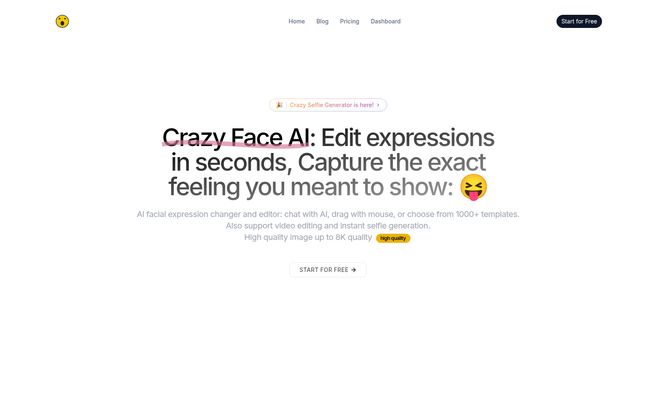
In short, CrazyFace is an AI-powered playground for your face. You upload a relatively neutral photo of yourself (or your pet, but more on that later), and it gives you a whole suite of tools to twist, morph, and remold your expression into just about anything you can dream up. It’s not just a simple filter; it’s a facial expression editor that seems to have been built from the ground up with one person in mind: the YouTube creator. It analyzes what makes a thumbnail pop and gives you the power to apply those principles to your own face, without needing a degree in drama.
My First Spin and Getting Started
Getting started was surprisingly simple. No complicated installs or anything. I just went to the site, uploaded a standard headshot I use for my professional profiles—you know the one, friendly but not too friendly—and braced myself. Within seconds, I was staring back at a dozen versions of me. One looked like he’d just won the lottery. Another looked like he’d seen a ghost. Another had the classic, jaw-on-the-floor MrBeast expression. It was… wild.
The interface lets you tweak things with simple text prompts, pick from a huge library of templates, or even upload a reference photo. Want to look like you’re reacting to a specific meme? Just show the AI that meme. It’s incredibly intuitive.
The Features That Actually Matter
A lot of AI tools are packed with features that sound cool but you never actually use. I found a few things in CrazyFace that feel genuinely useful for creators grinding it out every day.
The YouTube Face Hub is a Goldmine
This, for me, is the killer app. CrazyFace has a feature that has analyzed the faces from top Youtubers’ most viral videos. It’s not just guessing; it’s using data. You can literally say, “Give me that super-surprised face that gets a 10% CTR,” and it knows what you mean. It’s like having a cheat sheet for audience psychology, which can be a massive advantage when you’re trying to figure out what thumbnail will perform best.
Editing Your Face Like Digital Clay
This is where the fun really begins. Beyond the templates and prompts, there’s a Live Drag Face Editor. This is exactly what it sounds like. You use your mouse to literally pull and push your facial features in real-time. Want your eyebrows higher? Drag ’em up. Mouth wider? Pull the corners. It felt less like photo editing and more like sculpting with digital clay. It’s oddly satisfying and gives you a level of granular control that I haven’t seen in other tools.
Beyond Still Images with AI Video and Selfies
CrazyFace doesn’t just stop at photos. It can generate short video clips (up to 10 seconds on the Basic plan, longer on Premium) from a single image, animating your new expression. This is a nifty little feature for creating reaction GIFs, eye-catching social media posts, or Shorts without having to set up a camera. The “Crazy Selfie Generator” is also a blast, creating bizarre and hilarious versions of yourself that are perfect for more informal, meme-heavy content.
Don’t Forget Our Furry Friends
And now for the feature you didn’t know you needed. It works on animals. Yes, you read that right. I tested it on a picture of my friend’s golden retriever, and the results were hysterical. You can finally make your cat look as truly shocked about the empty food bowl as he acts. It’s a bit of a gimmick, sure, but for pet channels or anyone who uses animal memes in their content, it’s brilliant.
Also Read: Face-Swap.io Review: Free AI Face Swap Fun?
But Is The Quality Any Good?
Here’s a big concern with any image manipulation tool: quality. There is nothing worse than spending time on a thumbnail only for it to look blurry and pixelated on a big screen. I was genuinely impressed here. CrazyFace supports image generation up to 8K quality. That’s frankly massive overkill for a YouTube thumbnail, but it gives you incredible peace of mind. You know the asset you’re creating is crisp, clear, and professional. The detail it retains, even on a ridiculously stretched smile, is pretty remarkable.
A Look at CrazyFace Pricing
Alright, let’s talk turkey. The tool isn’t entirely free, but the pricing seems pretty reasonable for the target market. They have a few tiers:
- Basic Plan: This runs you about $3.99 per month. It gives you 30 “faces” or credits per month, access to most of the core features, and a 3-day free trial to kick the tires. This is probably enough for a creator posting once or twice a week.
- Premium Plan: At $9.99 per month, this tier bumps you up to 100 faces/month and adds support for generating longer videos. If you’re a full-time creator or a social media manager juggling multiple accounts, this is likely the better value.
- API Access: For developers and businesses who want to integrate CrazyFace’s tech into their own applications, you’ll have to contact them for pricing.
For my money, the Premium plan at ten bucks a month is a no-brainer if this tool becomes a core part of your content workflow. The time it saves could easily be worth more than that.
The Reality Check: Where It Stumbles
Let’s be real, no tool is perfect. AI isn’t magic, and sometimes the results can wander into the… uncanny valley. You’ll occasionally generate a face where an eye is just a bit off or a smile is a little too toothy and looks more creepy than crazy. It takes a bit of trial and error to get the perfect result. Also, the credit system on the paid plans means you can’t just generate hundreds of options endlessly. You have to be a little mindful of your usage, which is a fair trade-off for the power you get.
So, Is CrazyFace the Right Tool for You?
What it all boils down to is this: who are you and what do you need? If you are a YouTuber, a TikToker, a streamer, or a social media manager who lives and dies by click-through rates, then yes. I think CrazyFace is absolutely for you. It’s a massive time-saver, a creative spark, and a powerful tool for A/B testing what visuals resonate with your audience.
If you’re a professional portrait photographer looking for subtle, high-end skin retouching, this probably isn’t it. The tool’s name is “CrazyFace,” after all. It’s built for impact, not subtlety.
Final Thoughts on the Thumbnail Arms Race
In the never-ending content arms race, CrazyFace feels like a genuinely new and useful weapon. It’s not about replacing creativity, but augmenting it. It takes one of the most tedious parts of content creation and makes it faster, easier and, honestly, a lot more fun. It allows you to focus on the big ideas for your videos, knowing you can nail the thumbnail in a few clicks afterward. And for that alone, it’s earned a spot in my digital toolkit.
Frequently Asked Questions
What is CrazyFace primarily used for?
CrazyFace is primarily used by content creators, especially YouTubers, to generate and edit highly expressive facial expressions for their video thumbnails. The goal is to create eye-catching images that increase click-through rates (CTR).
Is there a free trial for CrazyFace?
Yes, the Basic plan comes with a 3-day free trial, allowing you to test out the features and see if it fits your workflow before committing to a subscription. You can cancel for free within those three days.
Can I use the faces I create for my YouTube channel?
Absolutely. The images you generate are meant for use in your projects, including monetized YouTube channels, social media posts, and other marketing materials.
Does CrazyFace really work on animal photos?
Yes, it does! The platform includes an Animal Expression Editor that allows you to apply the same kind of expressive edits to photos of pets and other animals, which is great for meme creation or pet-focused content channels.
How does the AI expression generator work?
It uses a combination of methods. You can type in a text prompt (e.g., “a shocked face”), choose from over 1000 pre-made templates based on viral content, upload a reference image whose expression you want to copy, or use the Live Drag Editor to manually adjust facial features in real-time.
What’s the main difference between the Basic and Premium plans?
The main differences are the number of credits and video capabilities. The Basic plan ($3.99/mo) offers 30 faces/month and supports videos up to 10 seconds. The Premium plan ($9.99/mo) provides 100 faces/month and supports the generation of longer videos.
Reference and Sources
-
VidIQ Blog – How to Make the BEST YouTube Thumbnails (to Get More Views)
-
CrazyFace Official Website


