
Categories: AI Code Generator, AI Copilot, AI Design Generator, AI Developer Tools
CSSPicker Review: AI Design to Code Magic?

If you’ve spent any time in the front-end development trenches, you know the feeling. You get this absolutely stunning mockup from the design team. It’s perfect. The spacing is immaculate, the color palette sings, the typography is a work of art. And then comes the soul-crushing part: translating that visual poetry into cold, hard, functional code.
I’ve lost more hours than I care to admit nudging pixels, wrestling with `divs`, and trying to replicate a subtle box-shadow that just won’t cooperate. It’s that tedious gap between design and code where joy goes to die. So naturally, when a tool like CSSPicker pops up on my radar, promising to bridge that gap with AI, my first reaction is a healthy dose of skepticism. Followed, of course, by a massive amount of curiosity.
Is this another overhyped AI toy, or is it the real deal? I spent some time with it, and well, the results were… interesting. Let’s get into it.
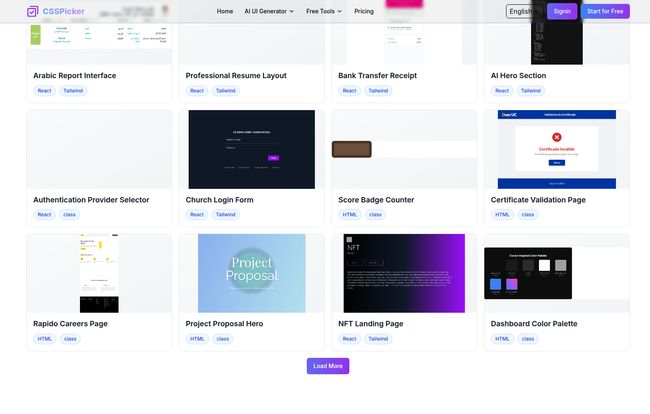
So, What Exactly is CSSPicker?
At its heart, CSSPicker is a suite of AI-powered tools designed to speed up web development. It’s not just one thing; it’s more like a Swiss Army knife for the modern front-end dev. Its main claim to fame is its ability to take a visual concept—whether it’s a screenshot, a detailed text description, or even an existing website—and spit out the corresponding code. It supports the frameworks we’re all using daily, like React, HTML/CSS, and my personal go-to, Tailwind CSS.
Think of it as a translator. It speaks the language of ‘design’ and fluently translates it into the language of ‘code’, saving you from being the overworked, under-caffeinated middleman.
The Core Features That Actually Matter
You can have all the fancy features in the world, but only a few really change your day-to-day workflow. After playing around, I found three parts of CSSPicker that really stood out.
The AI UI Generator: From a Whisper to a Webpage
This is the fun one. The AI UI Generator is where you feel like you’re living in the future. You just type a description of what you want. I started simple: “A clean login form with a google sign in button.” It produced a pretty solid component. Then I got more ambitious: “A dark mode dashboard header with a user avatar, a search bar, and a notification bell with a red dot.”
And you know what? It worked. It wasn’t 100% pixel-perfect to what was in my head, but it was a solid 85% of the way there in about 15 seconds. That’s the magic. It’s not about replacing developers; it’s about obliterating the blank page. It gives you a huge head start, a functional, well-structured component that you can then refine. It’s the difference between building a car from scratch and just getting in and driving, maybe stopping to adjust the mirrors.
Image to Code: The End of Slicing PSDs?
Okay, who here remembers the ‘good old days’ of slicing up Photoshop PSD files? It was a nightmare. This feature feels like the spiritual successor to that entire process, except it actually works. You can upload any screenshot—a design from Figma, a cool component you saw on Dribbble, or even just a photo of a sketch on a napkin (though I’d recommend a clearer source)—and the AI analyzes it and generates the code.
I tested this with a screenshot of a fairly complex pricing card from another site. The structure it generated was surprisingly clean. The colors were spot-on, and the general layout was correct. Some of the finer details, like the exact font weight and letter-spacing, needed a little human touch. But again, it saved me what could have been 30-45 minutes of tedious grunt work.
The Nifty Browser Extension for CSS Grabbing
This might be my favorite sleeper feature. It’s a simple browser extension that lets you just hover over any element on any website and instantly see its CSS. Yes, browser dev tools do this, but CSSPicker takes it a step further. You can not only copy the CSS, but you can also use its AI to instantly convert it to Tailwind or React (JSX). This is huge. Seeing a cool button animation or a unique layout and immediately being able to deconstruct it and convert it for your own project’s tech stack is an incredible time-saver.
Let’s Talk Money: CSSPicker Pricing
Alright, the all-important question: what’s it going to cost me? The pricing structure is refreshingly straightforward. They seem to have a monthly focus, though I saw a tab for one-time payments and a deprecated license option, which tells me they’re still figuring out the perfect model. For now, here’s the breakdown:
| Plan | Price (Monthly) | Key Features | My Take |
|---|---|---|---|
| Basic | $9.90 | Unlimited CSS Copying, 100 AI Generations/month, All AI tools, Image to Code | A total no-brainer for freelancers or developers who want to test the waters. 100 generations is plenty for personal projects or occasional use. |
| Standard | $29.99 | Everything in Basic, but with 400 AI Generations/month | This seems aimed at small agencies, full-time front-end devs, or anyone who plans to integrate this heavily into their workflow. The cost is easily justified if it saves you even a few hours a month. |
There’s also a ‘Start for Free’ option on the homepage, so you can try before you buy, which is always a good sign.
The Good, The Bad, and The AI-Generated
No tool is perfect. After all is said and done, it’s about weighing the good against the not-so-good. For CSSPicker, the upside is pretty clear: it’s a massive accelerator for your workflow. The AI-powered code generation is genuinely useful, especially for creating boilerplate or getting a head start on complex components. The support for different frameworks like React and Tailwind is a huge plus, and the ability to extract and convert CSS from live websites is just plain cool. They also have a bunch of handy free tools, like a standalone CSS to Tailwind converter, which shows a commitment to the dev community.
However, let’s be realistic. The AI isn’t a mind-reader. Some might argue its accuracy can vary, and I’d agree. You’re not going to get a production-ready, pixel-perfect application with one click. Think of the AI as a very skilled, very fast junior developer. It gets the job done quickly, but it needs a senior dev (that’s you!) to review the work, make tweaks, and ensure it meets best practices. And of course, to unlock the full power and a higher number of generations, you’re looking at a paid subscription.
Frequently Asked Questions about CSSPicker
I’ve seen a few questions pop up, so let’s tackle them head-on.
How does the image to code conversion actually work?
It uses computer vision AI to analyze the pixels of an image. It identifies elements like buttons, text blocks, and containers, determines their properties (color, size, position), and then translates that visual structure into semantic HTML and CSS code.
Honestly, how accurate is it?
It’s surprisingly accurate for structure and color, but you’ll often need to fine-tune the details. I’d say it’s about 80-90% accurate on average, which is a fantastic starting point but not a final product.
What frameworks does CSSPicker support?
Right now, it focuses on the big ones: plain HTML/CSS, React, and Tailwind CSS. This covers a huge chunk of modern web development projects.
Can I customize the generated code?
Absolutely! That’s the whole point. It gives you a fully-editable block of code that you can copy into your editor and tweak to your heart’s content. It’s a starting block, not a locked box.
Is there a free version available?
Yes, there’s a free tier that lets you try out the features. It’s a great way to see if the tool fits into your workflow before committing to a paid plan which gives you more AI generations.
Can I use this to improve my existing website code?
Sort of. The best way to do this is by using the browser extension to ‘pick’ a component from your live site and then use the AI to iterate or convert it to a different framework, like moving a CSS component to Tailwind.
So, Is CSSPicker Worth It? My Final Take
After spending a good amount of time with CSSPicker, I’m walking away impressed. It’s not the mythical “end of front-end development” that some people fear (or hope for). Instead, it’s something far more practical and useful: a powerful assistant.
It’s a tool that takes the most tedious, repetitive parts of front-end work and automates them, freeing you up to focus on the more challenging and creative aspects of your job—like logic, accessibility, and performance. For the price of a few cups of fancy coffee a month, it has the potential to save you hours of work. And in our line of work, time is everything.
Will I be using it? Yeah, I think I will. Especially for rapid prototyping and getting those initial components built. It’s a smart, well-executed tool that genuinely understands and solves a common pain point for developers. And that, in my book, is a win.


