
Categories: AI Agent, AI Charting, AI For Data Analytics, AI Report Generator
DataSquirrel Review: AI Data Analysis For The Rest of Us?

If I see one more VLOOKUP tutorial, I might just throw my laptop out the window. For years, we in the marketing and business world have been told to be “data-driven.” It’s a great mantra. A noble goal. But in practice, it often means spending hours, no, days, wrestling with unruly Excel sheets, trying to remember how pivot tables work, and begging our one over-worked data analyst for a report that we needed yesterday.
It’s a special kind of purgatory. You have the data. You know the answers are in there somewhere, hiding between messy columns and inconsistent formatting. But getting to them feels like trying to solve a Rubik’s Cube in the dark.
So when I heard about a tool called DataSquirrel.ai that promised to automate the whole mess—cleaning, analyzing, and visualizing data with no code or formulas—my inner skeptic raised a very prominent eyebrow. Another AI tool promising to solve all my problems? Sure. But I’m a professional, and it’s my job to see what’s what. So I dove in. And folks, I have to say, I’m pleasantly surprised.
So, What is DataSquirrel.ai, Really?
Think of DataSquirrel less as a complex analytics platform and more as a super-smart translator. On one side, you have your chaotic data—CSV files from your ad campaigns, Google Sheets tracking sales, Excel exports from your CRM. On the other side, you have the clear, simple insights you actually need to make decisions. DataSquirrel sits in the middle and does the translation work for you.
It’s built specifically for the people who aren’t data scientists. The marketing managers, the consultants, the startup founders, the ops leads. The people who are brilliant at their jobs but don’t have “SQL” or “Python” listed on their resumes. It automates the tedious stuff so you can get straight to the strategy. And frankly, that’s where we should be spending our time anyway.
My First Impressions of Getting Started
The homepage boasts a simple three-step process: Upload, Analyze, Visualize. It sounds too good to be true, right? The onboarding is, I’ve got to admit, ridiculously simple. You can drag and drop a CSV or an Excel file, or connect a Google Sheet. No complex setup, no configuration screens with a million checkboxes.
For my test, I grabbed a moderately messy sales data export from a side project. It had some blank rows, a few columns with inconsistent naming, and the usual spreadsheet weirdness. I uploaded it and held my breath.
Within seconds, it had ingested the file, identified the columns, and presented me with a clean dashboard. So. Much. Time. Saved. It’s not just about speed; it’s about lowering the activation energy required to even start looking at your data. That’s a huge psychological win.
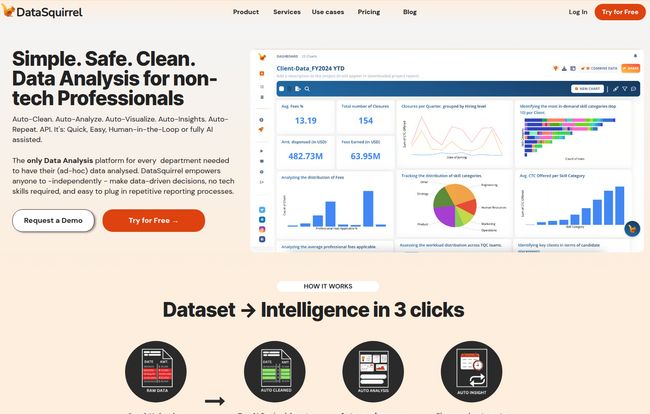
Visit DataSquirrel.ai
The Core Features That Actually Matter
A lot of tools throw a kitchen sink of features at you. DataSquirrel seems focused on a few core things and doing them well. Here’s what stood out to me.
The Magic Wand of Auto-Cleaning
This is probably the most unsung hero of the platform. Data cleaning is the grunt work that accounts for, what, 80% of any data project? It’s the digital equivalent of washing the dishes before you can cook. DataSquirrel’s “Smart Auto Data Cleaning” handles a lot of this automatically. It spots inconsistencies and prepares your data for analysis without you having to manually delete rows or use the dreaded “TRIM” function in Excel.
From Numbers to Narratives with Auto-Analysis & Insights
This is where the AI really flexes. Once your data is clean, the platform doesn’t just wait for you to build charts. It proactively generates them for you and, more importantly, provides “Auto-Generated Insights.” These are plain-English sentences that tell you what the data is saying. For example, instead of just seeing a bar chart, you’ll get a note saying, “Sales for Product B increased by 35% in Q3, driven primarily by the West region.” This is the “so what?” that separates data from actual intelligence.
You can also chat with an AI assistant they cheekily named “Squirby” to ask specific questions about your data, which feels very 2024 and is genuinely useful for digging a little deeper.
No More PowerPoint Nightmares: Customizable Reports
Okay, you’ve got your insights. Now you have to present them. DataSquirrel lets you customize the charts and reports it generates and then share them with a link. Team members can even comment directly on the reports. This closes the loop from analysis to collaboration, and it means I can build a clean, professional-looking report in minutes, not hours. My past self, sweating over aligning charts in PowerPoint at 2 AM, is weeping with joy.
Who is This Tool Actually For? (And Who Should Skip It)
Look, no tool is perfect for everyone. As much as I like DataSquirrel, it’s not going to put hardcore data analysts out of a job, and it’s not meant to.
This is a perfect fit for you if you’re a:
- Marketing Manager trying to quickly analyze campaign performance without waiting for a central BI team.
- Small Business Owner or Founder who needs a quick pulse on sales, operations, and customer trends.
- Consultant who needs to rapidly generate insights from client data to build a strategic recommendation.
- Team Lead in a non-technical department (like HR or Operations) who has data but lacks the tools to explore it.
You might want to stick with more traditional tools like Tableau or Power BI if you:
- Are a dedicated Data Scientist who needs to run complex statistical models or write custom scripts.
- Work in a large enterprise with a deeply entrenched, bespoke business intelligence ecosystem.
- Need to blend dozens of complex, real-time data sources with heavy transformation logic.
DataSquirrel is about speed and accessibility. It’s for the 90% of data tasks, not the 10% that require a specialist.
Let’s Talk Turkey: DataSquirrel.ai Pricing
So what’s the damage? The pricing structure is pretty straightforward and follows a classic SaaS model. I’ve broken it down here, but you should always check their official pricing page for the latest details.
| Plan | Best For | Key Limitations / Features |
|---|---|---|
| Free | A quick test drive | Very limited: 1MB file size, 500 rows, watermarks, no AI analysis or Squirby. Good for a basic feel, but not for real work. |
| Lite | Solopreneurs & Small Teams | A solid entry-point. Up to 5MB files, 5000 rows, removes watermarks, and gives you a decent number of AI insights and Squirby chats per month. |
| Pro | Power Users & Consultants | The full experience. Unlimited rows/columns, massive number of AI insights and Squirby interactions, and priority support. This is for people who live in data daily. |
My take? The Free plan is a demo. The Lite plan is the sweet spot for most individuals or small teams who need regular but not constant analysis. The Pro plan is for when this tool becomes a core part of your workflow.
The Elephant in the Room: Data Security
I can’t talk about an AI tool without talking about data privacy. It’s the number one concern for anyone handling sensitive business or customer information. I was genuinely pleased to see DataSquirrel address this head-on. They are GDPR/PDPA compliant, and they make a critical promise: your raw data is never sent to a third-party LLM like ChatGPT. The analysis happens within their secure environment. This is a massive differentiator and should provide a lot of peace of mind for users.
The Good, The Bad, and The Nutty
Alright, let’s wrap it up with a quick summary. No tool is without its quirks.
The Good: It’s incredibly fast and intuitive, genuinely saving a ton of time on repetitive tasks. It empowers non-technical users to finally make sense of their own data, which is a huge win for agility. And the security-first approach is exactly what the market needs right now.
The Bad and The Nutty: The free plan is quite restrictive, so you’ll need to upgrade for any meaningful work. And while the auto-cleaning is great, the age-old rule of “garbage in, garbage out” still applies to some degree. If your source file is an absolute train wreck of disorganization, the platform can only do so much. It’s a powerful tool, not a miracle worker. This isnt a flaw, just a reality check.
My Final Verdict: Is DataSquirrel a Game Changer?
After spending some time with it, I’m genuinely optimistic. DataSquirrel.ai isn’t trying to be the most powerful data tool on the market. It’s trying to be the most accessible. It’s a tool that bridges the gap between the data we have and the insights we need, without the steep learning curve.
For the legions of managers and marketers who have felt left out of the data revolution, this could be a really big deal. It’s about democratizing data analytics, putting power back into the hands of the people on the front lines. And if it means I spend less time wrestling with spreadsheets and more time thinking strategically, then this little squirrel has definitely earned its nuts.
Frequently Asked Questions
Is DataSquirrel difficult to learn?
Not at all. Its main selling point is its simplicity. If you can drag and drop a file, you can use DataSquirrel. It was designed from the ground up for non-technical users, so there are no formulas, code, or complex configurations to learn.
How secure is my data with DataSquirrel.ai?
They take security very seriously. The platform is GDPR and PDPA compliant. Crucially, they state that your raw data is processed in a secure environment and is never sent to external Large Language Models (LLMs) for analysis, which is a key concern with many AI tools.
Can I connect my Google Sheets data?
Yes, you can directly connect Google Sheets to the platform, and paid plans even allow for scheduled data updates, so your reports can stay fresh without you having to manually re-upload anything.
Is the free version of DataSquirrel actually useful?
The free version is best thought of as a trial or a demo. With limits on file size, rows, and features (like no AI-powered analysis), it’s great for getting a feel for the interface but you’ll need to upgrade to a paid plan like Lite or Pro for any regular, professional use.
How is this different from just asking ChatGPT to analyze my data?
There are a few key differences. First, security: you should be very careful about pasting sensitive data into public LLMs. DataSquirrel offers a secure, compliant environment. Second, workflow: DataSquirrel provides an integrated process from data cleaning to visualization and reporting, which is much more streamlined than copying and pasting between different tools. Finally, it’s a purpose-built interface designed specifically for this task.
Will DataSquirrel replace my data analyst?
Unlikely. It’s designed to automate common, time-consuming data tasks to provide quick insights. This frees up data analysts to work on more complex, strategic projects that require deep statistical knowledge and custom modeling. It’s more of a collaborator than a replacement.


