
Categories: AI Charting, AI Chatbot, AI For Data Analytics, AI Web Scraping
Datatalk Review: Chatting With Your Data Is Here

Data analysis. Ugh. For years, as an SEO and traffic guy, I’ve wrestled with dashboards that feel like you need a pilot’s license to operate. Google Analytics 4, I’m looking at you. We export CSVs, we try to mash them together, and we spend hours trying to answer one simple question.
What if you could just… ask?
That’s the promise of a new wave of tools, and one that recently landed on my radar is Datatalk. The name itself is a giveaway. It’s not about visualizing, or processing, or engineering data. It’s about talking to it. And I have to admit, I was skeptical. We’ve seen a lot of AI hype, but I wanted to see if this was genuinely useful or just another gimmick. So, I took a look.
So, What Is Datatalk, Really?
Okay, let’s cut through the marketing jargon. At its core, Datatalk is an AI-powered data analysis platform that turns data interaction into a conversation. Imagine you have all your business data—sales figures, website traffic, user behavior—in a big pile. Instead of hiring a data scientist to sort through it or fumbling with pivot tables for half a day, you just open a chat window and type, “Hey, how many sales did we make last week?”
And it answers you. In plain English. With the exact number.
That’s the magic trick. It uses an AI, much like the ones we’re all getting used to, as a translator between you and your database. It’s designed to be intuitive, to remove the technical barrier that keeps so many smart marketers and business owners from truly understanding the goldmine of information they’re sitting on.
The Core Features That Actually Matter
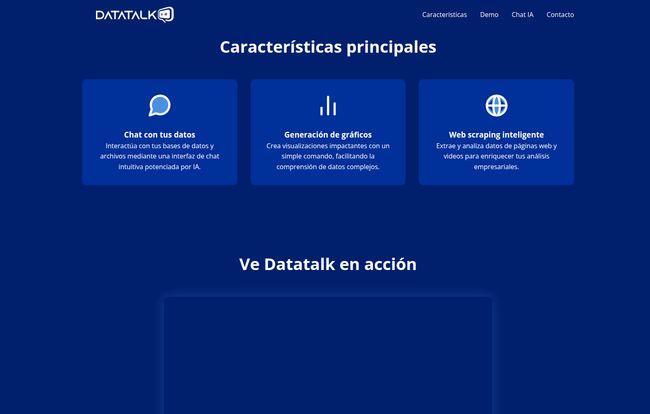
A tool can have a million features, but only a few ever really change your workflow. Based on what I’ve seen, Datatalk bets on three big ones.
Chatting With Your Data: The New Command Line
This is the main event. The entire experience is built around a chat interface. It feels less like software and more like messaging a very smart, very fast colleague who knows your business inside and out. The example on their site is perfect: someone asks about weekly sales, and the AI responds, “According to last week’s data, you made 342 sales for a total of $6,580 USD.”
Simple. Direct. No fluff. Think of the time saved. No more filtering columns, setting date ranges, and summing up cells. For quick, top-level insights, this is a massive win. I’ve always felt that the best tools are the ones that get out of your way, and this philosophy seems baked right into Datatalk’s DNA.
Instant Gratification with Graph Generation
Reading numbers is one thing, but seeing them is another. The second pillar of Datatalk is generating visualizations on the fly. You can apparently follow up your question with something like, “Show me that as a bar chart,” and—poof—a chart appears.
Visit Datatalk
This is huge for anyone who has to build reports for clients or management. It bridges the gap between raw data and a compelling story. We all know a good chart can make a point more effectively than a paragraph of text. Turning this into a simple command, rather than a 15-minute wrestling match with chart settings in Excel or Google Sheets, is a genuinely powerful idea. Its the difference between knowing your data and communicating your data.
The Secret Weapon: Intelligent Web Scraping
Now this is where my SEO antenna started twitching. Datatalk includes an “intelligent web scraping” feature. This means you can tell it to go out and pull information from websites to enrich your own data. The potential applications here are pretty exciting.
- Competitor Analysis: Scrape your top 5 competitors’ pricing pages and ask the AI to find the average price for a certain product.
- Market Research: Pull customer reviews for a product category from a site like G2 or Capterra and ask Datatalk to summarize the most common complaints.
- Content Strategy: Scrape the top 10 search results for a keyword and ask, “What are the main subtopics covered in these articles?”
This feature elevates Datatalk from just an internal analysis tool to a full-fledged business intelligence platform. It’s about combining what you know (your internal data) with what the world knows (public web data).
Who Should Be Using Datatalk?
This is not a replacement for Power BI or Tableau for a Fortune 500 company with a team of 50 data scientists. Let’s be real. Those tools are for deep, granular, and highly customized enterprise-level analytics.
Datatalk seems to be aimed squarely at the rest of us. Small to medium-sized businesses, marketing teams, solo entrepreneurs, and agency owners who are data-curious but time-poor. It’s for people who know they need to be more data-driven but are intimidated by the complexity and cost of traditional BI solutions.
If you’re the kind of person who just wants to know “What was our best-selling product in the Midwest last month?” without learning a new programming language, then you are the target audience. It’s about democratizing data, making insights accessible to the decision-makers, not just the data gatekeepers.
The Elephant in the Room: Pricing and Setup
So, what’s the catch? Well, a couple of things are a bit hazy. First, the pricing. There’s no pricing page on their website. The only call to action is “Get in touch.” In my experience, this usually points to a custom or enterprise-level pricing model. It likely means they want to talk to you, understand your needs, and quote you based on the scale of your data and usage. Don’t expect a $19/month plan you can just sign up for.
Secondly, one of the potential downsides mentioned is that it “may require some technical knowledge to set up data connections.” This is a critical point. The magic chat only works if Datatalk can access your data. This could be as simple as uploading a CSV, but for real-time insights, you’ll need to connect it directly to your database or platforms like Shopify, Google Analytics, etc. The lack of a clear list of one-click integrations is a question mark. How hard is this initial setup? That’s something you’d definitely want to clarify during a demo.
The Good, The Bad, and The Intriguing
Alright, let’s break it down. No tool is perfect, but some are more perfect for certain people.
The good is obvious: the intuitive chat interface is a breath of fresh air. The speed at which you can get answers and create visuals is a massive productivity booster. And that web scraping feature… that’s just plain cool and incredibly useful for any digital marketer.
The bad, or perhaps just the unknowns, revolve around the setup and data sources. Is connecting my data a five-minute job or a five-hour one involving a developer? Can it connect to my specific CRM or just a generic SQL database? These are the practical hurdles that can make or break the user experience.
What I find most intriguing is the direction this points to. The future of software is conversational. We’re moving away from clicking buttons and navigating menus to just stating our intent. Datatalk is a clear signal of that shift in the world of data analytics.
Frequently Asked Questions about Datatalk
What exactly is Datatalk?
Datatalk is a modern business intelligence (BI) tool that uses an AI-powered chat interface. It lets you ask questions about your business data in plain language and get immediate answers, charts, and insights without needing to write code or build complex reports manually.
How does the AI chat for data analysis work?
You connect your data sources to the platform. Then, when you type a question like “Which country had the most sales in Q2?”, the AI interprets your request, queries the connected database for the correct information, and presents it back to you in a human-readable format, often with an accompanying chart.
Is Datatalk a good tool for beginners?
Absolutely. In fact, it seems specifically designed for people who aren’t data experts. The whole point is to remove the technical barrier, so if you’re comfortable with a chat app, you can use Datatalk to get powerful insights. The only tricky part might be the initial data connection.
What kind of data can I connect to Datatalk?
The website is a bit light on specifics, which is a key question to ask their team. It likely supports standard data formats like CSV uploads and direct connections to SQL databases. The real question for many will be about direct integrations with popular SaaS platforms like Google Analytics, Shopify, Salesforce, etc. You should confirm this during a demo.
How much does Datatalk cost?
There is no public pricing information available. The website uses a “Get in touch” model, which suggests custom plans based on your company’s size, data volume, and specific needs. You’ll need to contact them directly for a quote.
Who is the company behind Datatalk?
According to its website footer, Datatalk is a product developed by KUBE AGENCY, a digital agency. This context is interesting, as it suggests the tool was likely born from the real-world needs of an agency managing data for various clients.
Final Thoughts: A Conversation Worth Having
So, is Datatalk the future of data analysis? It’s definitely a glimpse of it. The idea of making data analysis as easy as texting a friend is not just appealing; it’s transformative. It lowers the barrier to entry for so many people who have been locked out of the data conversation.
While there are some question marks around the nitty-gritty of pricing and integration, the core concept is incredibly strong. If you’re tired of spreadsheet hell and want to get answers from your data faster, Datatalk is certainly a platform to watch. It might just be the tool that finally gets you and your data on speaking terms.


